NOVA WORKFLOWS
Your Maintenance Rules, Running on Their Own
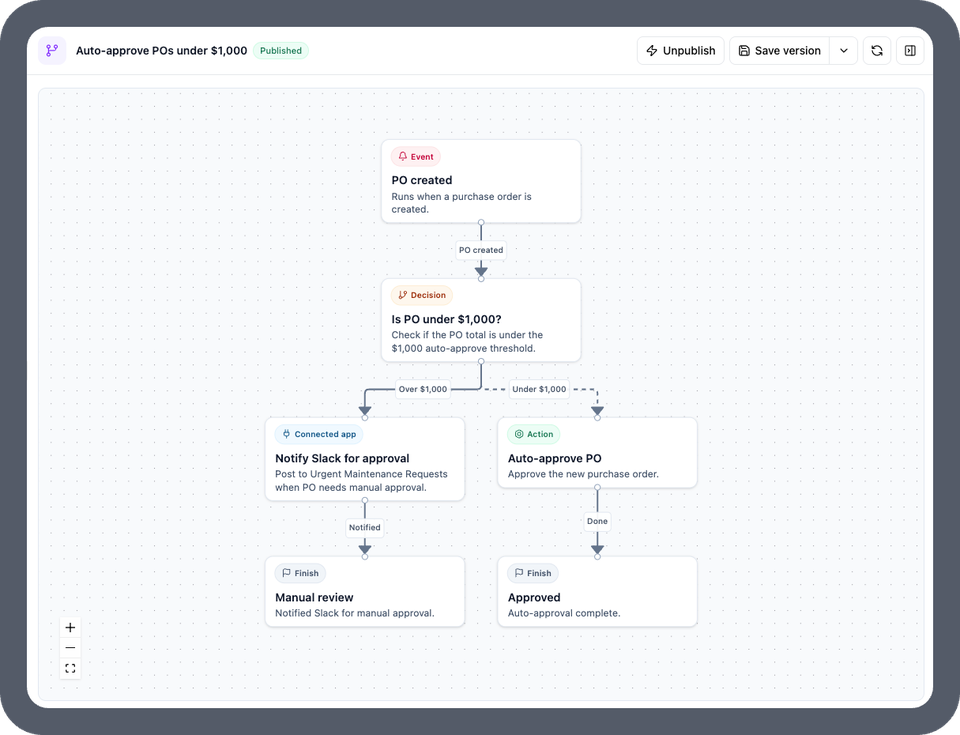
Describe a rule in plain English and Nova builds a multi-step workflow that triggers on events or schedules, branches on conditions, and posts to Slack, Gmail, or Salesforce. Built by AI, runs on fixed logic, the same way every time.







WHY NOVA WORKFLOWS
Describe the Rule. Nova Builds the Workflow.
The Rules in Your Head Become Automations That Never Miss
Every team has rules for how work should move: high-priority requests get approved right away, anything at the LA site goes to the LA team, a Breakdown work order means downtime starts now. Today someone reads each request and carries those rules out by hand. Type the rule into Nova Chat and it comes back as a workflow you can review, publish, and trust.
Request In
Branch
Routed
One Workflow Where Five Automations Used to Be
OR conditions across values, multiple decision paths, and parallel actions from a single trigger. Six locations route through one workflow instead of six separate rules.
Built by AI, Runs on Fixed Logic
Nova writes the logic once. After you publish, the workflow runs the same way every time with no AI guessing at runtime. Add an AI step only where you want judgment or generated text.
Governed From the First Minute
Admin-only. Unpublished until you click Publish. Scoped by filters. Runs with the permissions you already set in UpKeep, and every run is logged.
CAPABILITIES
Everything a Workflow Needs, Written From a Sentence
Event Triggers
Start a workflow the moment something happens: a request is submitted, a work order is created or completed, a status changes.
Schedule Triggers
Run on a cadence: the first of every month, every day at 5pm, every Friday at 3am. Cycle counts and audits stop depending on someone remembering.
Branching Logic
AND and OR conditions across priority, location, category, and more. Multiple decision paths in one workflow, with gray nodes marking where each branch ends.
Parallel Actions
Notify Slack and assign the team from the same trigger. Approve, set a due date, and create a downtime event without chaining separate rules.
Connected Tools
Use Slack, Gmail, and Salesforce as steps, including recipients outside UpKeep. Connect a tool once from Integrate My Tool in Nova Chat.
AI Steps Where You Choose
Drop in an AI step to name a record, draft a work order description, or suggest a PM. Everywhere else the workflow stays deterministic.
THREE WORKFLOWS TO START WITH
The Rules Most Teams Already Enforce by Hand
Each of these is one plain-English request to Nova. Review the diagram it returns, edit by describing the change, and publish when it matches how your team works.
Request Triage
"When a new request comes in, if it is high priority, approve it, set the due date 7 days out, and post it to #urgent-maintenance in Slack. If the location is Los Angeles or any sub-location, assign it to the LA team." SLAs run themselves.
Downtime Tracking
"When a work order is created with the category Breakdown, create a downtime event on the asset. When that work order is completed, end the downtime event." Downtime gets logged when it starts, not from memory afterward.
Scheduled Cycle Counts
"On the first of every month, find all parts at the Regional Fulfillment Center, generate a cycle count with a name and due date, and create it." One AI step names the count; the rest runs on schedule.
FROM THE FIELD
Teams Already Handing Nova the Busywork
Customer story · SpinTurf
SpinTurf's maintenance supervisor moved the team from paper tracking to Nova, and the work that used to eat evenings now runs in the background. See how a small crew turned AI into a shift toward preventive maintenance.
Read their story →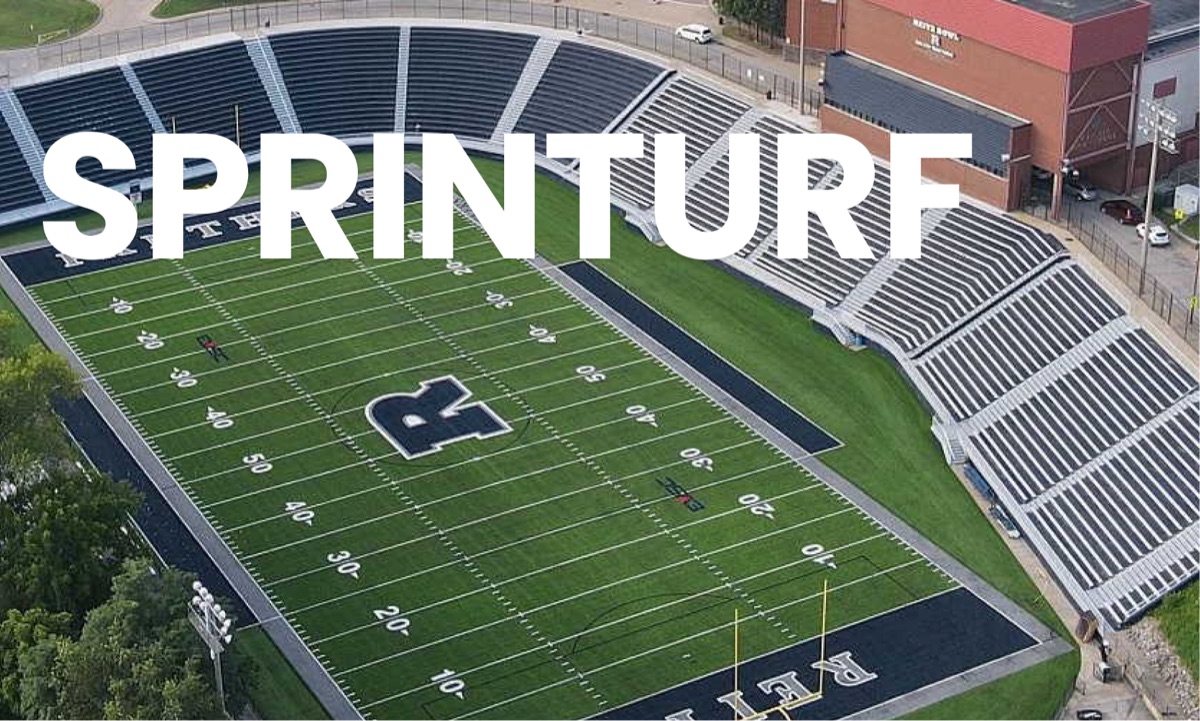
"Nova turned tasks I had shelved for months into instant wins... It's completely changed how I work. It's like having 10 assistants, minus the overhead."
"My work-life balance is a lot better now. I just dump a bunch of stuff into Nova, ask Nova for help, and it has changed everything."
"I was asking Nova to tell me what are the typical locations that I have the most requests in, so that we can try to get ahead of that and start turning some of it into preventative maintenance rather than reactive."
NOVA WORKFLOWS FOR EVERY ROLE
One Workflow, Three Points of View
The admin who writes the rule, the leader who has to trust it, and the technician who receives the work each see a different side of the same workflow. Nobody routes anything by hand.
For Maintenance Managers and Admins
Turn the triage, routing, and follow-up rules you carry out every morning into workflows that run on their own. Edit by describing the change. Publish only when it matches how your team works.
For Operations and IT Leaders
Automation you can sign off on: admin-only, unpublished by default, scoped by filters, inherits UpKeep permissions, and logs every run. One platform instead of another tool bolted on.
For Technicians
Work arrives already approved, prioritized, and assigned, with the Slack ping and due date set. The queue stops waiting on someone to sort it.
Frequently asked questions
Nova Workflows, answered
What are Nova Workflows?
Nova Workflows are account-level automations that Nova builds from a plain-English description in Nova Chat. They trigger on events or schedules, branch on AND/OR conditions with multiple decision paths, take actions in parallel, and can use connected tools like Slack, Gmail, and Salesforce as steps. Because Nova has access to the full UpKeep API, a workflow can read or create virtually any record.
How are Nova Workflows different from Automated Workflows?
They are a separate system that lives alongside your existing automations, which keep working as they do today. Automated Workflows follow a single linear path from a fixed set of building blocks. Nova Workflows are a more flexible option for complex logic: OR conditions across values, multiple branches, parallel actions, connected tools, and reach into any part of UpKeep.
How are Nova Workflows different from Nova Apps?
Nova Apps are tools and interfaces a person uses. Nova Workflows are automations that run without a person. Both are built the same way, by describing what you want to Nova in chat. If you find yourself building an app to do something that should simply happen on its own, a workflow is the right home for it.
Does the workflow use AI when it runs?
No. Nova uses AI to write the workflow logic while you build it. Once published, the workflow runs on fixed logic, the same way every time, and will not behave inconsistently. The only exception is an AI step you deliberately add, for example to draft an email or name a record. Everywhere else the workflow stays predictable.
Who can build and publish a workflow?
Admins only. A published workflow applies across the whole account the moment it triggers, so building and publishing are restricted to admins. You can scope a workflow with filters, for example to one location or team, even though it operates account-wide.
Does building a workflow use Nova credits?
Building or editing a workflow uses Nova credits, because Nova is doing the work of writing the logic. Running a published workflow does not use AI and does not consume credits unless you added an AI step.
What happens if a workflow does the wrong thing?
New workflows start unpublished, so nothing runs while you are building or testing. A workflow only goes live when an admin clicks Publish. You can scope it with filters, review every run, and unpublish or delete it at any time.
Which tools can a workflow connect to, and how do I add one?
Slack, Gmail, and Salesforce are available today. In Nova Chat, select Integrate My Tool and follow the prompts to connect. New integrations are being added regularly. If you need a tool that is not supported yet, let your Nova contact know which software and what you want the workflow to do with it.
4,000+ COMPANIES RELY ON UPKEEP
Bring the Rule You Enforce by Hand
Tell us how a request moves through your team today. We will show you the same rule written as a Nova Workflow, running on your records, in one demo.
Already on UpKeep? Admins can open Nova Chat and describe a first workflow today.