Blog Post
Predictive Maintenance Challenges: What to Fix First
Predictive maintenance challenges show up in your work orders before they cause downtime. See 10 common ones, where to look first, and how to fix each.



Key Takeaways
Main challenges - Predictive maintenance challenges show up in setup choices like asset fit and budget, in handoffs like unowned alerts, and in thin records after the repair. Your own alert history tells you which one is holding back repairs.
Repair windows - Setting aside technician hours and production stops for condition-based work gives early-warning repairs room in the schedule. Reserved hours keep those jobs from waiting behind emergencies, and agreeing on stops with production in advance avoids having to negotiate them job by job.
Alert ownership - Alerts stop sitting unanswered once someone on each shift owns the decision. Logging the reason with each call keeps the next review from starting over.
Machine-specific limits - Technicians keep trusting alerts that rarely send them to a healthy machine. Alert limits set based on how each machine normally runs, including startups and cleaning cycles, cut false alarms.
Proof of results - Logging what each early repair turned up, and whether readings recovered afterward, gives finance a predictive maintenance case it can check. Recorded downtime shows what changed, and that failure’s previous downtime gives a labeled estimate of what those repairs headed off.
What Are Predictive Maintenance Challenges?
Predictive maintenance challenges keep a sensor alert from becoming a planned repair with its result on record. They start with which assets get sensors and how their data is handled, and they continue through each handoff from the alert to the closeout.
A predictive maintenance program can stall without anyone deciding to stop it. The sensors keep reporting and the software renews, yet alerts stop turning into planned repairs, and unplanned downtime on the monitored equipment holds where it was before the install.
Most of the causes sit in the people, schedules, and records around the sensors. An alert goes to five inboxes and belongs to no one, a repair has no labor or production window, or a closeout is too thin to show what was found. Each one leaves a trail in your alert and work order records, so you can find the issue and fix it before the next budget review asks what the program delivered.
Predictive maintenance (PdM) uses condition readings and repair history to forecast when an asset will need work so the repair fits a planned window before the failure. In a sensor-based program, a reading triggers an alert, someone reviews it, and a confirmed fault moves through a work order, a scheduled repair, the technician’s closeout notes, and a follow-up reading that shows whether the fix held. PdM software carries the alert from step to step, but people still have to act at each handoff.
Some predictive maintenance challenges are more common than others. They keep an alert from reaching a lasting repair, so being aware of them can help you catch them early on before they balloon into a costly shutdown.


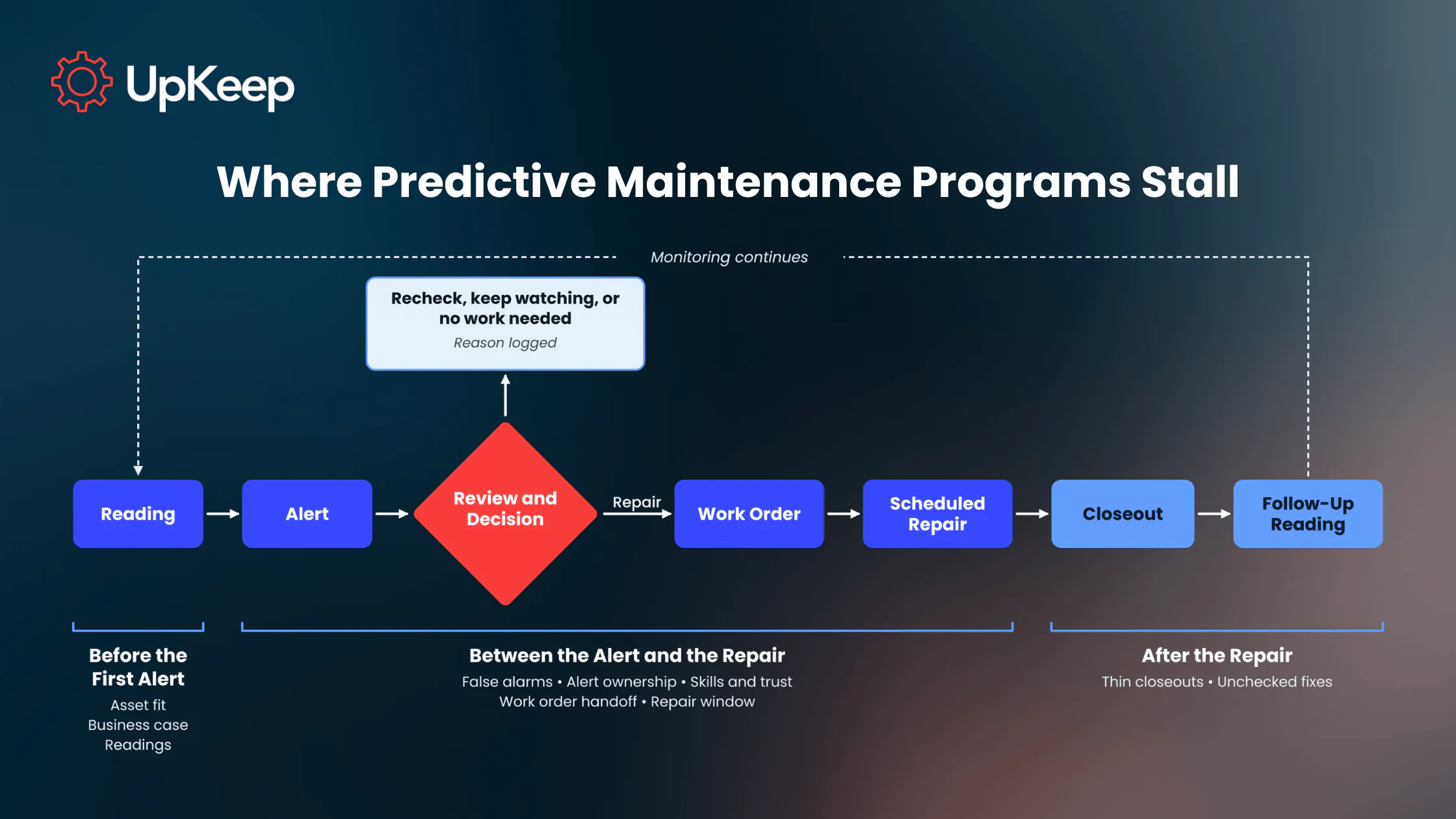
Use the table below to match what you see in your own records to a challenge and the first fix to try.
|
Challenge |
Typical Sign |
First Fix |
|
Assets or failure modes that don’t suit predictions |
Costly breakdowns still arriving without warning on equipment with no sensors |
Keep sensors on failure modes with enough warning and a high failure cost |
|
High upfront costs and a weak business case |
A pilot request stuck in approval or cut back to minor assets |
Rebuild the case from your own downtime records |
|
Security and privacy risks |
IT holds up the install over data storage or network access |
Bring IT in at scoping with answers on data and connections |
|
Poor sensor data quality |
Gaps in the readings or alerts on the wrong asset |
Add a sensor check to the preventive maintenance schedule |
|
Data volume and model limits |
Readings pile up, but rare failures still arrive without warning |
Log only the readings each failure mode needs, and record every failure’s cause |
|
False alarms from generic alert limits |
“No fault found” closures clustered around startups or cleaning |
Reset limits from each asset’s own baseline readings |
|
Alerts nobody owns |
The same alert repeating for days with no decision |
Name one reviewer per shift and asset group |
|
Skills gaps and low trust in alerts |
Alerts waiting for one person to read them |
Put a recheck checklist and decision rule on the work order |
|
Change management and buy-in |
Reserved hours drifting back to breakdown work |
Get a plant manager to sponsor the pilot with written first-quarter goals |
|
Poor integration between monitoring and the CMMS |
Alerts marked for repair with no linked work order |
Open the work order straight from the alert |
|
Repairs with no labor, parts, or production window |
Condition-based work orders past their planned date |
Reserve weekly hours, stock parts, and agree with production when a fault gets a machine stop |
|
Closeouts too thin to learn from |
Nobody can say from the records how the asset last failed |
Add a required failure-cause pick list |
|
Fixes nobody checked or counted |
Repeat alerts for the same fault after a repair |
Take a follow-up reading and log the failure each early repair headed off |
What a Stalled Predictive Maintenance Program Costs
A stalled PdM program can rack up your bill fast. The four obvious expenses you’ll face are:
Downtime: Faults that sensors flag can still end in breakdowns when nobody schedules the repair.
Running Costs: Sensor subscriptions, gateway fees, and alert review hours add up whether or not alerts lead to repairs.
Technician Time: Each “no fault found” trip pulls a technician off planned work.
Renewal Risk: A program with no repairs on record can’t show finance what it found or fixed, so the renewal and any next phase are hard to defend.
Challenges Before the First Alert
The following obstacles tend to occur as the program is being set up.
Assets or Failure Modes That Don’t Suit Predictions
A gearbox running short on oil shows rising temperature and vibration long before the gears fail. That’s enough lead time to plan the repair. A shear pin that snaps under a sudden jam has no trend data to follow. A cheap asset with a spare on the shelf, meanwhile, may cost less to replace than to monitor. Predictions are only useful when failure modes give plenty of warning and are too expensive to ignore.
In a first rollout, sensors often go on the machines that are easiest to reach or that someone already worries about. The failures behind the plant’s costliest downtime can sit on equipment nobody instrumented. The program then watches machines that seldom stop the line, and the breakdowns that cost the most still arrive without warning.
Solution: Your reliability lead (or whoever reviews trends on your team) checks each monitored failure mode for warning and cost to settle which assets are a good fit for predictive maintenance. Failure modes that pass stay monitored; the rest move to preventive maintenance (PM) on a calendar- or meter-based schedule, a regular inspection, or run-to-failure approach where a failure is safe, cheap, and allowed. That frees up sensors and review time for the assets that need them.
High Upfront Costs and a Weak Business Case
Upfront program costs land in one fiscal year, while savings arrive gradually, one avoided failure at a time. Sensor hardware is only part of the bill. Connecting the sensors to the software that analyzes their readings, plus the network and storage behind it, brings added costs and takes up much of the staff time.
Older equipment with no network connection may also need retrofit sensors and a gateway before it reports anything.
Pilot requests often justify that spend with industry averages. Finance usually wants your own plant’s numbers, like the cost of an hour of downtime on the line in question. A request without them tends to stall, or it comes back cut to a few sensors on assets too minor to show a result.
Solution: When a pilot request built on industry averages sits in approval, rebuild the case from your own records. Start with the assets whose failure hurts production most, the top of your criticality ranking, and pull two years of unplanned downtime caused by the failure modes you plan to monitor. Multiply by what an hour of lost production costs, then estimate how many of those failures gave enough warning to be found early. Set that figure next to a pilot cost that covers hardware, integration, training, and staff time.
Security and Privacy Risks
Each sensor gateway is a new device on the plant network or the internet, and its readings end up in the vendor’s software, often in the cloud. A gateway still on its default password, or one nobody updates, gives an attacker a way in. The readings also carry production details, such as run hours and stops by line. The plant needs to know who can see them, at the vendor and inside the company, and whether the vendor passes them on to anyone else.
When IT hears about the pilot after the sensors arrive, its review of every new connected device can hold up the install. A gateway connected without that review may never get the updates and access controls the rest of the network has.
Solution: The maintenance manager brings IT in at scoping, with the vendor’s answers on where sensor data is stored, who can access it, and how each gateway connects. Before the purchase, IT also asks the vendor whether its devices ship without default passwords, whether stored readings are encrypted, and whether it shares the data with anyone. Getting those answers early lets the install go ahead on schedule.
Poor Sensor Data Quality
Sensors go quiet when a battery dies or a gateway loses reception, and a loose mount skews the vibration they report. A sensor moved from one extruder to the next can keep logging the second machine’s vibration on the first one’s record. Gaps in the readings and alerts on the wrong asset point to the sensors themselves, while a trend that jumps after a repair can mean the machine’s normal has changed.
Plant conditions are behind many of these sensor problems. Washdowns, heat, and constant vibration wear on batteries and mounts, and a steel guard refitted after maintenance can block a wireless signal that tested fine on install day. A dashboard still showing a dead sensor’s last value can pass for a machine running steady, and no alert goes out while the fault grows. A rebuild can move readings either way. When the machine comes back quieter, it can sit so far under its old limit that the next fault grows a long way before it trips an alert.
Solution: Add a sensor check to the PM schedule at the interval the sensor maker recommends for your environment, with a technician confirming battery, mounting, signal, and asset assignment. After a rebuild or procedural change, compare new readings with the old baseline and reset it if they’ve shifted.
Data Volume and Model Limits
Sensors recording as often as possible on every monitored machine produce far more readings than anyone reviews, and sending and storing them all costs money every month. Most of those readings show a healthy machine. Readings logged without the line speed or the product running at the time make a poor basis for analysis. Nothing in that data shows whether a temperature rise came from wear or from a hotter product.
Supervised machine learning models trained on past failures need enough examples to learn reliable patterns, and maintenance records typically hold only a few. A machine that has failed twice in five years may not provide enough failure examples for reliable forecasts, however many healthy readings surround those events. A forecast of how many weeks a part has left, built on such limited history, needs validation before it guides repair planning.
Solution: For each failure mode you monitor, the reliability lead and the vendor agree on which reading it needs and how often. Each reading gets logged with the operating details that explain it, such as the line’s speed and what it’s running. Readings beyond what each failure mode needs can be averaged or dropped before storage. Until an asset has a failure history, the lead sets alerts on changes from its normal running and treats any forecast of remaining weeks as a rough guide. Each failure technicians record with its cause adds to the history later forecasts depend on.
Challenges Between the Alert and the Repair
Once alerts start arriving, new challenges can hold up the repair.
False Alarms From Generic Alert Limits
When an alert limit comes from a spec sheet or light-load readings, false alerts fire during startups, cleaning cycles, and heavy runs. A stamping press can read higher vibration on heavy-gauge runs than on the light-gauge runs its baseline came from.
A spec-sheet limit is written for a generic machine, and it can’t account for how yours is mounted, how fast it runs, or what it’s making that day. Each alert from a normal operating state sends a technician to a machine that’s running fine. After a few of those trips, someone raises the limit or mutes the alert to stop the noise, usually by guesswork. The new limit can end up above the level where a real fault would first show.
Solution: Those alerts close as “no fault found,” so have the reliability lead review them monthly to start. Where they cluster around one operating state, the lead resets that state’s limit from the asset’s own baseline readings. Requiring a reading to stay out of range for a set time before an alert goes out also filters out short spikes.
Alerts Nobody Owns
On a shift already busy with breakdowns, everyone on the alert list can assume someone else has it. Alert lists tend to grow during setup, as anyone who might care gets added: the maintenance supervisor, the planner, and a few technicians. Nobody on the list is named as the one who decides what happens next. Alerts also sit outside every work order queue and never show up as overdue. Those that fire overnight may reach people who aren’t on site.
In the alert history, the same alert repeats for days with no decision attached, and no work order or repair follows.
Solution: Name one reviewer per shift and asset group, and have every alert end in one of four decisions: repair, recheck, keep watching, or no work needed. The reviewer logs the decision and its reason on the alert or its work order so the next person who checks the asset sees what was decided and why.
Skills Gaps and Low Trust in Alerts
Reading a trend or a vibration spectrum requires training that many crews don’t have, so decisions wait for the one person who does. At many plants, that’s a single reliability lead or an outside analyst who visits once a month. Telling a worn bearing from a loose mounting bolt or an unbalanced rotor depends on where the peaks fall in the spectrum. A rising trend can also mean a developing fault or just a heavier load that day. When that one person is on vacation or tied up with a project, alerts wait unread and the window for a planned repair shrinks.
Technicians who’ve chased alerts that led nowhere also give the next one less weight. With the closeout going to the planner, technicians rarely hear whether an alert they checked was real. They trust alerts more when they help set the limits and hear what the repair uncovered after their inspection.
Solution: A short checklist (e.g., where to take a handheld reading and what value confirms the alert) lets technicians confirm an alert at the machine while the reliability lead or a contract analyst handles diagnosis. Put a simple rule for rechecks on the work order. If the recheck still reads above the limit, schedule an inspection within the response time you’ve set for that asset’s criticality. If it reads normal, the technician records it and the reviewer decides whether to keep watching, because an intermittent fault can read normal between episodes. Anomaly detection software can help the lead decide which trends to look at first.
Change Management and Buy-In
When production gets busy, the program’s reserved hours and budget are the first things pulled back. The plant manager’s support often rests on an early drop in downtime, and a first quarter without one puts the pilot’s budget in question. On the floor, some technicians see the sensors as a check on their own work or a step toward fewer maintenance positions.
The people deciding on repairs often don’t act on advice the software generates. They’re likelier to act on it when they keep control of the final decision and have time set aside to review it. Without that control and time, alerts get acknowledged and left alone, and the program takes the blame for breakdowns its readings flagged.
Solution: Ask the plant manager to sponsor the pilot, and agree on a written scope. It names the assets, the workflow results expected in the first quarter (e.g., a recorded decision on every alert), and the date downtime gets judged. Before the sensors go in, tell the crew the program is there to find faults early so repairs land on planned shifts. Say plainly that readings won’t be used to rate individual technicians. Block time on the schedule for each reviewer’s alert decisions. When an early repair heads off a breakdown, the supervisor points it out at the next shift meeting.
Poor Integration Between Monitoring and the CMMS
When monitoring runs separately from the computerized maintenance management system (CMMS), someone has to retype each confirmed fault into a work order. On a busy shift, the retyping gets skipped. Alerts marked for repair then pile up with no linked work order.
Sensors and the CMMS often come from different vendors. Alerts land in the monitoring app, and the planner, who builds the schedule from the CMMS backlog, may rarely open it. Retyping also loses detail. A work order that says “check the motor on line 3,” with no reading, trend, or sensor location, means the technician starts the diagnosis over. A fault without a work order never reaches the schedule or the parts room. If the motor fails first, the CMMS records an ordinary breakdown with no sign that the program saw it coming.
Solution: Connecting monitoring to the CMMS lets someone open the work order straight from the alert, with the reading and the asset already attached.
Repairs With No Labor, Parts, or Production Window
Having a warning helps only if the crew, parts, and a production stop line up inside it. When the crew is already behind on PM, a condition-based job waits behind emergencies, and production may not want to stop a machine that still runs.
A crew that spends most days on breakdowns pushes a job that isn’t urgent yet onto next week’s list, then the week after. The replacement seal or gear set may not be on the shelf, and some parts take longer to arrive than the warning gives. Production schedulers see a machine still making good product, and a stop costs output today against a failure that may be a month away. If the job keeps slipping until the warning runs out, the fault ends as the same emergency repair the sensors were bought to prevent, even though the alert was right.
Solution: Sort overdue condition-based work orders by what held them up to reveal which gap to close first. Then update overdue PM on monitored assets while shifting more of the schedule from reactive to preventive work. Hold a weekly block of technician hours for condition-based jobs and stock parts for the repairs your monitored failure modes call for.
Be sure to agree with the production manager how soon a fault gets a machine stop as well based on how close it is to failure and what a failure would put at risk. A low-risk fault in its early stages, such as a worn palletizer bearing, might wait for the next product changeover, while one close to failure on a critical machine would get a stop as soon as it’s safe to take.
Challenges After the Repair
After the wrench work, the record has to show what the repair found and whether it worked.
Closeouts Too Thin to Learn From
Past failures help explain today’s trend, and some forecasting methods learn from them directly. A closeout that just says “repaired” gives them nothing to work with. On equipment that fails rarely, like a boiler, every recorded failure counts.
Technicians often close jobs at the end of a shift, from memory, in a free-text box that accepts “done,” and nobody downstream asks for more. The note rarely says which part failed, what caused it, or how worn it was when the technician opened it up. Without those details, the reliability lead can’t tell whether the alert came early enough or whether its limit needs moving. Two belt failures a few months apart also read as unrelated jobs, and the repeat goes unnoticed.
Solution: If nobody can read from the CMMS how an asset failed the last three times, the closeouts need more detail. Add a failure-cause pick list (e.g., worn bearing, loose connection, contamination) to corrective work orders for monitored assets and make it required where your CMMS allows. Technicians fill it in before they leave the asset, while the details are fresh.
Fixes Nobody Checked or Counted
A completed work order doesn’t prove the repair held, and a failure that never happened leaves no downtime record. A new coupling fitted without realigning the shafts can wear out the same way within months. Too much grease in a new bearing can also make it run hot right after the repair. Without a reading afterward, the next alert looks like a new fault.
A planned repair also looks like routine work on the record. A quarter with fewer breakdowns then gives finance no way to tell whether the sensors helped or the machines just ran well. In UpKeep’s 2026 State of Maintenance Report, only 22% of 214 maintenance and reliability professionals say they can clearly demonstrate a return on investment (ROI) for maintenance as a whole.
Solution: To check the fix, the technician takes a follow-up reading under the same operating conditions as the alert. For each fault found early, the reliability lead then records the failure it most likely headed off and the downtime that failure caused the last time it happened. Totaled each quarter and labeled as an estimate, those entries sit beside the downtime you actually recorded, so finance sees both.
Metrics That Show Where Your Program Is Stuck
Unplanned downtime, mean time between failures (MTBF), and the other predictive maintenance KPIs take months to move. Start with the workflow checks below, using one per stage with the evidence that a fix worked. Then compare each quarter with one that had similar production volume and product mix.
|
Stage |
First Check |
Evidence It Worked |
|---|---|---|
|
Asset and failure-mode fit |
Is this failure mode worth watching for its warning time and cost? |
Monitored failure modes lead to planned repairs; the rest moved to another strategy |
|
Readings and alert settings |
Do alerts match the right asset and its operating state (startups, cleaning, load)? |
Fewer alerts closed as “no fault found” per comparable operating hour, with real faults still found |
|
Review and ownership |
Who recorded a decision on each alert, and how long did it take? |
Every alert has a recorded decision; time to decision shrinks |
|
Work order handoff |
How many alerts marked for repair have no linked work order? |
None, and each work order carries the reading and asset |
|
Planning and execution |
Were labor, parts, and a production window ready before the warning time ran out? |
More condition-based jobs finished in time; fewer overdue |
|
Closeout and results |
Does the closeout name a cause, and was a follow-up reading taken? |
Fewer repeat alerts for the same fault; faults found early logged with the downtime that failure caused last time |
For the readings and review rows, count each alert episode, from the moment the alert fires until readings return to normal, as one alert, however many emails and texts go out. A “no fault found,” isn’t always a false alarm because the condition may have cleared before the inspection.
How to Find and Fix Where Alerts Stall
To identify blockers in your PdM program, run this review each quarter using records you already have.
Pick One Asset and Failure Mode: At the start of the quarter, choose one monitored asset and the failure mode the program was meant to find early. A plant-wide downtime figure can hide where alerts get stuck, while one asset’s records highlight it.
Pull the Recent Alert Episodes: The maintenance planner, or whoever schedules your work orders, pulls 90 days of alerts on that asset (longer if it rarely alerts). Each episode gets one row with its decision and any linked work order. With UpKeep, each alert episode on an Edge sensor is logged as one incident, a record that stays open until the condition clears.
Mark Where Each Episode Stopped: The same week, the reliability lead matches each episode to a stage in the metrics table above. Blank closeout fields are a finding of their own and a reason to audit your work order data before going further.
Fix the Earliest Stage That Stalled: Once you know the stage, apply the fix from the matching challenge above since later stages can’t show results while the earlier one still holds things up. Where alerts fire during sanitation, off-hours, or planned downtime, an alert schedule in UpKeep pauses them for those windows, and the readings are still recorded.
Check the Evidence: At the next quarterly review, the planner checks that stage’s row under “Evidence It Worked,” and adds unplanned downtime and MTBF once they’ve had time to move.
Repeat Before Expanding: Run the review again before the next phase of your rollout. Once the asset’s records show the evidence in every row of the table, write the setup into a standard covering sensor-to-asset assignment, how limits are set, closeout fields, and who reviews alerts so each new site starts from the same basis.
Teams without sensors can run the same review on their preventive work orders, looking for jobs that waited for labor, parts, or a stop, and closeouts with no cause.
From Unanswered Alerts to Recorded Results
Once every alert has an owner and a decision and condition-based jobs land in planned windows, a PdM program stops paying for sensors with nothing on file to show for them. Unplanned downtime on monitored assets tends to fall, and the quarterly review shows finance what changed.
Through UpKeep, Edge sensors report as often as every 10 minutes, and a cellular gateway can send those readings over its own connection without touching the plant’s network. When a reading stays out of range past the set duration, an incident opens automatically. The work order opened from the alert carries the sensor details, the asset, and the incident. The technician closes it on a phone with what they found, and the incident closes on its own once readings are back in range.
Book a demo with UpKeep to see how the platform can remove the headache of predictive maintenance challenges from your setup.
FAQ
What is the biggest challenge in predictive maintenance?
The biggest challenge for a running program is turning valid alerts into scheduled repairs. Unclear ownership leaves alerts waiting for a decision, and with no production window available, confirmed faults wait for a stop. For teams still choosing assets or seeking funding, the priority comes earlier: picking failure modes worth monitoring and building the case from their own downtime records.
Does every predictive maintenance alert need a work order?
No, but every alert needs a recorded decision, and every repair needs a work order. A recheck or a “no work needed” call can be logged on the alert. If your system opens a work order for every alert, the reviewer closes the ones needing no repair with what was found and why.
How long before a predictive maintenance pilot shows results?
On assets that alert often, workflow changes can show within weeks: decisions on every alert, a work order on every alert marked for repair, and jobs finished before the warning time runs out. A fair downtime comparison takes longer since the pilot has to outlast the interval at which those assets used to fail. Until then, report the workflow numbers.
What are the challenges of having machine learning in predictive maintenance?
Most challenges come down to data. Supervised machine learning models learn from recorded failures, and rare failure modes often go unmodeled because there isn’t enough data to predict them. Models that learn an asset’s normal behavior need less failure history, but they do need clean baseline data. After major equipment changes, either kind may need new data and retraining.
4,000+ COMPANIES RELY ON ASSET OPERATIONS MANAGEMENT
Leading the Way to a Better Future for Maintenance and Reliability
Your asset and equipment data doesn't belong in a silo. UpKeep makes it simple to see where everything stands, all in one place. That means less guesswork and more time to focus on what matters.