Work Order Maintenance 101: How to Stop Chasing Fires and Take Control
Key Takeaways
-
A work order is a formal document that transforms a maintenance request into an authorized, scheduled, and trackable job while capturing exact costs and historical data.
-
An effective work order must contain comprehensive job details like asset ID, priority, location, prerequisites, and safety checklists to eliminate technician guesswork.
-
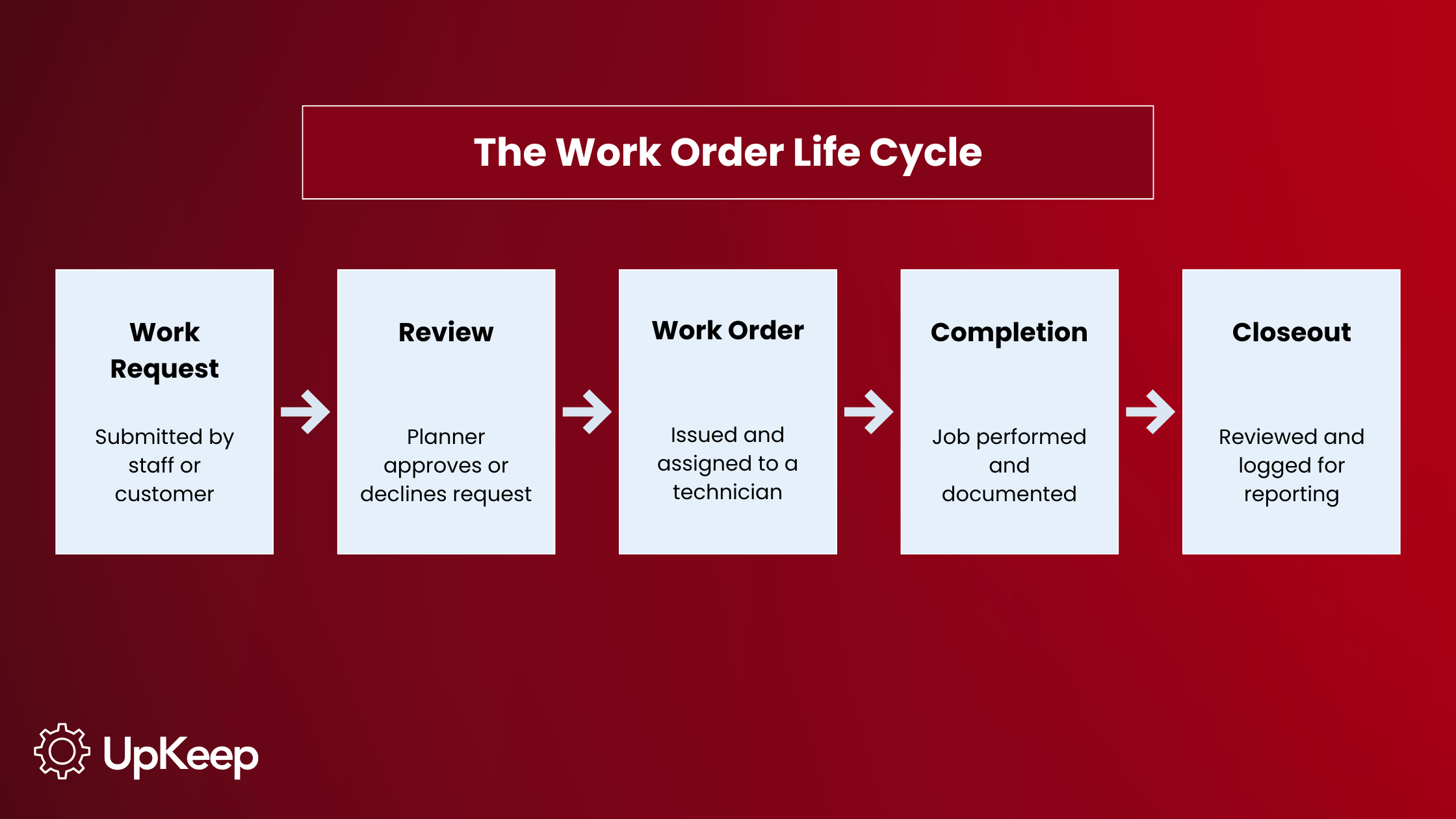
The work order process usually starts with a request submission, moves to planner review and approval, then task assignment, execution with documentation, and lastly, final review and closure.
-
Managing work orders through a digital computerized maintenance management system (CMMS) standardizes workflows, enforces safety checklists, and centralizes data to reduce unplanned downtime and extend asset life.
Imagine a technician showing up to a breakdown with no idea what's wrong, no parts on hand, and no record of what the last person tried. That's what everyday maintenance looks like without well-built work orders.
Work orders are a crucial part of every maintenance system, and this guide breaks down what they are, what should be included on every form, and how the best maintenance teams use them to cut downtime, control costs, and keep their operations audit-ready.
Work Orders Defined
A work order is a formal authorization to perform a specific task on an asset, facility, or piece of equipment. It's the document that turns a request for work into an approved, assigned, and trackable job. Once a work request is reviewed and approved by a maintenance planner or manager, it becomes an official work order, and the job can begin.
While a work request points to something that needs fixing, a work order says who's doing it, when, with what parts and tools, and to what standard. That distinction is what separates organized maintenance from chaos.
The Purpose of a Maintenance Work Order System
The goal of every maintenance work order system is to provide a clear trail for every maintenance task, from the moment it's requested to the moment it's closed out and verified. That lets you easily track who did what, when they did it, and why.
For a maintenance team, a work order provides the following benefits:
-
It explains the need. A work order explains why a task is being performed so nobody has to rely on memory or a hallway conversation.
-
It schedules resources. It assigns the right technician or team, reserves the right parts, and sets a realistic completion date.
-
It provides detailed instructions. Checklists, diagrams, lockout/tagout steps, and safety requirements travel with the job instead of living in someone's head. This eliminates guesswork and prevents safety incidents during the task.
-
It estimates and tracks cost. Labor hours and parts usage get logged against the work order, so costs per asset and per job are always visible.
Beyond the individual job, the information contained in a work order lays the foundation for reliability metrics like schedule compliance, mean time between failures (MTBF), and overall equipment effectiveness (OEE).
However, the data needed to include and update commonly requires a CMMS to stay on top of it all. Industry data shows around 70% of plants have already implemented a CMMS or EAM specifically to manage this workflow because trying to run work orders on paper or in a spreadsheet quickly becomes unmanageable at scale.
What Information Belongs on a Work Order?
A good work order template captures everything a technician needs to complete the job without having to track down someone for more information. At minimum, that includes:
-
A clear description of the task or need
-
The name of the requesting department or individual
-
An estimated completion date and duration
-
The name of the person or team assigned to the work (in-house or third party)
-
The location of the work (i.e., facility name, building, or specific area)
-
Prerequisites for completion, such as parts, tools, permits, or documentation
-
Priority level and asset or equipment ID
Digital work orders have become the standard because they attach checklists, safety procedures, technician sign-offs, and photos directly to the job, so nothing gets lost between the office and the plant floor.
Learn More: Work Order Template Essentials
Why You Should Choose Digital Work Orders Over Paper
Plenty of facilities still run maintenance using paper forms or spreadsheets, but the performance gap between paper and digital work order maintenance keeps widening. Facilities that adopt mobile-first CMMS platforms report work order documentation completeness above 90%, compared teams still relying on desktop systems and paper-to-digital transcription.
In terms of ROI, facilities that implement a CMMS for digital work orders report a 26% reduction in unplanned downtime, 12%-18% in cost savings, and 11% longer asset life.
Beyond the numbers, digital work orders cut the time technicians spend tracking down manuals, diagrams, or the last person who touched an asset. They also remove the physical cost of storing years of paper records and make maintenance data visible enough to feed directly into a dashboard rather than a filing cabinet.
The Stage of a Work Order
The life cycle of a work order describes all the stages it goes through from initiation to completion. That generally follows these steps: A work request is submitted, a planner reviews and approves it, a work order is issued and assigned, the technician completes and documents the job, and the work order is reviewed and closed out.
Say a production manager at a food packaging facility submits a request to install a new packing line. Once approved, the resulting work order would specify the task description, an eight-business-day due date, the assigned packaging engineer and supporting crew (electricians, technicians, movers), the exact processing room and asset ID, and prerequisites such as a quality department sign-off before the line goes into service. Every one of those details keeps the job from turning into a guessing game or unexpected failure once it hits the floor.
Understanding the Differences: Work Order, Work Request, and Purchase Order
A work request, work order, and purchase order are commonly used interchangeably, but they serve different purposes:
-
A work request allows team members or clients to flag issues and request maintenance tasks.
-
A work order authorizes the task and assigns the required resources.
-
A purchase order authorizes the purchase of goods or services from an outside vendor. It’s strictly financial and transactional, managing procurement rather than task deployment.
Knowing these distinctions is essential for streamlining organizational operations.
A work request is the initial communication mechanism, allowing team members or external clients to flag issues or suggest necessary upkeep without bypassing administrative review. Once submitted, it enters a validation phase in which supervisors assess its urgency and alignment with the budget before elevating it to official status. A maintenance planner weighs several factors before turning a request into an order. Those considerations include current budget, asset criticality (different from urgency), existing maintenance plans, asset age, and the severity of the reported issue.
That filtering step prevents every request from being automatically approved; otherwise, teams would burn hours on low-value work instead of focusing on what actually keeps the facility running.
Upon approval, the request is transformed into a work order, which serves as the operational roadmap for the execution phase. The work order contains explicit technical directives, safety protocols, and resource allocations that the maintenance crew needs.
|
Work Request |
Work Order |
Purchase Order |
|
Submitted by staff or customers asking for maintenance to be performed. It's an informal ask, not an authorization. |
Issued by a maintenance planner once a request is approved. It authorizes and directs the actual maintenance task. |
Authorizes buying goods or services from an outside vendor, like ordering replacement parts. |
Maintenance Work Order Management Software
Work order management software is a tool built for requesting, assigning, and tracking maintenance work. It often comes as part of a CMMS to manage an entire asset program. With this software, maintenance jobs no longer exist only as a note on a whiteboard or a verbal request between shifts.
Manufacturing is the heaviest user of this type of software, accounting for 22.4% of the CMMS market, but other industries have adapted the same core workflow to their own needs. Property managers use it to route tenant repair requests to the right vendor, while contractors use it to log labor and materials against a job and generate a customer invoice from the same record. In every case, the work order software remains important in connecting a request for work to a documented, accountable outcome.
Learn More: How to Choose the Best Work Order Software for your Operation
Best Practices for Managing Work Order Maintenance
Introducing a work order system is the first step toward maintenance efficiency, but true operational success depends on how consistently that system is managed. To transform your maintenance workflow from a reactive, disconnected process into a proactive, strategic operation, you need to standardize how you approach data, communication, and prioritization.
The following best practices provide a framework for centralizing your maintenance efforts, eliminating the chaos of manual documentation, and ensuring your team remains focused on the critical tasks that drive equipment reliability and long-term performance.
Centralize and automate work orders with a CMMS
A mobile-first CMMS lets technicians generate, update, and close work orders from the field in real time, even in areas with poor or no signal; offline logging syncs automatically once the device reconnects.
Everything the technician needs is on their phone, including the day's work queue, navigation to the next job, complete asset history, digital checklists, parts availability, photo capture, time logging, and closure documentation, so a technician can pull up a schematic or a unit's repair history on the spot instead of tracking down a binder or calling a supervisor. Because work orders aren't tied to a desktop or a specific location, technicians are more likely to actually use the system rather than defer it to end-of-shift paperwork.
How this works in practice: Instead of waiting until the end of the shift to transcribe handwritten notes, a technician logs parts used and photos of the repair directly on their tablet, even without a signal, and it updates the supervisor's dashboard the moment the device reconnects.
Standardize the intake and approval process
Create a uniform standard for converting requests into work orders. If every technician and planner follows the same approval workflow, you eliminate the hallway assignments that bypass official tracking. The standard should define who submits a request, who approves it, who it’s assigned to, and what happens after the work is done.
Every work order follows a defined life cycle with specific stages, handoffs, and documentation requirements, from request to analytics, so each handoff needs a clear owner. Assignment should route to the right technician based on skill and availability. Every closed work order should trigger a follow-up with specific steps such as a supervisor review, a scheduled inspection to confirm the fix, or an update to the asset's PM plan if the repair points to a recurring issue.
How this works in practice: Establish an SOP where no maintenance work begins without an approved work order, assigned to a named technician, with a defined follow-up step. This ensures every task is accounted for in the budget and scheduled workload, and nothing closes without someone responsible for confirming it's actually fixed.
Build the complete work order form
A work order form should function as a standalone instruction manual. Include technical manuals, schematics, lockout/tagout steps, and asset history so the technician has everything they need without having to hunt for information.
How this works in practice: When assigning a motor repair, attach the specific wiring diagram and a photo of the previous repair to the work order. This prevents the technician from wasting time gathering legacy manuals.
Mandate standardized checklists
Checklists are the most effective way to ensure consistency and safety. They prevent technicians from skipping critical steps and provide an objective record of quality. A standardized checklist should capture the same core fields on every job:
-
Asset ID and location
-
Task or inspection steps in sequence
-
Safety and lockout/tagout confirmations
-
Parts and materials used
-
Labor hours
-
Failure codes
-
Downtime duration
-
Technician notes
-
A completion sign-off
Closeout should also require a root cause code and follow-up recommendation before the work order can close so nothing gets marked "done" without the data that makes it useful later.
How this works in practice: For a monthly generator inspection, use a digital checklist that forces the technician to verify oil levels, battery voltage, and coolant pressure before the job can be marked "complete."
Prioritize based on criticality
Prioritization comes down to weighing asset criticality, risk, and available resources against each other.
-
Criticality: How much a delay on this asset would disrupt your core operations.
-
Risk: How likely the problem is to actually cause a failure, and how severe that failure would be. Not every task on a critical asset deserves urgent status.
-
Resources: Whether you have the people, parts, and time on hand to act quickly. If a repair costs more than the asset is worth, replacement may be the smarter route than a rushed work order.
How this works in practice: A failing main production line motor takes precedence over a routine filter change in the breakroom, regardless of which request arrived in the queue first.
Close the communication loop with triggers
Maintenance shouldn't be a communications black hole. When a work order status changes to "In Progress" or "Complete," ensure the system automatically notifies the person who made the request.
How this works in practice: An automated notification sent to the floor operator when their request is complete builds trust in the maintenance team and reduces the number of follow-up phone calls to the maintenance office.
Implement a feedback loop
Treat your work order data as a source for continuous improvement. Review your maintenance KPIs quarterly to identify where the process is failing.
How this works in practice: If data shows frequent rework on a specific pump, use the work order history to identify if it’s a training gap, a parts quality issue, or a PM frequency problem.
Implement a Feedback Loop
Treat your work order data as a source of continuous improvement. Review your maintenance KPIs quarterly and dig into the data behind them to find out where the process is breaking down.
-
Check repair frequency by asset, since repeat-failure assets surface far faster in trend dashboards than in manual review.
-
Compare parts spend against each asset's category average. Spending 4x the category average over a rolling 12 months signals a replacement candidate, not a repair problem.
-
Track downtime hours and failure codes by asset to see whether losses are concentrated in one machine or spread across the fleet, and watch first-time fix rate, since skill-matched assignment and digital checklists push it above 85%, so a drop points to a training or procedure gap.
-
Finally, watch the unplanned-to-planned ratio: a rising trend on one asset usually means its PM interval no longer matches its real wear.
How this works in practice: If a specific pump shows frequent rework, cross-check these fields. High parts spend with a low first-time fix rate points to training. High spend with a strong fix rate points to parts quality. A rising unplanned-to-planned ratio points to PM frequency.
The Work Order Process Doesn’t Need to Be a Bumpy Ride
A work order is the mechanism that turns a maintenance request into scheduled, accountable, measurable work. Although it’s a small component of the larger system, it has a powerful impact on helping maintenance teams shift from constantly reacting to breakdowns to embracing a seamless program built on real data.
The discipline is the same regardless of the number of work orders you run. Document the need, assign the resources, track the outcome, and use what you learn to do it better next time. A CMMS built around work orders like UpKeep moves that discipline off paper and spreadsheets and into a system your whole team can actually use from the field.
Ready to smooth out the creases in your maintenance work order process? Talk to someone from the UpKeep team today.
Frequently Asked Questions
What is the purpose of a maintenance work order system?
A maintenance work order system is designed to give every maintenance task a documented trail from request to completion. It schedules the right people and resources, records instructions and safety requirements, and tracks labor and parts costs for each job. That enables maintenance teams to measure performance and make informed decisions based on real data instead of guessing.
Who creates a maintenance work order?
A maintenance planner or manager typically creates the work order once a submitted work request has been reviewed and approved. In smaller operations, a maintenance supervisor or lead technician may handle this step directly.
Do you need a CMMS to manage work orders?
A CMMS is necessary for reliable, scalable, and consistent work order management. It’s the industry standard for tracking maintenance data and maintaining operational efficiency at any scale. Although manual methods can work for very small setups, they can’t provide the real-time visibility, automated resource allocation, and historical data accuracy required to keep your facility running without unplanned downtime and high costs.
When should I use a work order template?
You should use a work order template whenever you need to standardize repeatable tasks, ensure safety compliance, or track equipment history accurately. A standardized work order template removes guesswork and guarantees consistent documentation. They’re essential for preventive maintenance, reactive maintenance, and compliance audits, providing uniform, consistent historical data within your CMMS.
Want to keep reading?
What is the difference between a paper work order and a digital work order?
Work Order Template Essentials (With Free Templates)
Work Order Maintenance 101: How to Stop Chasing Fires and Take Control
4,000+ COMPANIES RELY ON ASSET OPERATIONS MANAGEMENT
Leading the Way to a Better Future for Maintenance and Reliability
Your asset and equipment data doesn't belong in a silo. UpKeep makes it simple to see where everything stands, all in one place. That means less guesswork and more time to focus on what matters.






![[Review Badge] Gartner Peer Insights (Dark)](https://www.datocms-assets.com/38028/1673900494-gartner-logo-dark.png?auto=compress&fm=webp&w=336)