Blog Post
EAM System Explained: Core Records, Workflows, and Integrations
See how an EAM system keeps asset records, work, and integrations tied to one identity, and how governance keeps that history coherent after go-live.



Key Takeaways
An EAM system gives every asset one complete history. Work orders, inspections, parts, readings, and costs all link to the same asset record, so repair-or-replace decisions start from its full repair and cost history.
The record stays current because the work itself updates it. Technicians close work orders from the floor with a failure code, and shared naming rules keep that history easy to search years later.
An EAM system runs alongside the software you already use. Finance keeps its ERP and purchasing keeps its ordering system, while each asset’s record shows the repair costs and purchase orders that planners and technicians need.
Matched identifiers keep every repair cost on the right asset. Each system either uses one shared identifier or relies on a lookup table that translates between them, so maintenance and finance records show each repair on the same asset.
Setting up an EAM system works best one integration at a time. Each one gets tested on a real asset before the next goes live. Naming one owner for the asset list and one for the integrations keeps each asset’s history consistent as more systems connect.
When finance asks whether to replace a pump, its repair history is split across three systems. Its work orders call it “Pump-2047,” inventory lists it as “P-2047,” and the finance ledger carries it as 4410-12, so someone has to match all three before anyone can decide.
An EAM system ties all three to one asset record, matched once during setup. From then on, every repair is logged against that pump, and its cost reaches finance under the same identifier. So, the next time someone asks about replacing it, the pump’s failures and repair costs are already in one place.
What Is an EAM System?
An enterprise asset management (EAM) system is software that keeps a complete record of each physical asset and connects it to the work done on that asset. Every work order, inspection, part, meter reading, and cost links back to the asset. Anyone who opens the record sees what was done, when, and how much it cost.
With that history in one place, a team can see which assets fail most often and plan repairs before breakdowns. The same records support bigger enterprise asset management decisions, such as when to buy, overhaul, or retire an asset.
An EAM system overlaps with a computerized maintenance management system (CMMS). A CMMS centers on maintenance work, including requests, work orders, preventive maintenance (PM), and the history they leave behind. An EAM system covers that same work and then carries the asset record to finance, purchasing, and other departments. When only the maintenance team uses the record, a CMMS is often enough, while an EAM system fits better once other departments or several sites rely on it too.
How an EAM System Works
An EAM system operates through four layers: records, workflow, integrations, and governance. Records describe each asset, and the workflow keeps them current as work gets done. Integrations then carry updates between the EAM system and other software. Meanwhile, governance sets the rules and owners that keep names, required fields, and access consistent.


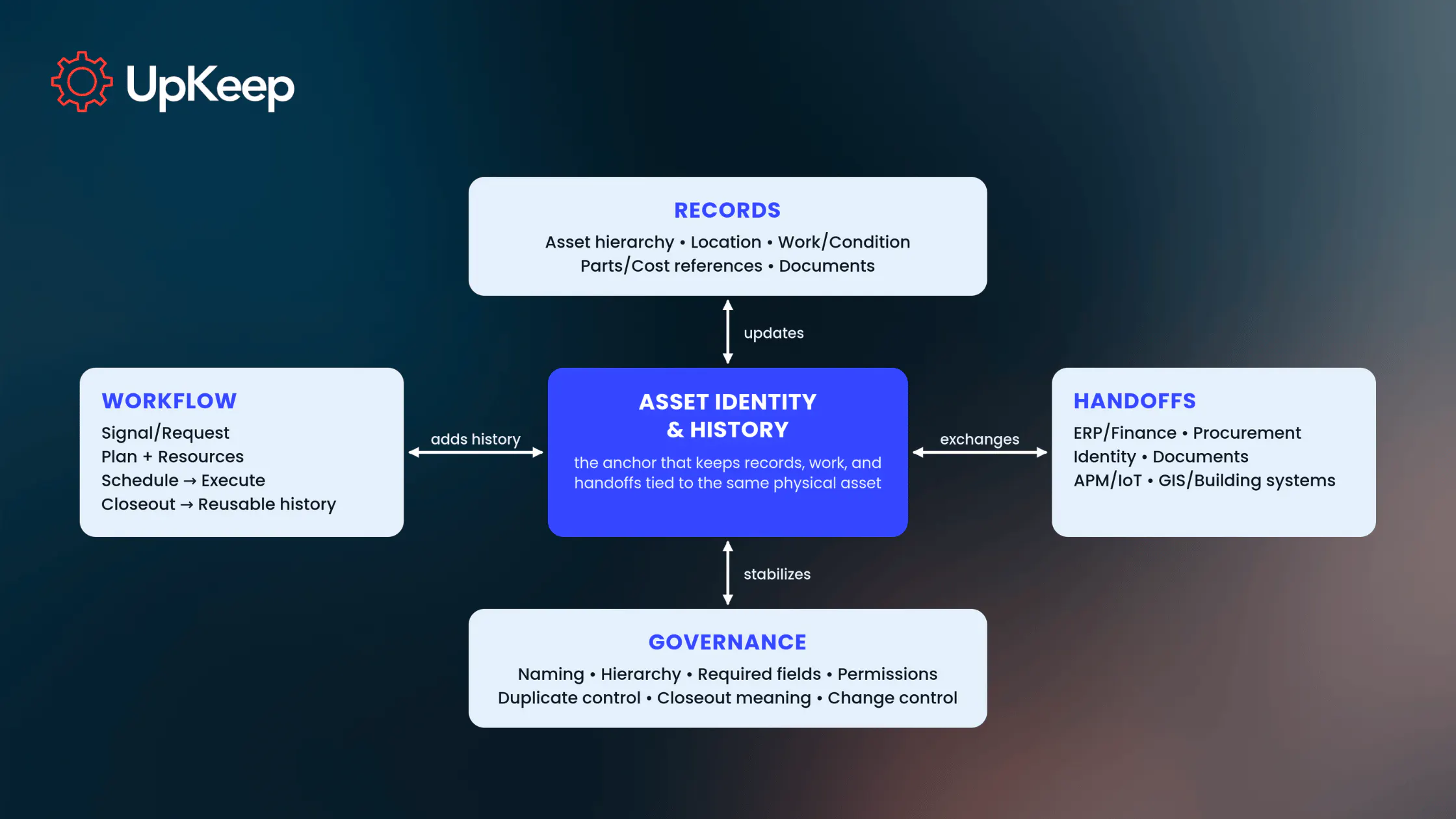
For a single repair, the job starts in the workflow layer, where a technician replaces a worn valve on an air compressor and closes the work order from a phone. The repair, the part used, and the findings then land in the records layer as part of the compressor’s history.
From there, an integration sends the part’s cost to the company’s enterprise resource planning (ERP) system, and finance sees the same repair on the same compressor. Governance makes that repair easy to find later, because the site follows one naming convention for its equipment and requires a failure code on every closed work order.
Inside an EAM System: The Asset Record and the Work Around It
Each asset in an EAM system has one asset record. Some information is stored on that record itself, and the rest lives in separate records that link to it.
Stored on the asset record:
Identifier and Name: A unique identifier, such as DC-04, plus a name people recognize, such as “Dust collector 4”
Hierarchy: What sits above and below the asset in the asset hierarchy, such as DC-04 under the paint shop’s ventilation system, with its fan and filter housing beneath it
Location: The site, building, floor, or production line where the asset sits
Details: Make, model, serial number, category, criticality (how severely a breakdown would hurt safety, production, or costs), and any custom fields your team sets up
Linked to the asset record:
Work Orders and Inspections: Every request, planned job, and inspection logged against the asset
Parts and Labor: The parts and hours each job used
Readings: Meter readings and sensor data on the asset’s condition
Costs: Labor, parts, and purchase costs, recorded in the EAM system or pulled from finance
Documents: Manuals, drawings, procedures, and certificates
Some of that information comes from other software. Finance, for example, keeps the official cost records, and the EAM system displays those costs on the asset so a planner doesn’t have to look them up somewhere else.
How a Work Order Builds the Asset’s History
Each stage of the maintenance work order process adds something to the asset’s record. Here’s how one job on the above DC-04 dust collector example moves through an EAM system:
Request: During rounds, a technician hears a squealing fan belt on DC-04 and submits a request for that asset. A vibration sensor alert can start the same process.
Planning: A planner reviews the request, confirms what needs fixing, and turns it into a work order.
Parts, Labor, and Safety: The planner adds the replacement belt, the assigned technician, and the lockout procedure.
Scheduling: The planner books the job for a time when the dust collector can be shut down and the belt and technician are both available.
Execution: The technician replaces the belt and records readings, parts used, and anything unusual from a phone.
Closeout: The technician selects a failure code, such as “belt worn,” and adds completion notes.
History: The EAM system adds the closed work order to DC-04’s record.
The failure code from Step 6 pays off months later; when the maintenance manager reviews DC-04 and sees “belt worn” on three work orders in one year, a check of the drive finds a misaligned pulley. Realigning the pulley stops the belt failures, and a belt-tension check goes on the next PM checklist.
What an EAM System Connects to
A company adopting an EAM system usually already runs software for finance, purchasing, and user accounts. An integration with each of those systems means nobody has to type the same information into both.
For every type of information, one system keeps the official version. That’s the one everyone defers to when two systems disagree. The others read from or send updates to it. The exact split depends on how your company has set up its systems. The table below shows common setups and which way the information moves in them.
|
Information |
Official version location |
What moves |
What your team gets |
|---|---|---|---|
|
Asset list and history |
EAM system |
The EAM system sends asset details and status to other systems |
Every team looks up the same asset |
|
Work orders |
EAM system |
Work orders stay in the EAM system; completed jobs send their costs to the ERP |
A full maintenance history on each asset |
|
Parts inventory |
EAM system, ERP, or inventory software |
When stock is kept elsewhere, stock levels flow into the EAM system and parts used flow back |
Parts ready before the job starts |
|
Costs |
ERP or finance software |
The EAM system sends labor and parts costs; the ERP sends budget codes |
Each repair cost tied to the asset it was spent on |
|
Purchasing |
ERP or purchasing software |
The EAM system sends purchase requests; purchasing sends order status back |
Parts orders that start from the work order |
|
Sensor readings |
Sensor platform or EAM system |
Readings and alerts flow into the EAM system |
Condition changes that turn into scheduled work |
|
Documents |
Document management software or EAM system |
Links or copies attach to the asset record |
Technicians open the current procedure from the asset record |
|
User accounts |
Company login system |
The login system sends users and roles to the EAM system |
One login for every app (single sign-on) and consistent access rules |
Any two systems that share asset data have to match each record to the same asset. The simplest setup gives each asset one identifier that the EAM system, ERP, and inventory software all use. If systems use different naming conventions, a mapping will match them. This lookup table pairs each identifier in one system with its match in the other, so “DC-04” in the EAM system and “5520-04” in the ERP are logged as the same dust collector.
With identifiers matched, a repair’s expenses land on the right asset in both systems, so finance sees what each asset costs to keep running and can trace any repair cost in its ledger back to the work order behind it. Maintenance and finance teams can keep their asset records aligned without having to move either team’s data into the other’s system.
Data can move between two systems through a built-in connector, a scheduled file transfer, or an API that lets the programs talk directly. Whichever you use, three questions decide whether the integration holds up: which system owns each record, which way updates flow, and who fixes a sync that fails. A sync is the automatic update that copies a change from one system to the other. It doesn’t have to run in real time, and a nightly cost sync may be all finance needs.
Signs Your EAM System Is Working
An EAM system proves its worth when every job lands on the right asset record and costs match across systems. Watch for signals like:
One Record per Asset: Monitor duplicate asset records found each month. Fewer duplicates mean each asset’s history sits in one place.
Work Tied to the Right Asset: Track the share of work orders opened for a specific asset. Quick fixes often get logged against a building or a general category, and moving them onto the asset adds them to its history.
Closeouts That Explain the Job: Determine the share of closed work orders with a failure code and completion notes, because those fields reveal repeat failures later.
Syncs That Run Cleanly: Calculate failed syncs each month and how long each one takes to resolve. Every fix brings the connected systems back to the same numbers.
Costs That Match Across Systems: Track cost mismatches between the EAM system and the ERP at the end of each month. Matching expenses let finance budget replacements separate from real repair spend.
How to Set up an EAM System in Your Existing Operation
Once you’ve picked your EAM software and moved your data into it, setup goes smoothly when segmented into stages. Start where shared data matters most, such as a production line with repair costs already tracked by finance. Connect the EAM system to your other software for that line’s assets, then add the rest of the site and any others. This first stage takes six steps to complete:
1. List the systems you already run. Write down which software currently holds the asset list, costs, purchase orders, parts inventory, sensor data, and user logins. That list becomes your integration plan.
2. Match asset identifiers across those systems. Before the first sync, your asset administrator (the person who maintains the asset list) gives each asset one identifier under a consistent naming convention. Every system then uses it, or the lookup table matches it to the identifiers each system already has. The asset administrator also merges duplicate records in the same pass so no system receives two records for one asset.
3. Decide which system keeps the official version of each type of information. Settle this with your finance, purchasing, and IT departments. Record and communicate the final decision so everyone knows where to look and where to fix errors.
4. Name owners for the asset list and the integrations. Before the first integration goes live, name two owners. The asset administrator approves every new asset so each new identifier is matched in every connected system. Meanwhile, an IT owner watches each integration and fixes failed syncs.
5. Connect one system at a time and test it. Either IT or the vendor starts with the system that needs maintenance data most, often the ERP, so repair costs reach finance from the first closed work order. Before the next system is connected, a planner tests this one on a real asset. For the ERP, that means closing a test work order and confirming the cost shows up on the same asset.
UpKeep, for example, offers built-in connectors to SAP, Oracle, NetSuite, and Microsoft Dynamics that sync data in both directions, plus single sign-on through your company’s login system and a public API for other systems.
6. Review the signs every month. The asset administrator runs the review, clears duplicate records and work orders logged without an asset, and passes failed syncs to the IT owner.
One Asset History Across Every System
The ultimate goal of an EAM system is uniformity. An asset’s whole repair history sits on one record, eliminating conflicting identifiers across work orders, the inventory list, and your finance ledger. Duplicate records drop, costs match at the end of each month, and repeat failures show up early enough to fix the cause.
With UpKeep’s asset operations platform, every app works from that unified record. A technician opens and closes work orders against the asset on a phone and keeps working offline if the signal drops. Readings from UpKeep Edge sensors, meanwhile, land on the same record, and integrations post the parts and labor cost to the ERP that finance already runs.
Book an UpKeep demo to see how one asset’s work orders and repair costs can line up seamlessly across the platform and your ERP.
FAQ
Is an EAM system the same as EAM software?
Yes. In everyday use, both terms describe software that manages physical assets and the work done on them, from asset records to work orders and maintenance history. Asset management standards use “asset management system” for the policies and processes a company uses to manage its assets, whether or not software supports them.
Does an EAM system replace an ERP?
No. ERP software keeps the official financial, purchasing, and accounting records, while the EAM system keeps the maintenance history for each asset. Both stay in use. An integration posts each repair cost to the ERP, and matching asset identifiers keep it on the same asset in both systems so finance can budget from the repair history the maintenance team sees.
Do all EAM systems work the same way?
No. EAM software vendors organize records, screens, and workflows differently, and companies connect them to different systems, such as an ERP, a purchasing tool, or a sensor platform. Every setup still needs asset records, work orders that keep them current, integrations with other software, and rules that keep the data consistent, whichever vendor builds it.
Which information should an EAM system keep?
The EAM system usually keeps the asset list, hierarchy, work orders, and maintenance history. Costs, purchase orders, and user accounts usually stay in ERP, purchasing, and login systems, and the EAM system displays or updates them. Recording that split in one shared document means a wrong value gets corrected once, in the system that keeps the official version.
Does an EAM system help with compliance audits?
Yes. Each asset’s record holds its inspections, the work orders they led to, and its certificates and procedures. Every inspection and work order shows who closed it and when. A work order can’t close until its required fields are filled in. When an auditor asks about one asset, the answer comes from its record.
4,000+ COMPANIES RELY ON ASSET OPERATIONS MANAGEMENT
Leading the Way to a Better Future for Maintenance and Reliability
Your asset and equipment data doesn't belong in a silo. UpKeep makes it simple to see where everything stands, all in one place. That means less guesswork and more time to focus on what matters.






![[Review Badge] Gartner Peer Insights (Dark)](https://www.datocms-assets.com/38028/1673900494-gartner-logo-dark.png?auto=compress&fm=webp&w=336)