Blog Post
What Is EAM Software? A Guide to Enterprise Asset Management
Discover what Enterprise Asset Management (EAM) software is, how it compares to CMMS and ERP systems, its core capabilities, and best practices for implementation.



Key Takeaways
EAM software keeps an asset's full history in one record from purchase to retirement. Repair, overhaul, and replacement decisions all draw on the same work orders, condition findings, and repair and parts costs.
EAM and CMMS differ mainly in scope, and modern platforms overlap substantially. The distinction comes down to which records and decisions each system needs to support.
A shared asset structure gives multi-site teams a common basis for comparison. Uniform asset names, work order statuses, and closeout rules make apples-to-apples comparisons possible across locations.
Data quality determines whether the asset record is reliable enough to act on. Before sensors or predictive analytics can add useful signals, each asset needs one record under the right name and location, and every job needs a complete closeout.
An aging air-handling unit may look like a maintenance problem until four departments demand different answers from it. The technician needs to know what failed last time; the planner needs open work, parts, labor, and inspection history; operations wants to know whether the latest repair fits a pattern; and finance needs the asset's repair and parts costs and current condition to decide whether another overhaul makes sense or they need to add replacement to next year's capital plan.
When those records live in separate spreadsheets, work orders, inboxes, and finance systems, every decision starts with someone collecting the asset's records by hand. Inconsistent naming, work statuses, and closeout habits across multiple sites make the history harder to compare.
Enterprise asset management (EAM) software addresses that disconnect by maintaining a durable asset record across the life cycle and linking it to the work and decisions around it.
What Is EAM Software?
EAM software is a system for managing physical operational assets across their full life cycle. It keeps asset information usable over time and ties work orders, parts, labor, condition findings, and repair costs to decisions about operating, maintaining, evaluating, and eventually retiring each asset.
EAM's core scope covers physical assets like production equipment, building systems, facilities, infrastructure, and fleets. Vendors build out from that core in different directions; one product adds fleet telematics, while another adds space planning or energy tracking. That’s why a definition built on a checklist of features goes out of date quickly. The true test of a good system is whether it preserves the information needed to understand an asset from acquisition and commissioning through operation, maintenance, review, and retirement.
That all-encompassing view is why asset life cycle management sits so close to EAM. Many organizations handle different stages of an asset’s life in different software, such as purchasing in the ERP, maintenance in a CMMS, and inspections on paper. That setup can work as long as the asset’s record carries over at each handoff so later decisions can draw on what was recorded earlier.
EAM overlaps with adjacent systems, and because modern suites often combine several of these jobs in one product, comparing them feature by feature gets confusing fast. The table below compares them by the main job each system does and how far ahead its decisions reach.
|
System |
Primary operating job |
Decision horizon |
Typical users |
Primary record focus and overlap |
|---|---|---|---|---|
|
EAM |
Life cycle management of physical assets |
Maintenance through capital and retirement |
Maintenance, reliability, operations, asset leaders, and finance partners |
Asset identity, work, condition, and cost and risk context; can overlap with CMMS, APM, FM, and ERP workflows |
|
CMMS |
Maintenance execution and records |
Daily through tactical planning |
Technicians, planners, and maintenance leaders |
Work orders, PM, assets, parts, and labor; modern products can be multi-site, mobile, integrated, and life cycle-aware |
|
ERP |
Enterprise transactions and financial processes |
Enterprise planning and financial control |
Finance, procurement, and operations |
Financials, purchasing, inventory, and transactions; often integrates with maintenance and EAM records |
|
APM |
Asset performance and reliability analysis |
Condition and performance improvement |
Reliability and operations teams |
Condition, reliability, and performance signals; may sit inside broader suites |
|
FM |
Space, occupancy, and building services |
Daily through workplace planning |
Facilities, workplace, and real estate teams |
Space, occupancy, and service requests; shares building assets with EAM |
EAM vs. CMMS
A computerized maintenance management system (CMMS) centers on maintenance execution, including assets, preventive maintenance (PM), work orders, technicians, parts and labor, and closeout. EAM broadens that context to cover life cycle cost, risk, cross-functional ownership, and capital or retirement decisions.
The boundary between the two keeps blurring, since modern CMMS platforms now handle multi-site operations, mobile work, inventory, integrations, and life cycle tracking. In practice, a team that mainly needs to run maintenance well, with work orders, PM, and parts, is usually well served by a CMMS.
A team that also needs finance and operations to plan replacements and budgets from the same asset record needs life cycle features beyond maintenance, either from an EAM suite or from a CMMS connected to the ERP. UpKeep's EAM vs. CMMS comparison breaks down which fits which type of operation.
EAM vs. ERP
Enterprise resource planning (ERP) runs enterprise transactions and financial processes. EAM holds the operating and life cycle context of physical assets and exchanges data with ERP, so maintenance records stay close to the asset while financial and purchasing records remain in the ERP.
EAM vs. APM
Asset performance management (APM) concentrates on condition, reliability, and performance analysis. EAM covers the wider life cycle and governance context around the asset and its work. Many suites combine both.
EAM vs. Facilities Management
Facilities management (FM) comprises the built environment as a service, namely, space and occupancy planning, moves, room booking, and occupant requests. EAM follows the maintained physical assets inside that environment (e.g., air handlers, chillers, and elevators) and the work, condition, and life cycle context around them. Modern platforms can cover both jobs, so this is a scope distinction rather than a hard feature boundary.
Why EAM Matters in Asset-Intensive Operations
The advantage of EAM is that it keeps the evidence behind each asset decision in one place. When maintenance history, condition findings, parts and labor use, and life cycle cost sit in the same record, leaders can answer a question like, “Should we repair this chiller again?” without first pulling data from separate systems. EAM also helps with:
Repair Versus Replace Decisions: When an air-handling unit fails again, a repair-or-replace review puts its repeated failures, labor and parts history, inspection findings, depreciation, and a replacement quote side by side. Maintenance, operations, and finance check the same evidence to decide whether another repair makes sense or the replacement goes into next year's capital plan. The decision stays with people, and the record documents why they made it.
Capital Requests: When maintenance asks the finance department to fund a replacement, an EAM ensures the request includes the asset’s full repair history, cost trend, and condition findings. That makes a stronger case than the latest breakdown alone. Finance can then add its own inputs, such as how much value the asset has lost to depreciation, and keep the accounting in its own systems.
Multi-Site Comparisons: According to UpKeep data, 50% of maintenance and reliability professionals reported managing six or more locations. A common asset taxonomy, shared work statuses, and consistent closeout rules give leaders a stable basis for comparing similar equipment across sites.
Knowledge Retention: A well-maintained record holds onto findings, procedures, history, and decision context when experienced technicians leave, so the next person starts from the asset's recorded history.
Audit and Review Readiness: The record dates and links each inspection, the work it triggered, and the closeout notes. When an auditor or safety inspector shows up asking for proof that a required inspection happened and that the defect it found was fixed, the team can pull up that full chain from the asset’s history in one step.
How EAM Connects Data to Life Cycle Decisions
EAM follows assets from the initial purchase order to final disposal. Each stage in that process adds to the asset's record, involves a different owner, and feeds a decision further down the line:
1. Acquisition: When the asset is purchased, a maintenance planner or asset administrator creates its record in the EAM software, entering the specifications, location, criticality (how much a failure would disrupt operations or drive up costs), documents, warranty terms, and owner. Many systems can import part of this from a spreadsheet or another system, so the record exists before the first work order.
2. Commissioning: Once the equipment is installed, the installation team or a technician places it in the right location and asset hierarchy, records its baseline condition, and attaches the relevant documentation. The planner then sets up the recurring inspections and preventive maintenance the asset will need, such as a quarterly filter check. One setup in the right place keeps later work orders from landing on duplicate records of the same unit.
3. Operation and inspection: Technicians and operators add readings, findings, inspections, and usage context to the system. A consistent series of readings shows whether an abnormal reading is a one-off event or a trend that needs to be investigated.
4. Maintenance planning: Planners decide which open work happens first, usually by weighing the asset's criticality, safety risk, and how soon a defect could cause a failure. They then assign labor, parts, procedures, and a date. The EAM software supplies the data and can sort work by priority, but the planner makes the final call. Asset history shapes that call too; a pump's fourth trip this quarter reads as a pattern worth investigating once the first three are on record.
5. Work execution: The technician completes the job and closes the work order, recording what they found, what they changed, the parts and labor used, and whether the asset is back in working order.
6. Life cycle review: Leaders review work history, reliability, condition, backlog, and cost together. At that point, the question grows beyond the next repair to ask, “Should the team keep the current maintenance plan, change it, schedule an overhaul, or start budgeting for a replacement?”
7. Retirement or replacement: When repairs stop making financial sense, the asset’s accumulated record supports a replacement discussion and documents why the decision was made.


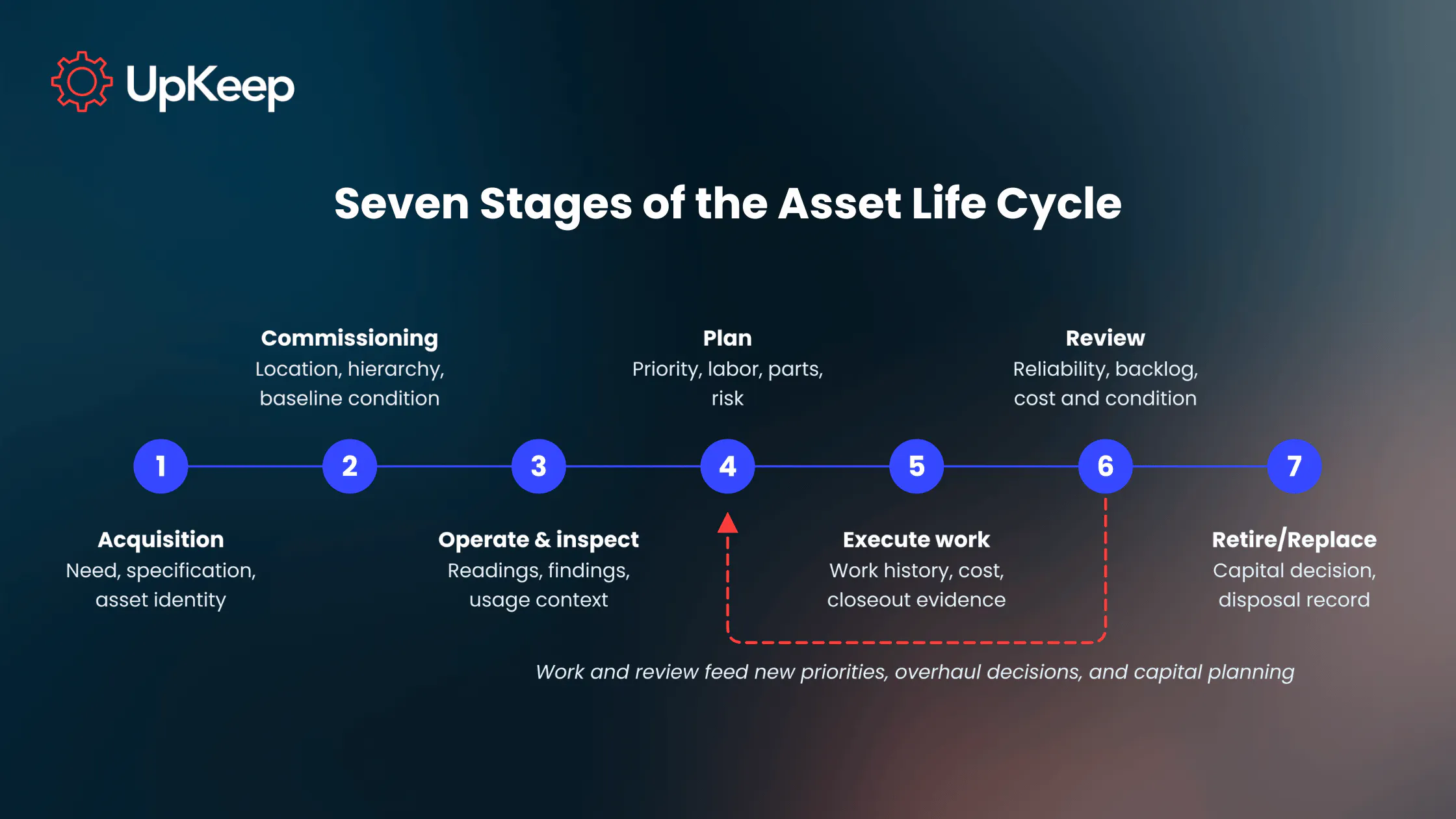
The payoff is continuity, as each stage produces evidence the next one uses. If the record breaks at a handoff, the work may still get done, but the history behind the most critical calls disappears with it: whether to repair or replace, whether to overhaul (rebuild major components to extend the asset’s service life, a larger job than a single repair), and how much to budget for new equipment when planning expenditures. Walk one critical asset through the seven stages in your current records; the first handoff where its history drops out is where an EAM rollout should start.
Core EAM Capabilities
Although modern systems package them differently, each EAM capability keeps the life cycle record usable. Some also rely on integrations for part of the job. Look for the following main features when considering adopting EAM software:
Asset Information: A durable identity, hierarchy, location, documentation, warranty, and history give every later work order a stable anchor. Without that identity, costs and findings scatter across duplicate records.
Work and Preventive Maintenance: Work orders, inspections, recurring PM tasks, labor, procedures, and closeout turn maintenance activity into a logged history. Every completed job then becomes evidence for the next plan or review.
Materials and Cost: Parts, labor, and purchasing references show what keeping an asset running actually costs. EAM tracks that expense at the asset level, and the general ledger stays in the finance system.
Condition and Performance: Findings, meter readings, reliability measures, and condition signals add context to work history. Sensors, IoT, and predictive analytics extend this capability once the underlying records are reliable.
Governance and Field Usability: Naming and status rules, closeout fields, permissions, mobile access, and data stewardship keep the record consistent. If technicians can't update a record from the field, it’ll go stale fast, because notes written up hours later at a desk are shorter and less accurate, and some small jobs never get logged at all.
Integrations: Each connected system remains the official source for its own data: the ERP for financial records, the procurement system for purchase orders, and the building automation system for live equipment readings. EAM works best when the team agrees on those roles before launch so no one updates the same record in two places.
EAM Metrics to Track
Metrics turn the life cycle record into decisions when each one answers a specific question about an asset. Two of the most useful are mean time between failures (MTBF), which calculates how long an asset typically runs before it breaks, and mean time to repair (MTTR), which shows how long it takes to get it running again. Together, they reveal whether an asset is becoming less reliable and more expensive to keep in service, which feeds directly into repair-or-replace decisions.
UpKeep’s free maintenance calculators can handle the arithmetic for you. Use the table below to read each measure for a specific asset.
|
Measure or record |
Life cycle question it raises |
How to interpret it |
|---|---|---|
|
PM completion |
Are planned tasks being executed as intended? |
Review with criticality, deferrals, findings, and work quality; completion alone says little about effectiveness |
|
Corrective-to-preventive work mix |
Is work demand shifting toward reactive intervention? |
Use as a pattern indicator. Asset class and operating context set what a healthy mix looks like |
|
MTBF |
Is the interval between failures changing? |
Compare like assets over a meaningful period with consistent failure definitions |
|
MTTR |
Is restoration taking longer? |
Check job scope, access, parts, staffing, and repeat-work context |
|
Availability |
Can the asset support required operation? |
Connect lost availability to cause and consequence; one percentage can't decide a replacement |
|
Backlog age |
Are important defects staying open too long? |
Separate low-priority backlog from aging work on critical assets |
|
Maintenance cost by asset |
Is the resource demand changing relative to condition and replacement context? |
Use cost as one input for repair-versus-replace reasoning, weighed with condition and criticality |
|
Closeout completion rate |
Can later reviewers understand what was found and done? |
Missing failure, action taken, labor used, or parts details weakens future decisions |
How to Implement EAM Software
To introduce EAM software into your operations, start with the decisions your organization needs to make about its assets, such as which units to replace next year. Then add data fields only when one of those decisions needs them, since every extra field adds work for technicians and clutters the record. How long it takes to go live depends on scope, data quality, integrations, and how much your team’s daily process has to change.
1. Define the operating scope. Pick one site or asset class where a life cycle decision is already overdue, such as a replacement request with no cost history. List the assets, users, and decisions involved, then write down the specific questions the system needs to answer at launch, such as, “What has this A/C cost us in repairs over the last three years?”
2. Build a usable hierarchy and taxonomy. Set naming conventions (for example, “AHU-03-ROOF” for the third rooftop air handler), locations, parent-child relationships (a motor recorded under the conveyor it drives, so its work history rolls up to the conveyor), asset classes, criticality, and ownership so users land on the right record every time. Asset and location hierarchies solve different problems, so invest the time to design both.
3. Clean the data that drives decisions. Prioritize asset identity, status, work history, maintenance plans, criticality, and parts relationships. Before go-live, the rollout lead should run a data quality audit that checks for duplicate assets, missing criticality ratings, blank locations, and work orders not tied to any asset, then send each gap to the team that owns that data to fix.
4. Define the work and closeout model. Agree on what triggers work, who plans it, and what technicians record at closeout. Keep the form short enough to finish at the asset and build it around cause codes (short standard labels for why something failed, such as “worn bearing” or “misalignment”), plus the few details a later repair-or-replace review will need, like parts used and labor time.
5. Set system boundaries and integrations. Decide which records the EAM owns and which stay in the ERP, procurement, identity, building, document, or sensor systems’ domain. A CMMS-ERP integration can show how maintenance and enterprise systems exchange data while each keeps its own role.
6. Make field use practical. Give technicians a fast and easy way to pull up the right asset, such as scanning a QR code on the equipment, along with its history, procedures, and a closeout form they can finish on mobile before moving to the next job.
7. Assign stewardship and a review cadence. After launch, name an owner for each part of the data, including the asset taxonomy, required fields, duplicate records, outdated maintenance plans, permissions, and report definitions. Those owners then review their allotted data on a cycle the business already runs, such as quarterly budget planning. Matching the review to budget planning is helpful because that’s when leaders lean on the asset data most, so gaps surface while there’s still time to fix them.
Data governance decides how long the system stays useful after migration. On the closeout form, restrict the required fields to the few that later decisions actually use, such as failure cause, action taken, parts, and labor time, and make those mandatory on every job. When a review needs something the form doesn't capture, add a field for it. For example, if leadership starts comparing repair costs by shift but closeouts don't record the shift, that becomes a new required field.
From Scattered Records to Controlled Asset Decisions
Without a life cycle record, aging equipment can cycle through repairs while replacement evidence stays split across work history, inspection findings, cost records, and finance. Budget planning then starts with someone digging through old work orders, invoices, and inspection notes to piece together what each asset has cost and how it has performed.
With a consistent, up-to-date record, maintenance sees what’s failed and what work was done, while operations sees the asset’s condition and reliability. Finance then brings replacement quotes and depreciation figures into the same review. All three teams work from one up-to-date record, so the repair-or-replace decision gets made on the evidence before the next failure forces it.
With UpKeep’s CMMS-centered asset operations platform, technicians can easily scan an asset QR code to reach the asset record and current work on a mobile device. Then they can close the job at the site with labor, parts, findings, and completion details tied back to the same asset. Each completed job adds to the maintenance history that the next inspection, plan, or life cycle review needs.
Book an UpKeep demo to see how that asset record and maintenance workflow come together in practice.
FAQ
Is EAM the same as ERP?
No. ERP manages enterprise-wide transactions and financial processes, such as accounting, purchasing, and payroll. EAM focuses on the physical assets themselves, namely, their maintenance history, condition, and life cycle cost. The two usually work side by side, with EAM sending maintenance costs and parts usage to the ERP, and the ERP holding the financial record of each asset.
Does EAM require IoT?
No. EAM runs on the asset records, work orders, inspections, and cost data that technicians and planners enter every day. Sensors and IoT add live condition signals, such as vibration or temperature readings, and predictive analytics turn those signals into early warnings. Monitoring adds the most value once the underlying asset records and work history are reliable.
Is EAM only for large enterprises?
No. “Enterprise” refers to the system’s scope, which covers an asset’s whole life cycle across maintenance, operations, and finance more than company size. A mid-sized manufacturer with two plants can need EAM as much as a global corporation. It becomes relevant once several teams or sites need to share one reliable record for each asset.
How long does EAM implementation take?
It depends mostly on scope. The number of assets and sites, hierarchy complexity, the systems you need to integrate, the state of your existing data, and technician training all affect the timeline. A practical approach is to launch with one site or asset class, tie milestones to the first decisions the system supports, and then phase in the rest.
Can an existing CMMS be part of an EAM approach?
Yes. A modern CMMS can provide most of the maintenance record an EAM approach needs, including assets, work history, preventive maintenance, parts, labor, and mobile field work. Whether you need more depends on the decisions in scope. If finance, operations, and maintenance all need one asset record for budgeting and replacement planning, look for life cycle features or ERP integration.
4,000+ COMPANIES RELY ON ASSET OPERATIONS MANAGEMENT
Leading the Way to a Better Future for Maintenance and Reliability
Your asset and equipment data doesn't belong in a silo. UpKeep makes it simple to see where everything stands, all in one place. That means less guesswork and more time to focus on what matters.






![[Review Badge] Gartner Peer Insights (Dark)](https://www.datocms-assets.com/38028/1673900494-gartner-logo-dark.png?auto=compress&fm=webp&w=336)