Blog Post
What Is CMMS in Manufacturing? How It Works on the Plant Floor
Learn what a CMMS is in manufacturing, how it optimizes plant maintenance, integrates with ERP and MES, and shifts your facility from reactive to planned uptime.



Key Takeaways
A CMMS in manufacturing schedules maintenance around production. Planners move work that used to stop the line into changeovers and shutdown windows.
Shifting work from reactive to planned is where plants recover the most uptime. PM schedules and asset history make that shift hold under production pressure.
CMMS reporting is only as good as the closeout data behind it. How technicians close work orders at the machine decides whether MTBF and MTTR trends can be trusted.
Predictive maintenance builds on a CMMS that's already working. Condition alerts pay off once a reliable workflow exists to act on them.
A CMMS has a defined job alongside ERP and MES. Drawing those boundaries early keeps parts, cost, and downtime data consistent across systems.
Unplanned stops cost manufacturers more than any other maintenance failure. Every hour a line sits idle loses output, overtime, and schedule slack at once.
Although plants know planned maintenance can prevent many of those stops, fitting it around production is a struggle: According to UpKeep data, the top barrier to preventive maintenance was a tie between scheduling conflicts with production and staffing or resources, each cited by 31% of maintenance and reliability pronfessionals.
Additionally, more than a third of organizations still manage maintenance work manually, including through pen-and-paper processes or spreadsheets. When requests, PM schedules, parts information, and completed work live across notebooks, inboxes, and spreadsheets, planners have to piece together the picture by hand, and the technician arriving at a failed gearbox finds out at the machine that the replacement part isn't on the shelf.
A computerized maintenance management system (CMMS) gives personnel one place to see what's due, what's in stock, and when the line can spare each machine for servicing. Planned work then moves into changeovers and shutdown windows before a failure picks the (inconvenient) timing.
What Is a CMMS in Manufacturing?
A computerized maintenance management system is maintenance software that organizes work orders, asset and maintenance history, preventive maintenance (PM) schedules, spare parts, and maintenance records in one system. In a plant, it schedules that work according to production runs, technician availability, parts stock, and shutdown windows.
Plants run several systems that touch the same equipment and can connect to the CMMS directly, including:
An enterprise resource planning (ERP) system owns purchasing, supplier records, and inventory valuation. So, in a connected plant, the parts a work order consumes flow back to ERP for reordering and cost tracking.
A manufacturing execution system (MES) owns the production schedule and run status. The CMMS reads it to find changeover windows for planned work and logs downtime events as they happen.
The table below sets out which job each system owns.
|
System |
Primary Job |
Role in Plant Maintenance |
|---|---|---|
|
CMMS |
Maintenance execution and records |
Work orders, asset history, PM schedules, parts, maintenance reporting |
|
Spreadsheets |
General-purpose records |
Manual lists and schedules with no workflow, triggers, or audit trail |
|
EAM |
Asset life cycle management |
Extends the maintenance record into procurement, life cycle cost, and retirement decisions |
|
ERP |
Enterprise business transactions |
Finance, purchasing, and inventory valuation; exchanges parts and cost data with the CMMS |
|
MES |
Production execution |
Schedules and records production activity; shares run status and downtime context |
The boundary between CMMS and EAM has blurred as maintenance platforms add life cycle features. Considering where the CMMS sits among plant systems, the ANSI/ISA-95 enterprise-control integration standard sorts manufacturing activity into five levels, but only the first four are relevant here:
Levels 1 and 2 cover sensors, PLCs, and control systems responding in fractions of a second.
Level 3, manufacturing operations management, groups maintenance with production, quality, and inventory operations on a timescale of shifts, hours, and minutes, and it's where both the CMMS and the MES sit.
Level 4 belongs to ERP, which runs business planning and logistics over days, weeks, and months and exchanges information with Level 3 systems.
Before choosing a system, list where requests, PM calendars, and spare-parts counts currently live. Any job that depends on two of those places at once is where handoffs break, and it's the first workflow to move into the CMMS.
Why a CMMS Matters in Manufacturing
A plant without a maintenance system carries the cost in three places: the line, the parts room, and the planning meeting.
Those expenses appear in distinct consequences:
Unplanned stops cascade through the schedule. A bearing that fails mid-shift stops the line, idles operators, pushes orders into overtime, and forces the repair into the worst possible window. That downtime cost adds up really fast.
Parts shortages stretch every repair. When stock levels live in a separate spreadsheet, the technician discovers the missing motor or belt at the machine. MTTR then includes expedited shipping time for an emergency order, and the line stays down while the part ships.
Recurring failures stay invisible. If completed work sits on paper or is trapped in a technician's memory, nobody can see, for instance, that the same conveyor drive has failed four times this quarter. The plant keeps paying for the repair and never fixes the cause.
PM compliance erodes under production pressure. Scheduled tasks get deferred when production runs hot, and without a system tracking what slipped, deferred maintenance accumulates until it shows up as breakdowns.
How a CMMS Works on the Plant Floor
Say a conveyor drive starts running hot during the second shift. The maintenance need can arrive as an operator request, a technician observation, a meter reading, or a condition alert from a connected sensor.


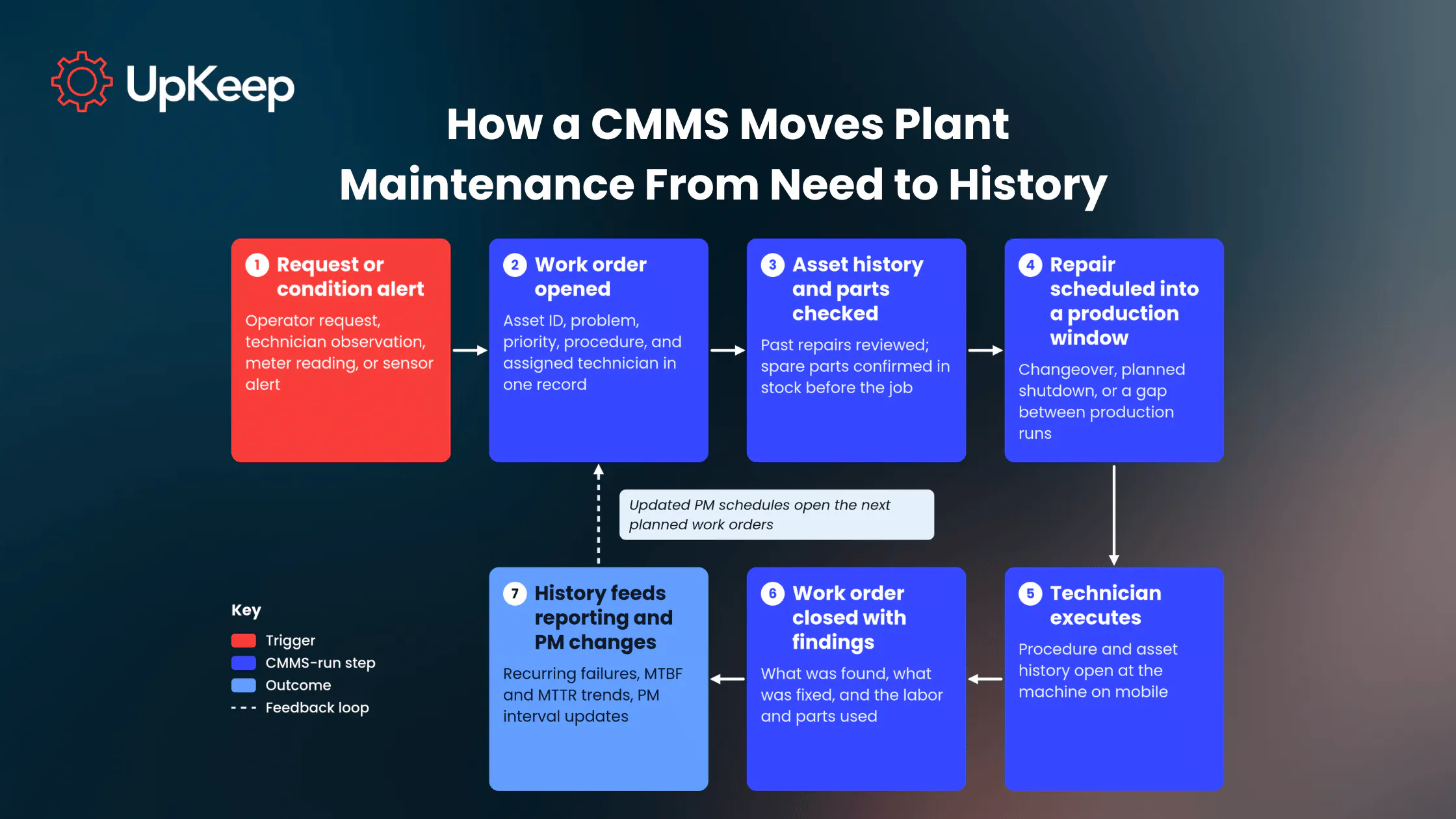
The work order carries the asset ID, the problem and its priority, past repairs on that drive, the procedure, the assigned technician, and the parts needed. The planner checks whether the job needs a shutdown or fits between runs and confirms the spare motor or bearing is in stock before anyone walks to the line. Following a structured maintenance work order process keeps that handoff consistent across shifts.
Closing the work order records what the technician found and fixed. Over months, that closeout history shows which assets fail the most, which PM intervals are too long, and where parts consumption is climbing.
Trace your last three emergency repairs and note where each one lost time: finding the asset's history, finding the part, or finding a production window. The step that cost the most is where the CMMS workflow needs to be strongest first.
Core Capabilities of a Manufacturing CMMS
A manufacturing CMMS earns its place through six capabilities, each tied to a point where plant maintenance breaks down without one. Use them as a checklist when comparing systems, because a gap in any one of them may show up later as downtime that the software was supposed to prevent.
Work Order Management: Every request, planned job, and completed repair lives in one queue with status, labor, parts, and notes attached. That way, planners see the full backlog before setting priorities.
Asset and Maintenance History: Each production asset carries its full failure, repair, and inspection record. Troubleshooting starts from the data, and knowledge stays in the system when experienced technicians retire.
Preventive Maintenance Scheduling: PM tasks trigger by calendar or meter and runtime where the platform supports it.
Parts and Inventory: Spare parts link to assets and jobs so planners confirm availability during scheduling, well before the technician reaches the machine.
Mobile Execution: Technicians open work orders, history, procedures, and parts lists at the equipment and close jobs on the spot. Offline capability and mobile features vary by product and plan.
Reporting: Completed work cuts down on backlog and feeds schedule compliance, recurring-failure, and MTBF and MTTR reporting, with accuracy tied to the quality of closeout data.
Preventive vs. Predictive Maintenance in a CMMS
The three main maintenance strategies depend on what triggers the work. Reactive maintenance follows a failure, preventive maintenance runs on a time or cycle schedule, and predictive maintenance acts on observed condition data such as temperature, vibration, or noise.
|
Strategy |
What Triggers the Work |
Data It Needs |
What the CMMS Does |
|---|---|---|---|
|
Reactive |
An asset fails or stops |
Failure report and asset history |
Opens and tracks the repair work order and records cause, labor, and parts |
|
Preventive |
A time, cycle, or runtime interval |
Calendar dates, meter readings, or runtime counts |
Generates PM work orders on schedule and tracks completion |
|
Predictive |
Condition data showing a developing fault |
Temperature, vibration, noise, or other condition readings |
Turns the alert into a scheduled repair with an owner, a procedure, and a record |
A CMMS handles both planned approaches. Preventive work runs on schedules the CMMS generates. Predictive work starts when condition data and analysis identify a developing fault, and the CMMS turns that finding into a scheduled repair with an owner, a procedure, and a record.
Plants can add predictive capabilities asset by asset. Reliable PM schedules and asset history come first, because condition alerts are only as useful as the workflow that acts on them.
Manufacturing Maintenance KPIs to Track
The metrics below reveal if the CMMS is moving work into planned windows and whether that shift is protecting output.
The planned-versus-reactive ratio deserves the closest watch. It's the first metric to move when planned work starts displacing breakdown repairs. MTBF and MTTR anchor the rest of the set, and OEE connects maintenance performance to production.
|
Metric |
What It Tells You |
What to Watch for |
Trending Direction |
|---|---|---|---|
|
PM compliance |
Share of scheduled PMs completed on time |
Rising compliance with flat MTBF means the PM tasks miss the real failure modes |
Up |
|
Planned-versus-reactive ratio |
How much work runs on schedule versus after failure |
A drop on one line flags deferred PMs piling up there |
More planned |
|
MTBF |
Average run time between failures per asset |
One asset well below similar machines is a bad actor worth a root cause review |
Up |
|
MTTR |
Average time to restore an asset to service |
MTTR climbing alongside stockouts points to parts, so extra labor won't close the gap |
Down |
|
Unplanned downtime hours |
Production time lost to unscheduled stops |
Break out hours by asset to find the few machines driving most of the loss |
Down |
|
OEE availability |
Share of scheduled time the line actually runs |
A drop while MTBF holds steady points to longer repairs, so check MTTR first |
Up |
|
Work order backlog age |
How long open work waits before execution |
Aging work on critical assets matters more than total backlog size |
Down |
|
Parts stockout frequency |
Repairs delayed by missing parts |
Repeat stockouts on the same part mean its minimum stock level needs resetting |
Down |
How to Implement a CMMS in a Manufacturing Plant
Build the asset list and hierarchy. Register production assets by line and area with consistent naming, starting with the equipment that stops output when it fails. Pinpoint those assets by reviewing downtime and work order history, asking operators and technicians which machines bottleneck the line or have no practical backup, and flagging equipment whose failure creates safety or quality risk.
Clean and import maintenance history. Bring over past work orders and PM schedules before go-live. Pull records from the current CMMS or maintenance spreadsheets through data migration, then standardize asset names, remove duplicates, and map fields to the new system before import. If the history lives on paper, enter only the records still useful for planning or troubleshooting.
Set closeout standards. Keep the form short enough to finish at the machine. UpKeep's data found teams with good data quality rely on just five essential closeout fields instead of 15, with cause codes and auto-populated assets.
Load PM schedules around production. Align intervals with changeovers and planned shutdowns, using runtime or meter triggers where the equipment reports them.
Link parts to assets. Attach critical spares to the assets they serve and set minimum stock levels so planners see shortages during scheduling.
Define ERP and MES boundaries. Decide which system owns parts valuation, purchasing, and production status, then configure your CMMS ERP integration accordingly. UpKeep supports imports from spreadsheets, ERPs, or another CMMS, and its API is available on the Enterprise plan.
Roll out mobile to technicians first. Give technicians a way to open the assigned work order, asset history, procedure, and required parts at the equipment and close the job before leaving the asset. For instance, technicians scan an asset's QR code in UpKeep to open its manuals, history, and open work orders at the machine, which makes accurate closeout the easiest path.
Review KPIs monthly. Use MTBF, MTTR, and PM compliance trends to adjust PM intervals and target recurring failures.
From Breakdown Response to Planned Production Maintenance
A reactive plant is all too familiar with interruptions. A gearbox fails mid-shift, the technician hunts for a replacement that isn't in stock, the line waits, and the same failure returns next quarter because nobody connected it to the last three.
When processes are controlled through a CMMS, the system schedules most of the plant’s work into production windows. PM compliance holds steady, MTBF climbs on the assets that used to fail most, MTTR shrinks because parts and procedures are staged before the job starts, and unplanned downtime hours trend down month over month.
UpKeep runs that shift inside a single workflow. An operator submits a request, or an UpKeep Edge sensor detects vibration or temperature drift and opens a work order with the readings attached. The planner checks the asset's history and parts, schedules the repair into the next changeover, and the technician scans the asset's QR code to pull up the procedure and history at the machine. The closed work order rolls labor and parts cost into the asset record, and downtime analysis by asset, location, and root cause points the team at the next recurring failure to eliminate.
Don’t make things harder for yourself. See how a connected workflow can keep your equipment running smoothly with a free UpKeep trial.
FAQ
What's the difference between a CMMS and an MES?
An MES manages production, namely, what runs, when, and at what output. Maintenance on the equipment doing that production belongs to the CMMS. The two share context such as run status and downtime events, and plants often connect them so maintenance can schedule work around the production plan.
Can a CMMS integrate with ERP?
Yes, a CMMS can integrate with an ERP through supported integrations or APIs. ERPs typically hold finance and purchase records, while the CMMS handles work orders, asset history, and maintenance labor. Decide which system is the record for each data type before connecting them.
Does a CMMS need IoT sensors to work in a plant?
No, a CMMS doesn’t need IoT sensors to work in a plant. The system runs on requests, PM schedules, and technician closeouts. Sensors add condition alerts that trigger work earlier, and they deliver the most value once the PM program and asset history are already reliable. So, while sensors aren’t necessary, connecting them to a CMMS helps boost overall efficiency.
Does a CMMS make a plant audit-ready?
A CMMS makes maintenance records easier to retrieve during an audit by centralizing procedures, work history, and completion records, which shortens the time spent assembling evidence. Compliance with OSHA, FDA, ISO, or other requirements still depends on the plant's own procedures, approvals, and controls.
When does a manufacturer need a CMMS?
A manufacturer should consider adopting a CMMS when signals are lost, work requests are duplicated, PM schedules live in separate files, technicians are unable to see an asset's history, parts availability is uncertain, or failures repeat that nobody can trace across past work orders. Two or more of those issues usually means the manual process is already costing uptime.
4,000+ COMPANIES RELY ON ASSET OPERATIONS MANAGEMENT
Leading the Way to a Better Future for Maintenance and Reliability
Your asset and equipment data doesn't belong in a silo. UpKeep makes it simple to see where everything stands, all in one place. That means less guesswork and more time to focus on what matters.






![[Review Badge] Gartner Peer Insights (Dark)](https://www.datocms-assets.com/38028/1673900494-gartner-logo-dark.png?auto=compress&fm=webp&w=336)