Blog Post
CMMS Asset Management: How It Works and What It Tracks
Learn how CMMS asset management streamlines maintenance history and processes so teams know asset condition before failure, not after.



Key Takeaways
CMMS asset management gives teams one place to answer what broke, what was replaced, and what it costs to keep an asset running.
Asset history makes repair-versus-replace decisions defensible by providing a complete record of service events, parts costs, and failure frequency tied to the asset.
A PM schedule tied to the asset record and triggered by meter reading or condition data determines whether you catch deterioration before it causes a failure.
Every work order logged against an asset builds the documentation trail that makes root cause investigations traceable and compliance records audit-ready.
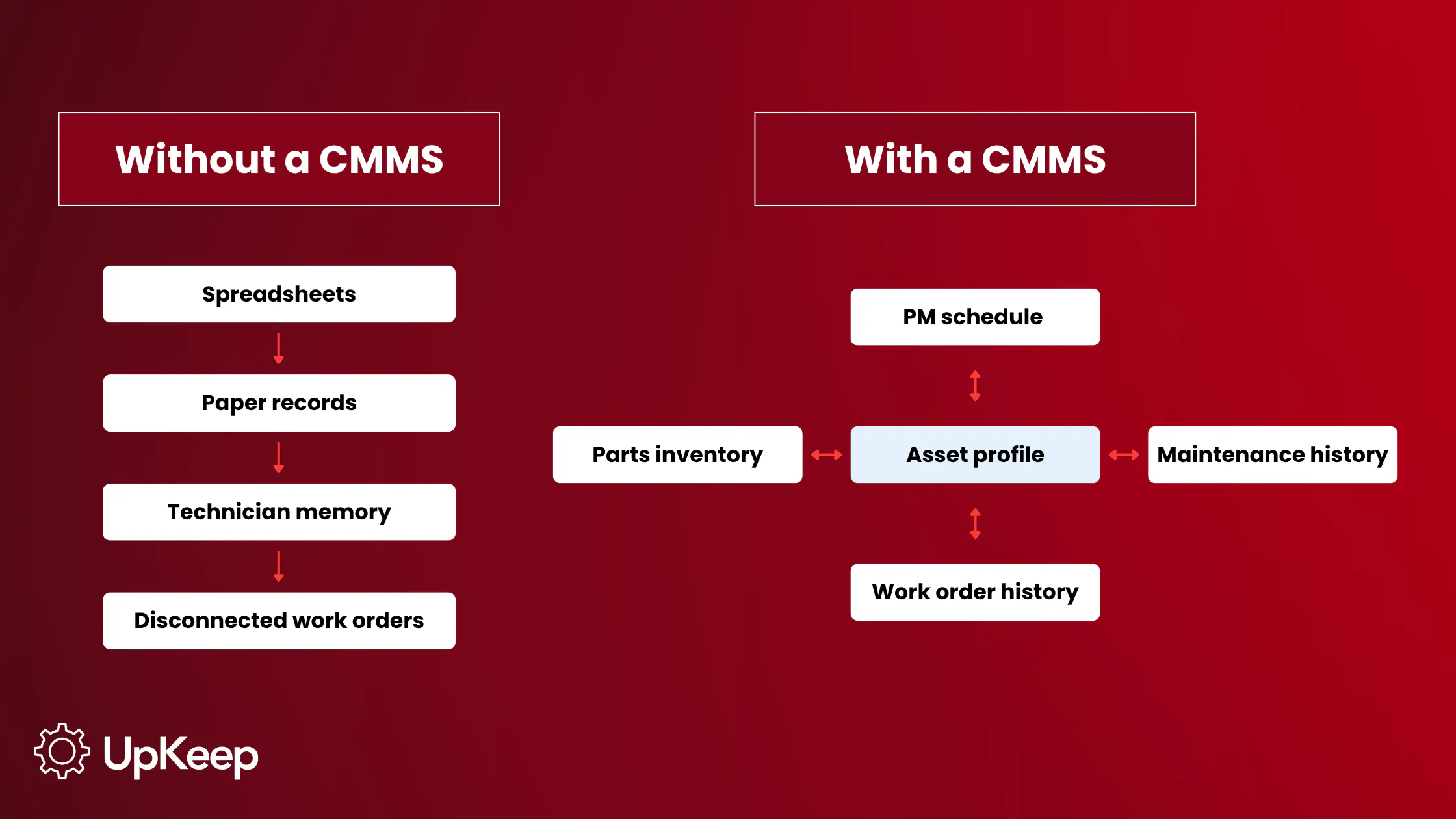
Asset history doesn’t disappear all at once. Many maintenance teams lose it one disconnected record at a time: a repair note in a spreadsheet, a part replacement buried in a work order, a PM interval that’s never updated after production volume changes.
When that data is scattered, the team can't quickly answer the questions that matter when equipment fails, namely, “Has this happened before? What did we replace last time? Is this asset becoming too expensive to keep repairing?”
A program running on several separate systems can't answer those questions quickly. It assembles whatever it can locate, and the investigation starts with critical gaps in the asset history.
That's the gap CMMS asset management closes.
What Is CMMS Asset Management?
CMMS asset management connects equipment data in one system, including asset profiles, maintenance history, PM schedules, parts records, and work order history. That unity allows every maintenance decision to draw from a complete record rather than a reconstructed one.
Generic asset tracking records location and ownership. It tells you where an asset sits and who's responsible for it, but not when it last saw service, what failed, or whether the current PM interval fits actual operating conditions.
Enterprise asset management (EAM) extends further to cover the full procurement-to-disposal life cycle, including financial depreciation, capital planning, and vendor contracts.
CMMS asset management sits in the operational middle. It provides everything a maintenance team needs to keep equipment running, documented, and serviceable.
Older equipment accumulates more complex service histories, more failure mode variation, and a greater dependency on accurate records to service them correctly. The case for centralizing that data gets stronger as assets age.
What a CMMS Manages: The Asset Data Layer
Four components make up the asset data layer in a CMMS. Each owns a distinct function and depends on the others to work:
1. Asset Profiles: Equipment identity, location, manufacturer, model, serial number, installation date, warranty status, and criticality classification.
The profile anchors every other data point. A work order without an asset profile attached floats apart from the equipment it serviced, producing a repair record with no home. A PM schedule without a profile has no asset to trigger against.
2. Maintenance History: Every work order, inspection, and repair logged against the asset in sequence, with dates, technician sign-off, parts used, and labor time.
This record makes repair-versus-replace decisions defensible; not based on budget or memory but on a complete cost history for that specific machine. It's also what root cause investigations draw on to pinpoint the source of repeated symptoms.
When a failure mode recurs, the maintenance history shows whether it happened before, what corrective action followed, and whether that action held.
3. PM Schedules: Maintenance tasks tied to the asset by interval, meter reading, or condition trigger.
The schedule determines whether maintenance catches deterioration before it produces a failure or responds after the fact. A PM interval set to the manufacturer's default that’s never revisited doesn't account for how the equipment actually runs. For instance, a machine on two shifts burns through its service interval faster than the default assumes, while a machine running intermittently may never reach the usage threshold that the interval targets.
Tying the PM schedule to the asset record and updating it against actual usage data keeps the interval accurate over time.
4. Parts and Inventory Links: Which parts belong to which assets, current stock levels, reorder thresholds, and parts consumed in each work order.
This connection generates procurement signals weeks ahead of a service window rather than triggering emergency sourcing after a failure. It also stops technicians arriving at a repair without the correct part, which, in practice, means the asset stays out of service while the part is sourced.
Why Disconnected Asset Data Fails
Fragmented asset management leads to the same failure modes repeating. They show up predictably whenever work orders don't link to the asset history.
Repair-Versus-Replace Decisions Depend on Memory
Without centralized maintenance history, deciding whether to repair or replace a failing asset comes down to whoever has the loudest recent experience of the equipment, the tightest budget, or the most pressing operational pressure.
A complete cost record that outlines total maintenance spend per asset, failure frequency, downtime hours turns that judgment call into a number. Without it, expensive equipment keeps receiving expensive repairs past the point where replacement would have cost less. Maintenance cost per asset is the metric that makes this visible.
PM Intervals Drift From Actual Operating Conditions
A schedule set to a manufacturer's default assumes the conditions the manufacturer used when they calculated it. Process changes, increased production volume, and shifting operating environments all change the actual wear rate.
Without a maintenance record connecting usage data to the PM schedule, nobody updates the interval. Equipment either accumulates deferred maintenance between services or receives unnecessary service when it's running fine. Both outcomes push the corrective-to-preventive ratio in the wrong direction.
Failure Modes Repeat Across Assets Because Nobody Spots the Pattern
When work orders don't link to asset records, the same failure can hit multiple assets in the same class over 18 months with nobody connecting the events. The failure looks isolated each time. Corrective action addresses the instance without touching the underlying condition, and MTBF on that asset class stays flat when it should be climbing.
All three failure modes share the same root: maintenance teams making decisions without reliable asset history, PM records, or failure data. NIST research found manufacturers relying more on preventive and predictive maintenance had 52.7% less unplanned downtime and 78.5% fewer defects than those running reactive programs. Those numbers only become achievable once the underlying asset data is in place.


Metrics That CMMS Asset Management Makes Visible
These metrics don't become trackable until asset profiles, work orders, and PM schedules connect in one system. Before that, the data exists in fragments across spreadsheets and paper. After though, each one gives the maintenance program a specific number to move.
|
KPI |
What It Measures |
What to Watch for |
|---|---|---|
Asset Uptime % |
Percentage of scheduled production time the asset runs without unplanned failure |
Rising trend as PM compliance improves; declining uptime on a specific asset signals a PM gap or developing failure mode |
PM Compliance Rate |
Proportion of scheduled PMs completed on time |
Programs running below 80% accumulate deferred maintenance that typically surfaces as reactive work within one or two maintenance cycles |
Mean Time Between Failures (MTBF) |
Average operating time between unplanned failures per asset |
Upward trend confirms PM intervals match actual wear rates; flat or declining MTBF signals interval miscalibration |
Mean Time to Repair (MTTR) |
Average time from failure detection to asset return to service |
Downward trend as technicians arrive with complete asset history and confirmed parts on hand |
Corrective-to-Preventive Ratio |
Ratio of unplanned reactive work orders to scheduled PM work orders |
A high ratio signals the PM program isn't catching deterioration early enough; target shifts toward preventive over time |
Maintenance Cost per Asset |
Total maintenance spend, labor, parts, and downtime per asset, per period |
Identifies high-cost assets for repair-vs.-replace review; tracks whether PM investment reduces overall spend |
How to Incorporate Asset Management Into Your CMMS
1. Audit and Inventory All Assets, Then Assign Criticality Classifications
List every piece of equipment the maintenance team covers, including production machinery, utilities, HVAC, and facility infrastructure, then enter it before anything else. Classify each asset as high, medium, or low criticality. High-criticality assets are those whose failure stops a line, creates a safety hazard, or triggers compliance exposure.
That classification drives PM frequency, documentation requirements, and response priority. Without it, every asset competes equally for attention regardless of its actual impact on operations. Review classifications when operating conditions change.
2. Build Asset Profiles for Every Piece of Equipment
This encompasses make, model, serial number, installation date, warranty expiration, location, and assigned technician at a minimum. Attach existing documentation like manuals, wiring diagrams, and prior service records in whatever form they exist.
UpKeep generates a QR code for each asset so a technician can scan from a phone at the point of work and pull up the full service history, open work orders, and view attached manuals instantly. The profile doesn't need to be perfect on day one; it just needs enough detail to make the first work order meaningful.
3. Link Historical Maintenance Records
Paper logs, spreadsheet entries, and completed work orders from previous systems all carry history the asset profile needs. Migrate what's available. For incomplete records, document the gap and build forward from go-live. An incomplete history beats no history at all, since a documented gap is at least visible and can be closed.
4. Configure PM Schedules by Asset Class
Start with manufacturer-recommended intervals as the floor and adjust against actual usage data. If a high-criticality motor averages 12% more operating hours per month than the manufacturer's interval assumes, the PM trigger needs to reflect that. For assets with condition-based monitoring via sensors, tie the PM trigger to condition data rather than a fixed interval.
5. Connect Parts Inventory to Asset Records, Then Verify the Full Loop Closes
Map parts to each asset class, set minimum stock levels, and configure reorder thresholds so the team knows whether required parts are on hand when a work order opens, not when the technician arrives at the machine. A parts shortage discovered at the repair changes a planned intervention into an extended outage.
UpKeep connects each step in this sequence so the data flows without a manual relay. Asset profiles link to PM triggers, work orders attach to parts inventory, and every completed repair feeds back into the asset record automatically. A Forrester study even found that teams making this shift reported a 90% reduction in time spent on work order filing and asset location, and a 315% return on investment.
6. Log Labor and Parts Costs Against Every Work Order
Labor time and parts consumed should be required fields on every work order. Optional fields get skipped under pressure, and a cost record with gaps can't support a repair-versus-replace decision when it matters.
CMMS Asset Management in Practice
Here are some concrete examples of how manual asset management falls apart and how a CMMS can avoid those failures.
Food and Beverage
A bottling line runs three shifts. The filling heads are high-wear components serviced on an interval set when the line was commissioned five years ago, when production volume was 30% lower than it is today. Nobody updated the PM schedule when volume climbed.
Service happens on calendar time regardless of cycle count, so the filling heads wear past their functional limit between PMs. The QC rejection rate climbs before maintenance gets the call. Tying the PM trigger to cycle data rather than elapsed days moves the replacement back into a planned window.
Multi-Site Facilities With Criticality Routing
A facilities team manages 47 buildings across a university campus with a crew of 18, handling HVAC, electrical, plumbing, and elevators. Without criticality classifications tied to each asset profile, every incoming request competes on the same flat list.
A broken window in a low-traffic building and a failing cooling tower for the data center sit in the same queue. The crew works top-to-bottom and high-impact failures don’t get a priority signal until somebody calls the maintenance manager.
Once criticality is built into the asset record, the CMMS routes high-criticality assets to the front of the queue automatically. The cooling tower receives a response before the data center overheats. The broken window goes into the backlog at its actual priority. At any point, the maintenance manager can see how many high-criticality assets have open work orders and how long they’ve been aging.
CMMS Asset Management as an Operational Foundation
Without centralized asset data, every maintenance decision runs on whatever the team can locate. Repair-versus-replace calls happen without a cost record. PM intervals set at commissioning drift further from actual operating conditions every month nobody updates them.
When the same failure mode hits a third asset, no one connects it to the first two because the work orders aren't linked to each other or to the asset history.
Spreadsheets and paper records fail quietly, through continuously missed repair history that causes more cracks in the system. Enforcing the record doesn't require more discipline and even removes the dependence on it entirely.
UpKeep structures that connection so it runs automatically. The work order opens against the asset, the PM fires against actual usage data rather than a default interval set years ago, and technicians close out on mobile at the point of work.
When the next failure hits, the investigation starts from a complete record rather than a reconstruction under pressure. Asset history, prior corrective actions, and parts consumed are all there without anyone having to find it.
Want to see how it works? Try it free today.
FAQ
What does a CMMS track for asset management?
It tracks equipment profiles, maintenance history, PM schedules, and parts inventory, all linked to the same asset record. Every data type connects so maintenance decisions draw from a complete picture, not whatever someone can locate under pressure.
How is CMMS asset management different from EAM?
CMMS covers the operational maintenance life cycle, keeping equipment running, documented, and serviced. EAM extends into procurement, capital planning, depreciation, and disposal. Many operations run both, with the CMMS handling daily execution and financial systems covering the broader lifecycle.
What's the difference between asset tracking and asset management in a CMMS?
Asset tracking records location and ownership. Asset management in a CMMS captures the full service history, including PM schedule, parts association, and work order record over the asset's operational life. Tracking tells you what you have. Asset management tells you what condition it's in and what it costs to maintain.
What asset data should be in a CMMS before going live?
At a minimum, the CMMS should have the equipment name, location, make, model, serial number, installation date, and criticality classification for every asset the team maintains. Add manufacturer-recommended PM intervals and parts associations for high-criticality assets. The record doesn't need to be perfect. It just needs enough detail to make the first work order useful.
How does CMMS asset management connect to preventive maintenance?
The asset record is what the PM schedule attaches to. Configure a PM interval, and it triggers against that specific asset by time, meter reading, or condition data, with every completed PM feeding back into the asset history automatically.
4,000+ COMPANIES RELY ON ASSET OPERATIONS MANAGEMENT
Leading the Way to a Better Future for Maintenance and Reliability
Your asset and equipment data doesn't belong in a silo. UpKeep makes it simple to see where everything stands, all in one place. That means less guesswork and more time to focus on what matters.






![[Review Badge] Gartner Peer Insights (Dark)](https://www.datocms-assets.com/38028/1673900494-gartner-logo-dark.png?auto=compress&fm=webp&w=336)



