Blog Post
6 Best Data Security Practices for IIoT
Explore data security best practices for IIoT, from mapping data paths and access to trust boundaries, signal validation, recovery, and maintenance action.



Key Takeaways
Before using a sensor reading or engineering drawing for a repair, check when the reading was taken and if you have the approved drawing revision.
Verify who or what is connecting, what that user or system is allowed to change, and which controllers it can reach.
Keep the source, units, and measurement time with any readings you share. If a value looks off, check the system records against the sensor and machine.
A completed backup job doesn't prove you can recover. Test whether the saved programs, settings, and tools can restore a working system.
You’re halfway through a shift when a pump trips. The technician pulls up its temperature trend to see whether it started overheating before it stopped. Trouble is, the latest readings are from yesterday. The chart’s there, but it can't answer the question the repair team has right now.
The industrial Internet of Things (IIoT) links equipment, sensors, and software so plants can collect operating data. Maintenance teams use those readings alongside controller programs, engineering drawings, and other equipment records. That information moves through plant systems, supplier reports, and stored copies.
To keep it secure and useful, teams need to control who can access it, preserve what the readings mean, and make sure the plant can recover what it needs. Maintenance and operations leaders work through those decisions with IT and operational technology (OT) specialists, who manage systems that monitor or control physical processes.
Protect the readings and records your plant relies on
1. Identify critical data and map where it goes
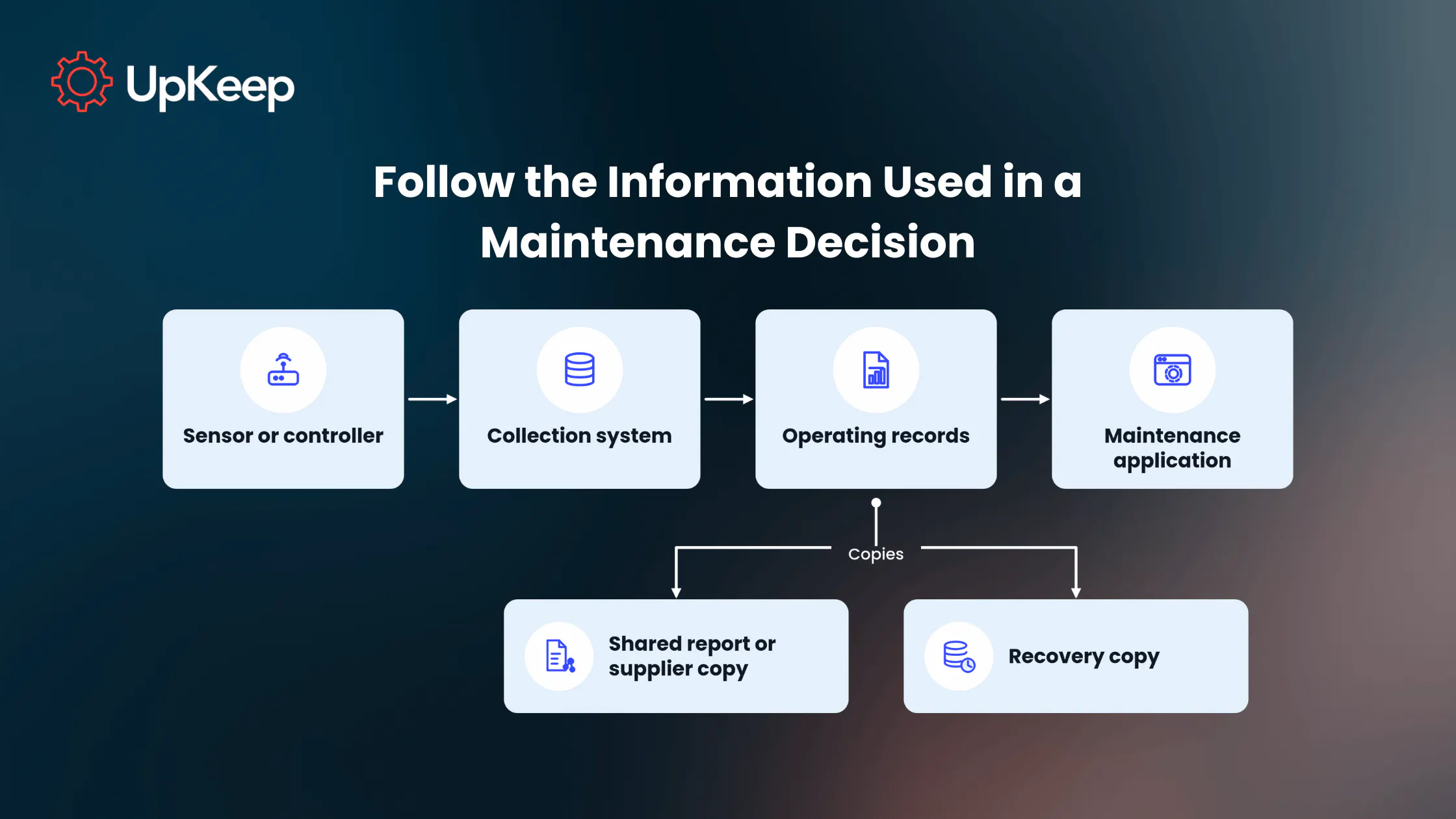
An equipment list shows which machines are on site. A data inventory goes further, covering the sensor readings, engineering drawings, controller settings, and other records your team needs to operate, repair, or restart them. It also shows where those records are used or copied, including maintenance applications, shared reports, and backup copies.
An engineering drawing helps a technician set up a machine. If that drawing has been altered, the technician could configure the equipment incorrectly. Limit who can edit the drawing and keep earlier revisions so the team can see what's changed and pull up the approved one.
Start with records that could lead to a wrong repair, disrupt production, or put people at risk if they're lost, changed, or exposed. For each one, outline five elements:
Source and owner: Which equipment, person, or application creates or maintains the record, and who's responsible for keeping it up to date?
Access: Who's allowed to view, change, or share it, including contractors and connected applications?
Copies: Where's the live record stored? Where are shared and recovery copies kept, and who receives them?
Timing: How recent does the record need to be for its intended job, and how long does it need to be kept?
Consequence: What could go wrong with repair work, production, or safety if the record is wrong, missing, exposed, or out of date?
A controller program needs an approved, known-good recovery copy, while a bearing-temperature reading needs its measurement time. Before sharing an engineering drawing with a contractor, make sure the recipient is authorized. For passwords and private keys, record who protects them and which approved storage system holds them. Never put the secrets themselves in the inventory.


2. Control who can read or change the data
A maintenance dashboard shows a compressor's operating history. Its application account needs permission to read selected measurements, without the ability to change compressor settings or create new users. A technician troubleshooting a fault may need broader access for a particular job. Remove those extra permissions when the work's done.
Authentication checks the identity of the person, device, or application requesting access. Permissions determine what that identity is allowed to read or change. Network rules separately limit which systems it can reach. That lets the compressor dashboard show operating history while its account stays read-only and its connection can't reach unrelated controllers.
Individual accounts make it easier to trace changes and remove someone's access when they leave. Give applications and machines their own credentials, separate from employee logins. Otherwise, disabling an employee's account could also break a connection the plant still needs. Replace factory-default passwords. If an older controller supports only a shared login, document who's authorized to use it and tightly restrict how they connect.
People connecting remotely to plant controls need more than a password. NIST recommends multi-factor authentication for remote OT access, such as a password paired with a hardware token. If an older controller can't perform that check, a remote-access gateway can verify the person's identity before allowing the connection. Operators must still have their approved emergency access to equipment.
Devices and applications can use digital certificates to verify each other's identity. The certificate works with a private key, which must stay protected on the device or in the application. IT/OT needs to replace certificates before they expire and check that the systems can still communicate afterward. If a device or key is compromised, IT/OT must revoke the affected certificate and make sure connected systems stop trusting it.
3. Keep unnecessary connections away from controllers
A controller open to the internet is reachable by more than just the maintenance team. Plants can separate controllers, monitoring systems, and business software into different network areas, then allow only the necessary connections between them. A supplier may still need remote service access, but that route should reach only the equipment being serviced, rather than every controller in the plant.
In July 2026, attackers targeted internet-facing Allen-Bradley MicroLogix 1100 and 1400 programmable logic controllers (PLCs) at water and wastewater utilities. An FBI and EPA advisory reported incidents in at least seven U.S. states. Attackers changed controller IP addresses and set passwords, disrupting operators' ability to monitor or control equipment. Reported operational effects included loss of water pressure and flooding.
When a supplier gets remote access for an approved job, the connection should reach only the PLCs needed for that work. The supplier account should allow only the changes approved for that job. For data traveling over that connection, OT engineers should check which security features both systems support, then configure the available identity checks, message-integrity protection, and encryption. Those safeguards depend on the equipment and its configuration, not just the protocol's name. At the gateway, engineers should limit administrator access and turn off unused services after checking that the plant's required control communications still work.
An older sensor may send its readings to a gateway without encryption. Someone with access to that local sensor network may be able to see the readings. Encrypting the link from the gateway to a monitoring server or data collector protects that later connection, but leaves the sensor-to-gateway link unencrypted. OT engineers still need to restrict access to the local network segment and monitor its traffic.
A patch can fix a security weakness and still change how a controller behaves. For supported equipment, OT engineers can test the vendor's update away from production, schedule installation with operations, and prepare a way to roll it back. Before it goes onto a live system, they check that control messages aren't delayed and that the equipment still does its job. Equipment the manufacturer no longer updates may need tighter access, more monitoring, and a replacement plan.
4. Share readings without losing what they mean
In an example from the UK's National Cyber Security Centre (NCSC), a plant shares oven readings with its equipment supplier. The plant sends selected operating records across a controlled boundary to a separate copy in an operational technology demilitarized zone (DMZ), a network area between production systems and outside users. The supplier retrieves the approved readings through a distinct, controlled data service without connecting to the oven's controllers.
Before sharing the readings, the plant and supplier need to agree on what to send, how to protect it, and what each value means:
Which readings to send: Choose the temperatures needed for the supplier's analysis and leave out sensitive fields it doesn't need.
How the supplier receives them: Allow authorized supplier accounts to retrieve only the approved readings through the data service. Protect the data in transit and storage with encryption, assign someone to manage the encryption keys, and make sure the plant can stop the outward feed without interrupting the oven.
What each number represents: Keep the equipment source, original units, and measurement time with each reading, along with any conversion or averaging.
The supplier needs readings taken every second to see the shape of the oven's heating and cooling cycle. The export can reach the supplier up to 24 hours later because the supplier is reviewing that cycle, rather than responding to a live alarm. Someone dealing with an oven getting too hot right now needs a much more recent reading.
OPC UA is a standard that industrial systems can use to exchange readings. In a secured exchange, a digital signature helps the receiving system verify the sender and detect changes to a message. Message-sequence checks can also help flag a replayed message, one sent again outside its intended exchange. Those checks don't tell the maintenance team when the sensor measured the value. For that, the reading needs its own timestamp.
If a report labels 80°F as 80°C without converting it, for example, the technician sees the wrong temperature. The exported record needs to show the original units and any conversion made along the way.
The oven's operating history can also help the plant plan maintenance. A supervisory control and data acquisition (SCADA) system gives operators a view of the running process. As our product manager Mark McKelvy explained in our sensor-technology webinar, readings from sensors and PLCs, including data already visible through SCADA, can guide preventive-maintenance schedules and active work orders. Maintenance teams can use that history to decide what to inspect and when.
5. Check unusual readings against the machine and the records
A compressor shows a higher vibration reading. The bearing may be wearing, the sensor may be reading differently after maintenance, or a system change may have affected the recorded value. Before treating the alert as evidence of bearing damage, the team needs to work out what's changed.
Compare vibration readings taken at roughly the same compressor speed and load. Otherwise, a change in normal operating conditions could look like a fault. For predictive-maintenance sensors, our founder and CEO, Ryan Chan, recommends regular checks of sensor accuracy and calibration. He also advises establishing a baseline of normal equipment behavior.
See more:
If a sensor was recently replaced or remounted, its reading may change even when the compressor is running as before. An accelerometer measures acceleration, including vibration. Extra mass at the mounting point can reduce the sensor's usable frequency range, while a softer attachment can damp higher-frequency vibration.
When a reading changes after sensor work, check the attachment and sensor condition alongside the bearing itself.

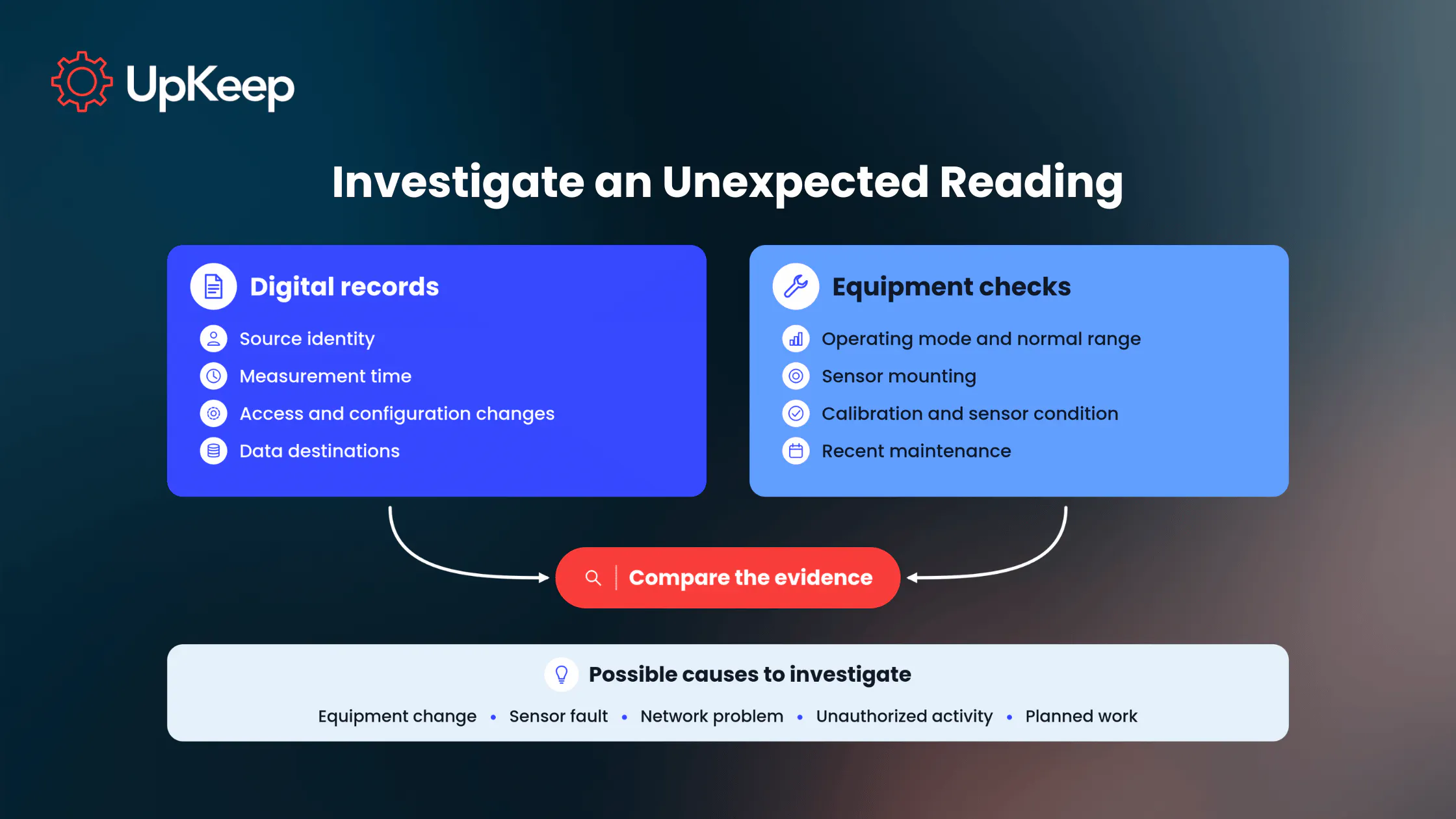
At the compressor, inspect the sensor's mounting and calibration history. Where it's safe and practical, compare its reading with a known-working instrument under similar conditions. In parallel, review digital records for changes to accounts, controller settings, or data destinations and compare those changes with approved maintenance work.
If approved maintenance explains the change, document it and check whether later readings match the machine's condition. If the records show an unauthorized change to controller settings, OT engineering and security should preserve the logs and investigate. The site's agreed-upon isolation method may block a suspect connection while keeping communications required for control running. If people or equipment are in immediate danger, follow the site's safety procedure first.
6. Test recovery and manage data copies
Prove the system can restart
To get a controller running again, the team needs a current, known good program and settings that match the device, plus the engineering information needed to load them. The job may also require compatible hardware, software, engineering tools, and licenses. Identify who can access those tools before an outage.
After an approved change to PLC logic or settings, save and identify an updated known good recovery copy. Even an intact older backup could put an outdated configuration back on the controller.
A realistic recovery test has three parts:
Prepare the test: Set up a compatible controller for a non-production test, or use another suitable non-production system. Have the software and tools needed to load the saved files ready.
Check the copy: A file hash is a digital fingerprint of a file. Calculate a new hash and compare it with the one recorded when the backup was made to catch unexpected changes. For a PLC, compare the saved program with known good logic before restoring it.
Restore and observe: Load the saved files into the test system and check that it starts and performs the functions the plant needs. OT engineering and operations then decide whether the procedure is ready for a real outage.
As a real-world example, Norsk Hydro's cyberattack disrupted plant operations as well as IT services. Some Hydro plants couldn't connect to production systems and used manual procedures while affected systems were isolated. Hydro's internal teams and outside specialists worked on safe restarts and cleaned affected computers and servers. Encrypted PCs and servers were rebuilt from backups.
After a little over a week, Extruded Solutions was running at roughly 70%–80% of normal output, while its Building Systems unit averaged around 20% capacity. Most production was normal or near normal by the next month, even though IT recovery and temporary workarounds continued. Those different recovery timelines are why a plant's plan should spell out which maintenance and production work can continue during partial recovery and who can authorize each restart.
Protect, retain and dispose of copies
When a connection drops, a collector with store-and-forward may hold sensor readings locally and send them once the connection returns. The buffer has limited space, and readings that arrive late still need their original measurement times. It helps carry measurements through a communications gap. A controller's program and settings need their own separate recovery copy.
Recovery copies and exported reports still need protection after they're saved. Backup files, removable drives, and temporary caches can be stored in several places. Limit who can change or delete recovery files, and keep backups offline or segregated where the recovery plan calls for them.
Deleting the live record won't automatically remove copies held in backups. The data may remain there until its retention period ends. For cloud or managed-service copies, agree on who controls access and exports, how long each copy stays, and how it’ll be returned or securely deleted when the service ends or equipment is retired.
First checks for common data problems
|
What you notice |
Where to start |
Who can help |
|---|---|---|
|
A controller setting changes without approval |
The account and change log for that setting |
Equipment owner and IT/OT security |
|
An unfamiliar system connects to a PLC |
The network route and rule that allowed it |
OT engineering and IT security |
|
A report is missing its sensor ID or measurement time |
The original reading and export history |
Data or integration owner |
|
Vibration changes after sensor work |
Sensor mounting, calibration, and operating conditions |
Maintenance or reliability and the sensor specialist |
|
A restored system won't run |
Controller program, settings, tools, and verified backup |
OT system owner and equipment support |
Respond to sensor alerts easily with UpKeep
UpKeep customer Primal Pet Foods didn’t monitor their freezers and coolers after hours. So, if temperatures rose overnight, the team wouldn’t catch the problem until the next shift, putting $160,000 in daily revenue at risk on one production line. They contracted UpKeep, and we added continuous temperature monitoring and automated alerts, which helped the team spot rising temperatures outside business hours and respond sooner.
For a freezer, the team can now set a temperature limit and how long a reading must stay outside it. If the reading stays outside that limit for the configured duration, Edge triggers an alert and creates an Incident that tracks the event until readings return to normal. Email or text notifications can go to the recipients the team selects, and a responder can then open the incident and choose “Create a Work Order.” The work order contains sensor details, the associated asset or location, and information from the Incident.
If you set an alert schedule for a freezer, include the hours when your team needs notifications. If alerts are scheduled for daytime only, new, out-of-range readings at night remain visible, but they won't start a new alert, notification, or incident. With no alert schedule configured, Edge can monitor and alert 24/7. An Incident that's already open stays active until readings return to normal, even after its scheduled alert window closes.
Put security checks to work on critical jobs
Pick a maintenance job that depends on industrial data, such as diagnosing a compressor alarm or restoring a controller after a shutdown. Trace the sensor reading, configuration record, and recovery copy the team needs for that job.
Then bring maintenance, operations, and IT/OT together to check who's authorized to change those records, how they'd spot a misleading reading, and when they last proved they could restore the records and working system the job depends on. Those answers give the team a practical place to start before an outage forces a rushed decision.
Book a demo with UpKeep to walk through a sensor alert, see who'd receive the notification, and check how your team could create a work order for the affected equipment.
FAQ
What risks should an IIoT data security plan address?
Cover unwanted access to controllers and records, altered settings, readings with missing source or measurement details, and recovery files that can't restore a working system. What deserves attention first depends on the work at your site. An altered setting can affect production, while a missing program can delay a restart. Rank the records and connections by the maintenance, production, or safety work they could disrupt.
How can a plant check that its IIoT data security controls work?
Have IT/OT confirm a monitoring application's account can read its approved measurements but can't change controller settings. They should also check that an unapproved network connection is blocked. If a reading seems wrong, maintenance can compare it with the sensor, the machine, and the change history. Finally, test restoration of the approved program and settings on compatible non-production equipment.
4,000+ COMPANIES RELY ON ASSET OPERATIONS MANAGEMENT
Leading the Way to a Better Future for Maintenance and Reliability
Your asset and equipment data doesn't belong in a silo. UpKeep makes it simple to see where everything stands, all in one place. That means less guesswork and more time to focus on what matters.