Blog Post
It's Now Easier to Find and Manage Work Orders!
We recently redesigned the work orders page to make it easier for you to create, find, and manage work orders on your desktop.


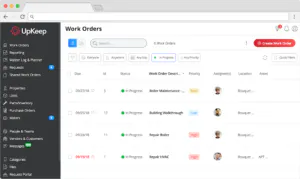
We recently redesigned UpKeep’s work orders page to make it easier for you to create, find, and manage work orders from your desktop. This new release brings the speed of mobile to the desktop and will help account administrators do more in less time.
Here is what the new work orders page looks like:
[Image: The newly designed work order page]
And here is what the old work orders page looked like:
[Image: Old work orders page on UpKeep]
Before, work order details were hidden beneath the work order title in gray text. Now, details of the work order are organized into a row-column format that provides 20-20 visibility into all work orders that match your filters.
There’s this, and so much more.
Find specific work orders in fewer clicks
Now you can gracefully apply multiple filters to work orders without opening the advanced filtering panel. Important filters are located at the top of the work order page and you can select multiple options within each filter in record time.
You can still reset filters in one click and access the advanced filtering panel when you need it.
[Image: Filter work orders in fewer clicks with UpKeep]
Switch seamlessly between the list and calendar view
Now you can instantly switch between the list view and calendar view without loading a new page. What’s even cooler is that filters carry over from the list view to the calendar view, and vice versa.
(Before, filters were not available on the calendar view.)
[Image: Switch between list and calendar view on UpKeep]
Create work orders from the main page
Before the redesign you had to leave the main work order page to create a work order. Now you can create a work order without leaving the main page. When you click Create Work Order, a new work order box appears on the right side of the page.
[Image: Create work orders without leaving page in UpKeep]
Share your feedback with us
We’d love to know what you think about the new work order experience on desktop. If you have feedback, you can leave a comment on this LinkedIn post.
4,000+ COMPANIES RELY ON ASSET OPERATIONS MANAGEMENT
Leading the Way to a Better Future for Maintenance and Reliability
Your asset and equipment data doesn't belong in a silo. UpKeep makes it simple to see where everything stands, all in one place. That means less guesswork and more time to focus on what matters.






![[Review Badge] Gartner Peer Insights (Dark)](https://www.datocms-assets.com/38028/1673900494-gartner-logo-dark.png?auto=compress&fm=webp&w=336)



