Blog Post
Maintenance Work Order Process: A Step-by-Step Guide to Getting It Right
Optimize your maintenance work order process. Discover the best strategies to streamline tasks, improve data quality, and reduce downtime effectively.



Key Takeaways
A maintenance work order is a formal document that authorizes, assigns, and tracks a maintenance task from first request to final closure, creating accountability, traceability, and a data trail for future decisions.
The five core types of work orders that serve a distinct purpose are reactive, preventive, predictive, inspection, and corrective.
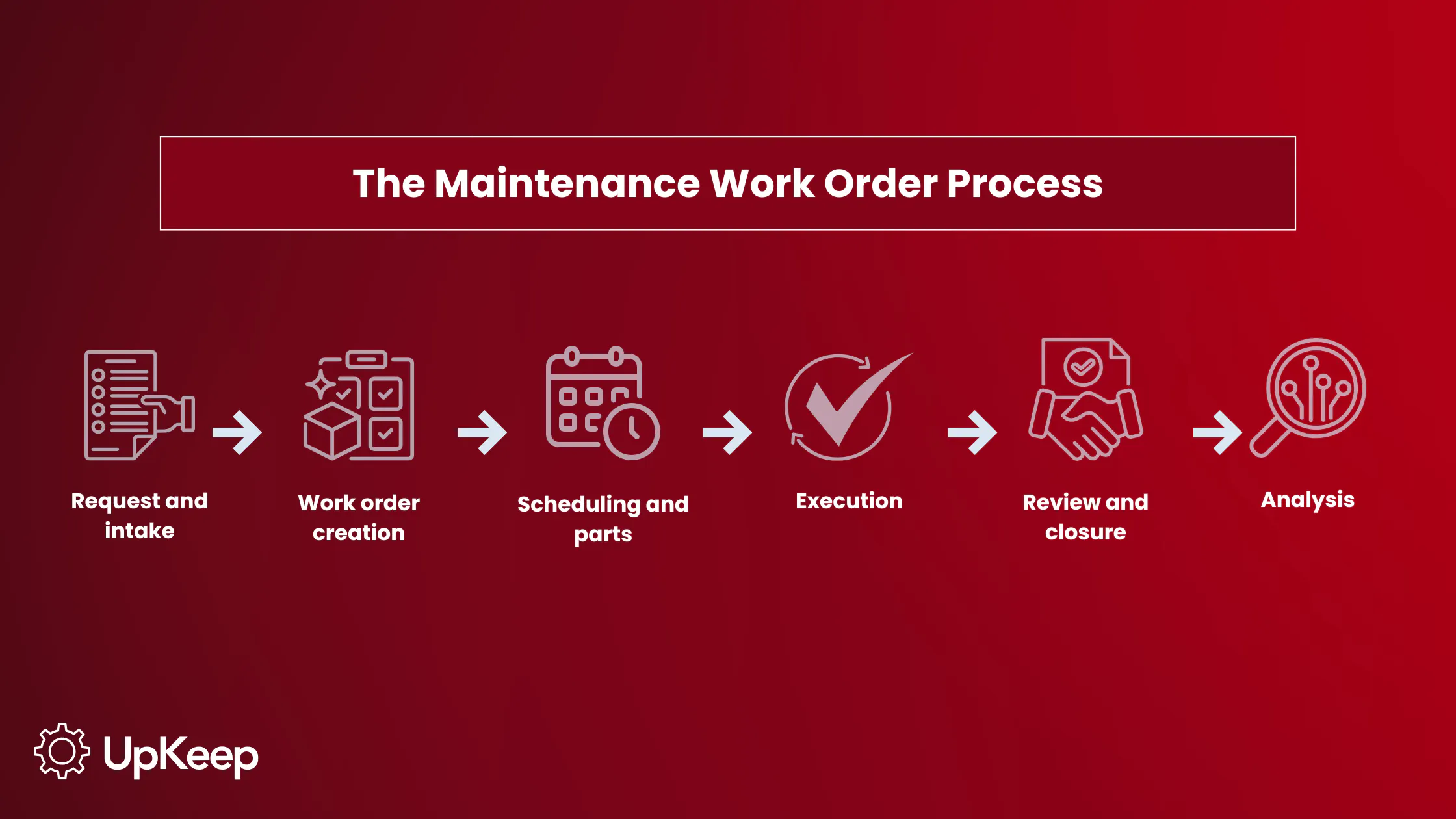
A structured work order process follows six steps: request and intake, work order creation, scheduling and parts planning, execution, review and closure, and analysis.
CMMS software like UpKeep automates and connects every stage of the process to reduce administrative burden, improve data quality, and give managers real-time visibility into team performance.
Your technicians know what they’re doing. Most maintenance strategies fail because the systems around them break down. Requests go missing, work is done twice, parts aren't stocked, and nobody can say with confidence what was repaired last month or why the same pump keeps failing.
A structured maintenance work order process prevents that. It's the operational backbone that connects a maintenance request to a completed, documented repair, turning every closed job into data your team can actually use. Creating a well-oiled maintenance work order process requires time and attention but isn’t the monumental undertaking it may seem at first.
What Is a Maintenance Work Order?
A maintenance work order is a formal authorization that tracks and documents a maintenance task from request to completion. It creates accountability by assigning a named owner to every task, traceability by logging every action taken, and a data trail that feeds asset history. It also surfaces information across team silos and informs future maintenance decisions.
A maintenance request triggers this process, and anyone in the organization can submit one. A work order is the authorized, actionable document created by a planner or supervisor after that request has been reviewed and approved. One is an ask; the other is an assignment.
Organizations that use structured work order systems report significantly higher preventive maintenance completion rates because tasks are assigned, tracked, and formally closed rather than informally handled and forgotten.
Breaking Down the Work Order Process
What Does a Work Order Include?
A well-built work order template gives technicians everything they need to start a job without additional back-and-forth. The core components include:
Asset identification: The equipment name, asset ID, and physical location. Without this, technicians waste time looking for the asset or potentially working on the wrong one.
Work description: A detailed explanation of the task being performed. Vague descriptions can lead to incomplete repairs, duplicate tickets, and missed root causes.
Priority level: Response urgency is typically a tiered system comprising emergency, urgent, routine, or scheduled. Determine priority through a combination of safety risk, production impact, asset criticality, and the cost of deferral.
Assigned technician(s), estimated labor hours, and required parts: This confirms task ownership and verifies parts availability before dispatch. Including part costs and any contractor fees keeps cost tracking clean and supports budget justification later.
Safety requirements: Attach or reference permits, lockout/tagout procedures, PPE requirements, and relevant SOPs directly in the work order. Technicians under a time crunch shouldn't have to hunt down a manual to work safely.
Status tracking fields and timestamps: Work orders typically move through open, in progress, on hold, and completed states. Timestamps support mean time to repair (MTTR) calculations and help identify exactly where work orders are stalling in the process.
In UpKeep, real-time status updates sync across the entire team the moment a technician makes a change in the field. This gives managers a consistent, accurate picture of what's open, what's moving, and what's stuck.
What Type of Work Order Should I Use?
Not every maintenance task calls for the same response. Choosing the right work order type keeps your program balanced and your costs manageable.
Reactive/Emergency work orders
These are triggered by unexpected failures or safety issues. They carry the highest priority and, by necessity, will always have a place in any maintenance program. But they're expensive; reactive maintenance can cost two to five times more than the same repair performed on a scheduled basis, and reactive repairs take 1.5 to 3 times longer than one conducted during planned downtime. Minimization, not elimination, is the real goal.
Preventive maintenance (PM) work orders
These are generated on a time- or usage-based schedule. They're the foundation of a proactive maintenance program. Organizations with strong PM programs are more likely to ensure the vast majority of their maintenance effort is planned, rather than reactive.
Predictive work orders
These are triggered by condition data or sensor alerts indicating asset wear or emerging issues. They reduce unnecessary PM labor while catching failures more accurately and earlier. UpKeep's Edge solution, for instance, connects directly to equipment sensors to monitor asset conditions in real time, automatically triggering work orders when readings indicate emerging failure.
Inspection work orders
These document structured checks of asset condition, safety compliance, or regulatory requirements. They also generate follow-on corrective work orders, which means the thoroughness of your inspections is a direct predictor of how well your corrective backlog reflects actual asset condition. A missed inspection item can mean a future emergency, a failed audit, or a costly regulatory fine.
Corrective work orders
These are in response to inspection findings or minor defects that don't require immediate shutdown. They fall under corrective maintenance practice, offering planned, non-emergency repair of known issues.
Comparing Types of Work Orders
|
Type |
Triggered by |
When to use |
Priority |
Cost profile |
|
Reactive/Emergency |
Unexpected failure or safety issue |
Urgent matters: equipment down, safety risk |
Highest |
2-5X more expensive than planned; 1.5-3X longer repair time |
|
Preventive |
Time- or usage-based schedule |
Routine servicing to avoid future failure |
Scheduled |
Foundation of a proactive program |
|
Predictive |
Sensor data or condition alert |
Asset showing early wear signals before failure |
Condition-based |
Reduces unnecessary PM labor; catches failures earlier |
|
Inspection |
Scheduled suit or compliance check |
Documenting asset condition; regulatory requirements |
Scheduled |
Thoroughness directly predicts corrective backlog quality |
|
Corrective |
Inspection finding or minor defect |
Known issue that doesn’t need immediate shutdown |
Planned |
Lower cost than reactive; planned, non-emergency repair |
What Are the Steps in a Maintenance Work Order Process?
1. Request and intake
A technician, operator, or automated sensor alert submits the maintenance request. Accepting requests through email, text, or verbal communication creates inconsistency and gaps. A standardized intake process keeps every request documented and reviewable before a work order is ever created.
2. Work order creation
The approved request becomes a formal work order with asset details, task description, required parts, safety requirements, and priority level. Everything a technician needs to start work without additional back-and-forth should be on the work order before it's dispatched.
3. Scheduling and parts planning
Work enters the maintenance schedule based on priority, technician skill match, availability, and confirmed parts stock. Scheduling without confirming parts availability is a common source of delays but easily preventable.
4. Execution
The technician completes the work and documents labor hours, parts consumed, findings, and any follow-up actions needed, noting it all on the work order as they go. Documentation captured at the point of work is consistently more accurate than notes filled in at the end of a shift.
5. Review and closure
A supervisor or reliability lead reviews completed work, verifies quality, and formally closes the work order. Closure triggers the asset history update. Work that isn’t formally closed doesn't feed diagnostics, KPI reporting, or capital planning.
6. Analysis
Closed work orders feed maintenance KPIs and inform future scheduling, parts stocking, repair versus replace decisions, and budget planning. Every closed work order makes the next maintenance decision a little sharper.


How to Measure Your Work Order Process Performance
Closing work orders is only the beginning of the insight cycle. The following KPIs give maintenance teams a clear picture of how well their process is performing:
Work order completion rate measures the percentage of work orders closed on time versus total created in a given period. A declining completion rate is often the first measurable signal that backlog is growing faster than capacity.
Mean time to repair (MTTR) tracks the average elapsed time from work order creation to verified closure. Benchmarking MTTR by asset type and failure category reveals where process bottlenecks, parts delays, or skill gaps are adding time to resolution.
Planned maintenance percentage (PMP) represents the share of total maintenance hours spent on scheduled work. An optimal PMP starts around 80% and indicates a healthy, proactive maintenance strategy. A low PMP is a leading indicator of rising reactive costs.
Work order backlog is the total count of open, unscheduled work orders at any point. A healthy backlog is manageable and scheduled; a problematic one is open-ended and grows without a clear path to resolution.
PM compliance rate measures the percentage of scheduled preventive maintenance work orders completed on time. Low PM compliance has a predictable downstream effect where deferred PMs become the asset failures that generate emergency work orders later on.
Why Do Maintenance Work Order Processes Break Down?
Even well-intentioned maintenance teams run into the same recurring failure points. Understanding them is the first step toward fixing them.
Incomplete or inconsistent work order data
Vague documentation makes it harder to diagnose recurring failures, justify budgets, or pass compliance audits. This is mainly a process design problem. Required fields and mobile-friendly forms reduce friction and improve data quality without adding administrative burden.
Manual and paper-based processes
Work orders managed on paper or in spreadsheets create delays at every stage. Research from Zapium found that 45% of maintenance professionals still log maintenance requests manually, while just a quarter of companies use integrated systems to connect teams with real-time updates on inventory, maintenance, and financial needs. Manual processes don't scale and don't produce reliable data.
Poor prioritization
Without a standardized priority framework, emergencies displace scheduled preventive maintenance. With reactive maintenance costing two to five times more per repair than planned work, this disorganized pattern erodes PMP while quietly driving up costs over time.
Parts and inventory gaps
When inventory isn't integrated into the work order process, technicians don't find out about missing parts until they're already on-site. The resulting delay extends MTTR and, in production environments, directly translates to downtime costs.
Lack of visibility into backlog
A rising work order backlog is one of the earliest measurable signals that a maintenance operation is falling behind. Without real-time dashboards, managers can't effectively allocate labor, identify delay patterns, or forecast capacity needs before the backlog becomes a crisis.
Siloed communication
When maintenance requests come in through multiple informal channels, work orders get duplicated or lost. Without a centralized platform for tracking, someone may handle a problem verbally, and it never enters the system. This creates both an execution problem and a data problem because off-system work can't factor into asset history or inform future decisions.
How CMMS Software Improves the Work Order Procedure
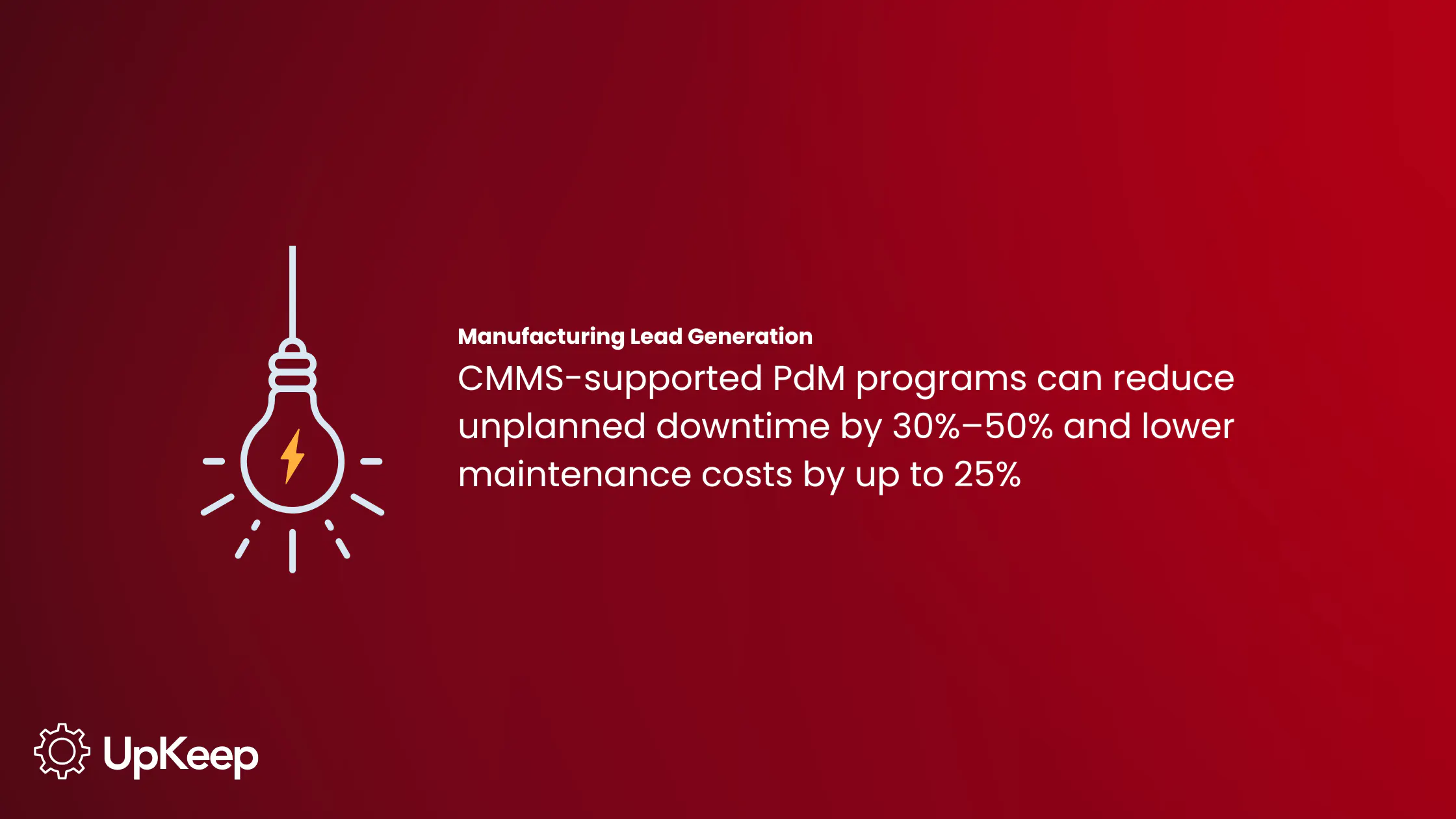
By digitizing manual processes, a CMMS closes the gaps that paper procedures structurally can't fix, creating measurable impact. CMMS-supported PdM programs can reduce unplanned downtime by 30%–50% and lower maintenance costs by up to 25%. Here's how the right platform changes every stage of the work order procedure.
Automated work order generation and centralized intake
A CMMS eliminates the manual step of creating work orders from PM schedules, inspection findings, and IoT sensor alerts. Intake in UpKeep is handled through a requester portal that allows non-maintenance staff to submit structured requests without accessing the full CMMS. This helps ensure intake is consistent, auditable, and free of duplicates. Automated generation from PM triggers and sensor data reduces administrative workload and eliminates the risk of missed PMs.
Centralized data as a single source of truth
Every work order lives in one searchable system rather than across disconnected spreadsheets and inboxes. With a single log serving as the source of truth, asset history can accurately support diagnostics, compliance documentation, and capital planning without anyone having to reconcile conflicting records.

Mobile work order execution
Technicians can receive, update, and close work orders from the field the moment work is done, when thoughts are fresh and observations are most accurate. UpKeep's mobile-first design means work orders are accessible from any device, anywhere technicians are stationed. Mobile tools eliminate the end-of-shift backfill that consistently degrades data quality.
Automated priority and routing
Work orders reach the right technician with the right skills, and parts availability is confirmed before dispatch. That eliminates the back-and-forth that delays execution and improves first-time fix rates. UpKeep's Nova AI automates work order creation and routing using natural language input and has been shown to reduce administrative burden on field teams by about five hours per week.
Digital SOPs at the point of work
UpKeep Studio enables teams to build and attach digital SOPs, checklists, and equipment documentation directly to work orders. Technicians have everything they need at the point of work, reducing errors from memory and eliminating time spent hunting for paper manuals. Standardized procedures attached to work orders also strengthen compliance documentation and audit readiness.
Real-time dashboards for proactive management
Managers gain visibility into open work orders, backlog trends, overdue tasks, and technician utilization, allowing for more proactive resource allocation before problems compound. UpKeep's reporting and analytics uncover work order KPIs in real time so teams can manage performance and demonstrate program value to leadership.
Inventory integration that closes the loop
A CMMS automatically checks parts availability when a work order is created and triggers reorder alerts before a shortage stalls work. Organizations that manage parts inventory inside their CMMS gain a closed loop between what work is planned and what materials are stocked. That means fewer surprises when technicians arrive on-site.
The Right Tools Make the Difference
A well-run maintenance work order process doesn't happen by accident. It's the result of consistent intake, clear documentation, smart prioritization, and a system that keeps every stakeholder connected from the moment a request is submitted to the moment a work order closes. When that process breaks down due to manual tracking, siloed communication, or incomplete data, the costs begin to add up until they're impossible to ignore.
UpKeep gives maintenance teams the structure and visibility to run that process the right way, every time. From automated work order creation and AI-powered routing to real-time dashboards and mobile execution in the field, UpKeep connects every step of the work order procedure in one user-friendly platform.
Schedule a demo to see how UpKeep can help your team move from reactive firefighting to a maintenance operation that's efficient, intelligent, and built to scale.
Frequently Asked Questions About the Work Order Process
What is the difference between a work order and a work request?
A work request is a form submitted by anyone in the organization to flag a potential maintenance need. A work order is the formal, authorized document created by a planner or supervisor after the request has been reviewed, prioritized, and approved for action. Not every request will become a work order.
What should a work order include?
At a minimum, a work order should include asset identification, a detailed work description, priority level, assigned technician(s), required parts and estimated labor, safety requirements, and status tracking fields with timestamps. Templates are a useful starting point for ensuring consistency across your team.
How long should a work order stay open?
It depends on the work type and priority tier, but no work order should remain open indefinitely without a documented reason. Aging open work orders signal either a backlog management problem or a data quality problem. Regular backlog reviews help catch both.
Can work orders be created automatically?
Yes. In a CMMS, work orders can be automatically generated from PM schedules, IoT sensor alerts, or inspection findings, all without manual intervention. UpKeep's Nova AI can also create and route work orders from natural language input, further reducing the administrative burden on planners and field teams.
4,000+ COMPANIES RELY ON ASSET OPERATIONS MANAGEMENT
Leading the Way to a Better Future for Maintenance and Reliability
Your asset and equipment data doesn't belong in a silo. UpKeep makes it simple to see where everything stands, all in one place. That means less guesswork and more time to focus on what matters.






![[Review Badge] Gartner Peer Insights (Dark)](https://www.datocms-assets.com/38028/1673900494-gartner-logo-dark.png?auto=compress&fm=webp&w=336)