Blog Post
CMMS Work Order Management: Types, Workflows, and Best Practices
Learn the different types of work orders, how to choose a CMMS to streamline the process, and best practices that maintenance teams can try.



Key Takeaways
CMMS work order management replaces paper tickets and hallway requests with a centralized digital system that creates, routes, tracks, and closes every maintenance task.
Poor work order visibility is a leading contributor to unplanned downtime, which now costs manufacturers hundreds of thousands of dollars per hour.
There are five work order types, and each requires different handling inside a CMMS.
Mobile work order management eliminates the lag between when work happens and when the system reflects it.
When a machine goes down, maintenance teams don’t just ask what broke. The real question is whether anyone caught it early enough. Between a shift change or a hallway conversation, requests are lost, and the team ends up reacting to sudden failures instead of carrying out the planned work they'd rather be doing.
CMMS work order management gives every request a clear home, turning each maintenance task, whether planned or unplanned, into a trackable digital record from submission to sign-off. This article covers CMMS work orders, the five types you’ll encounter, and the workflows, metrics, and best practices that help hardworking maintenance teams spend less time chasing paperwork and more time keeping equipment running.
What Is CMMS Work Order Management?
A work order is the formal record of a maintenance task. It includes who requested it, what asset it's tied to, its priority level, the parts it needs, and the proof it was completed. CMMS work order management is the system and process that creates, routes, tracks, and closes those records digitally, instead of relying on flawed methods like paper records, whiteboards, or a shared email inbox.
Without a system to track it, a repair request can get lost between a verbal handoff and an actual repair. Poor work order visibility is a major contributor to unplanned downtime. Industry data from Fluke found that 61% of manufacturers experienced unplanned downtime in the past year, costing an average of $1.7 million per hour. When work orders sit unassigned or undocumented, that visibility gap widens, and downtime gets more expensive.
A CMMS closes that gap by giving every request a timestamp, an owner, and an audit trail from submission to sign-off.
The 5 Types of Work Orders
Not every maintenance task belongs in the same category, and a CMMS should be able to handle all five without forcing a team into workarounds.
Reactive/Corrective: An unplanned repair after something breaks or underperforms. It's the fastest type to create, but the most expensive type of work order to build an entire maintenance program around.
Preventive: Set on a calendar or meter-reading trigger to catch wear before it becomes a failure. For example, scheduling repairs every 90 days or every 500 operating hours.
Predictive/Condition-based: Triggered by sensor data or inspection findings, such as vibration, temperature, or output, rather than a fixed schedule.
Emergency/Safety: The highest priority tier, often tied to compliance requirements or incident response.
Compliance: Recurring audits, certifications, or regulatory checks that need a documented trail.
|
Type |
Trigger |
Urgency |
Cost Impact |
|
Reactive/Corrective |
Breakdown or poor performance |
High |
Highest per incident |
|
Preventive |
Calendar or meter reading |
Low |
Moderate and predictable |
|
Predictive/Condition-based |
Sensor data or inspection finding |
Variable |
High initial cost, but lowest over time |
|
Emergency/Safety |
Incident or safety risk |
Critical |
High, plus compliance risk |
|
Compliance |
Regulatory or audit schedule |
Low |
Low but mandatory |
The amount of unplanned downtime tied to a work order depends on the maintenance type, but reactive maintenance generates the most. Preventive maintenance shifts that unexpected servicing into a scheduled plan instead. Predictive maintenance goes a step further and sees the least unplanned downtime of the three types because it acts on real asset condition rather than a fixed calendar.
In addition to managing the entire work order process in one place, a platform like UpKeep supports all five work order types in a single queue, rather than requiring separate tools for different categories of maintenance tracking.
Core Features of a CMMS Work Order Management Software
Every business has its unique needs and obstacles, but when it comes to work order management, a CMMS needs to have a few key characteristics:
Centralized request intake: A single portal to store all requests. This can be through a web form, QR code, or email-to-ticket.
Automated PM scheduling: Recurring work orders generate themselves based on calendar or meter triggers, so no one has to remember to create them manually.
Asset and parts linkage: Every work order ties back to a specific asset's history and pulls from a live parts and inventory count, so a technician is never dispatched without the part actually in stock.
Priority-based assignment and routing: Urgent or safety-related work automatically routes differently than routine tasks, instead of sitting in the same queue.
Digital audit trail: Timestamps, technician sign-off, photos, and notes attach directly to the closed work order, supporting compliance reviews and warranty claims.
AI-backed automation is also gaining traction in this category. Tools like UpKeep Nova can auto-generate or triage work orders from a plain-language request, which cuts out the manual step of translating a verbal complaint into a structured ticket.
Mobile Work Order Management in the Field
The lag between "job done" and "system updated” is where a repair is finished but not logged until the end of shift (if at all). That’s where data quality problems are born. Technicians who can receive, update, and close work orders from the floor eliminate that gap thanks to features like:
QR/Barcode asset scanning lets a technician pull an asset's full history and open work orders just by scanning the machine in front of them.
Offline mode matters for plants, warehouses, and remote sites with spotty connectivity, letting updates queue locally and sync once a signal returns.
Photo and note attachments from the field create the documentation trail that auditors and warranty claims require.


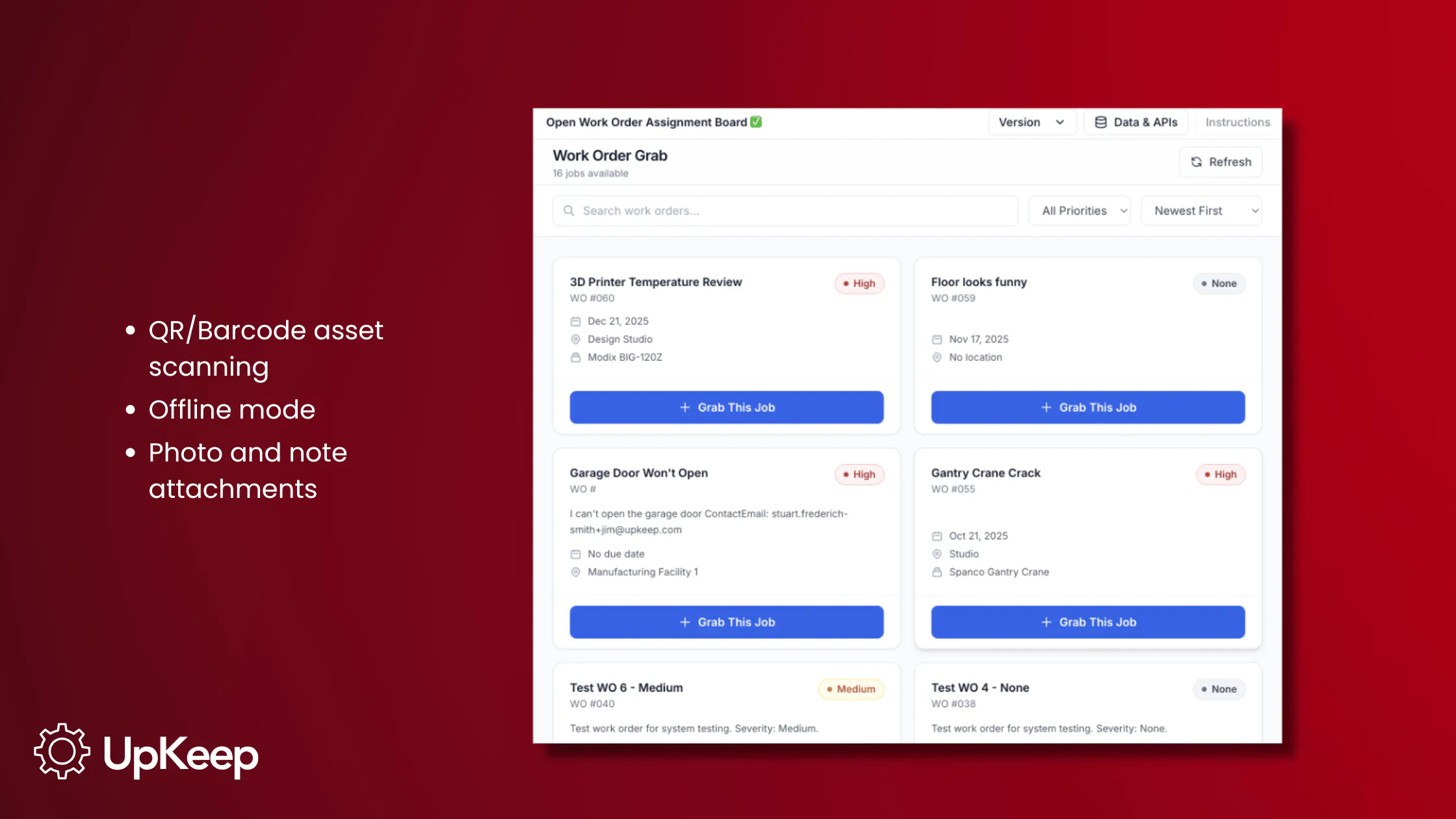
This remains a major challenge for a lot of teams, since only 32% have moved toward AI-supported maintenance workflows, and about 41% of teams still don't use a CMMS at all. That continues the cycle of delayed data entry that’s prone to error. UpKeep's mobile-first design is built around solving that challenge. A technician can scan an asset, pull its history, log parts and time, attach a photo, and close the work order without ever returning to a desk.
How a CMMS Improves Work Order Workflows
Each step in a CMMS generates data that feeds the next one. That’s the advantage over paper and other methods. A completed work order then offers reusable information for the next scheduling decision or audit, which improves processes to maximize uptime.
When you introduce a CMMS into your work order process, the workflow is streamlined into:
Request submission: Someone (technician, operator, tenant, etc.) submits a request through a portal, QR code, or automated trigger.
Triage and prioritization: The request is reviewed and assigned a priority level, separating safety/emergency work from routine tasks.
Scheduling and assignment: The work order is routed to the right technician based on skill, location, and availability, often automatically.
Execution in the field: The technician receives the work order on mobile, pulls asset history, and logs parts used and time spent as the job happens.
Completion and documentation: Sign-off, photos, and notes attach before the work order closes, feeding directly into asset history.
Review and reporting: Closed work orders roll up into dashboards for backlog, cost, and performance analysis.
Work Order Reporting and Performance Metrics
Core metrics to track include mean time to repair (MTTR), mean time between failures (MTBF), PM compliance rate, work order backlog, and first-time fix rate.
A growing backlog is often the earliest warning sign that a team is sliding from proactive to reactive maintenance before downtime numbers ever move. Reporting is only useful if it feeds decisions; closed work order data should be used to flag recurring failures and address root causes.

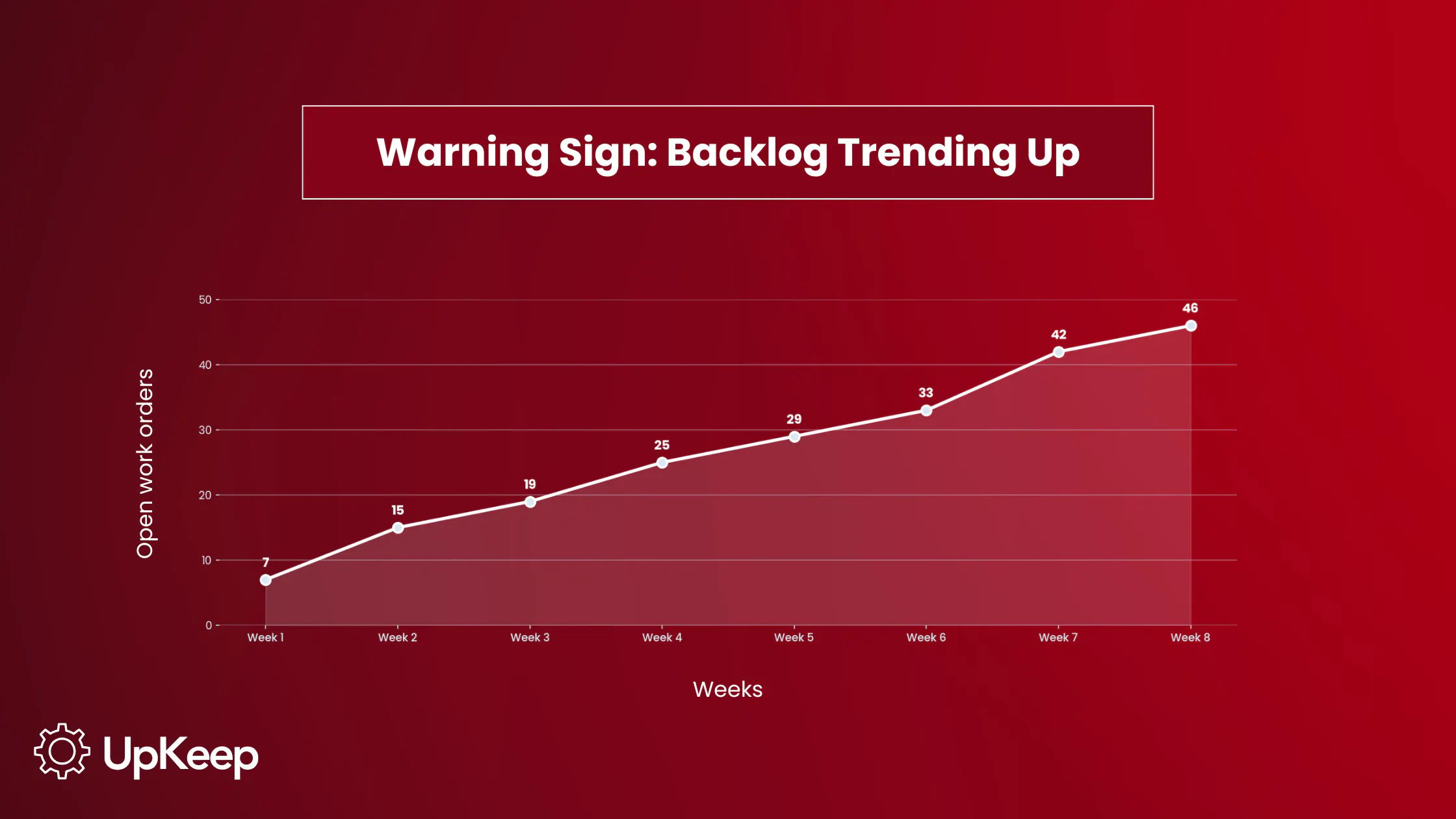
Customizable dashboards and reports built around a team's specific KPIs turn that closed work order data into something a manager can actually act on, rather than a static report nobody opens.
Work Order Management Best Practices for Maintenance Teams
About 80% of all CMMS users don't use every function the software offers, and, in turn, almost 80% of all CMMS deployments underperform or fail to meet expectations. Here's how to keep an implementation from becoming another one of those statistics:
Standardize templates and naming conventions across sites and departments. Inconsistent categorization is what makes reporting unreliable later.
Define priority levels and response time expectations up front so triage isn't a judgment call every time a request comes in.
Require completion data at the point of work. This is where mobile completion pays off.
Review backlog and KPIs on a fixed cadence, such as weekly or monthly, rather than only when something breaks.
Connect work orders to inventory so a job never stalls waiting on a part that could have been reordered automatically.
Audit "hidden" manual workarounds. Teams that quietly track fixes outside the official system lose the very data that makes reporting useful in the first place.
Unify Every Work Order in One System
Work order management is the operational core of a CMMS. The system seamlessly transforms requests into scheduled labor, parts consumption, and documented history. Teams that centralize intake, standardize how work orders are categorized, and require mobile completion at the point of work see the clearest gains. That appears as fewer stalled jobs, more reliable reporting, and a shrinking gap between planned and unplanned downtime.
It’s time to move your maintenance program away from paper and spreadsheets. Talk to our team to learn how UpKeep can take work order management off your plate.
Frequently Asked Questions About CMMS Work Order Management
What is a work order in a CMMS?
A work order is the formal digital record of a maintenance task. A CMMS creates, routes, and stores that record instead of tracking it on paper. The five main types of CMMS work orders are reactive/corrective, preventive, predictive/condition-based, emergency/safety, and inspection/compliance. Each has a specific trigger and a CMMS should support all five in one system.
How does a CMMS auto-assign work orders to technicians?
Most CMMS platforms route work orders automatically based on rules like technician skill set, current location, availability, and the priority level assigned during triage, so urgent or safety-related requests are routed differently than routine ones.
What is the difference between a work order and a work request?
A work request is the initial ask for maintenance on an asset that needs attention. A work order is what that request becomes once it's reviewed, prioritized, assigned, and tracked through to completion inside the system. The first is an informal ask, while the second is the formal documentation.
How do work orders support compliance and safety audits?
Closed work orders carry a digital audit trail like timestamps, technician sign-off, photos, and notes. They document exactly what was done, when, and by whom, which is what record auditors and regulators typically ask for during a compliance review.
4,000+ COMPANIES RELY ON ASSET OPERATIONS MANAGEMENT
Leading the Way to a Better Future for Maintenance and Reliability
Your asset and equipment data doesn't belong in a silo. UpKeep makes it simple to see where everything stands, all in one place. That means less guesswork and more time to focus on what matters.






![[Review Badge] Gartner Peer Insights (Dark)](https://www.datocms-assets.com/38028/1673900494-gartner-logo-dark.png?auto=compress&fm=webp&w=336)