Blog Post
UpKeep Update: Bulk Imports and Exports!
We are so excited to announce that starting today, you can move over all your data from spreadsheets to UpKeep more easily than ever before!
Bulk Importing and Exporting of Work Orders in UpKeep
[Image: UpKeep Bulk imports and exports ]
Click this image to see how simple it now is to export bulk work orders in UpKeep.
We are so excited to announce that starting today, you can move over your work orders from spreadsheets to UpKeep more easily than ever before!
Now, you can import and export up to 20 thousand work orders into the UpKeep software. Additionally, you can customize what data you pull out of UpKeep. This will make it much easier for you to share the insights that matter with upper management or other departments.
In this short overview, we'll cover
What you can expect from bulk importing and exporting
Who can access bulk importing and exporting
How you can get started with importing and exporting
What you can expect from the bulk imports and exports in UpKeep
Import unlimited work orders and more
Alerts for incorrect imports


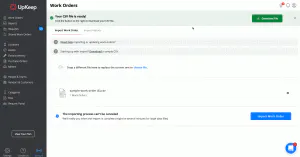
Click this image to see UpKeep's bulk imports in action. UpKeep will alert you if any rows imported incorrectly, and you can save time by making quick fixes on the selected rows.
Choose columns that are exported
Additionally, you can export custom data fields from UpKeep into a spreadsheet or pdf. You can easily export the data from your current CMMS / EAM tool. Most CMMS / EAM tools give users the ability to export their data as a CSV file.
This makes it easier for admins to choose exactly what they need from their old systems to be set up for success on UpKeep.
Who can access bulk importing and exporting
Admins who are setting up your UpKeep account have access to these features today! If you're the admin for your UpKeep account, that means you'll be in full control over what work orders gets put into UpKeep and what reports you want to pull out of UpKeep.
Bulk work order importing is great for when you are just at the beginning of moving from old software to UpKeep, or if you are updating your existing data. It's a much quicker way to put in the relevant info you need, instead of manually entering in all of your work orders.
Self-starter implementation
The Self-Starter Implementation is a convenient way to get your team up and running with UpKeep! This is the best option if you want a free way to set-up your UpKeep account on your own time. We have daily UpKeep webinars you can attend that cover topics including team training and account set-up best practices. Additionally, we have how-to videos that help you get started with UpKeep, including our popular video on how to get started with data importing.
Quick start implementation
The quick start implementation program is ideal for customers with multiple locations in their business, as well as multiple users. With this option, you have the added benefit of set-up assistance from a dedicated Customer Success Manager who will assist your team with training and best practices throughout your partnership with UpKeep. Your Customer Success Manager will take care of all your implementation needs to get your data inputted into UpKeep and get you started!
Premium implementation
4,000+ COMPANIES RELY ON ASSET OPERATIONS MANAGEMENT
Leading the Way to a Better Future for Maintenance and Reliability
Your asset and equipment data doesn't belong in a silo. UpKeep makes it simple to see where everything stands, all in one place. That means less guesswork and more time to focus on what matters.






![[Review Badge] Gartner Peer Insights (Dark)](https://www.datocms-assets.com/38028/1673900494-gartner-logo-dark.png?auto=compress&fm=webp&w=336)



