Blog Post
August 16, 2019: Linking Work Orders, Automating Checklists, Duplicating Checklists
[video width="1280" height="720" mp4="http://wordpress-484842-1527293.cloudwaysapps.com/wp-content/uploads/2019/08/Release-notes_8.16.19.mp4"][/video]
When it rains it pours, and at UpKeep, it is pouring new features! We could not be more excited to announce we have released 3 highly anticipated features this week: Linking Work Orders, Automating Checklists, and Duplicating Checklists. Let's dive right in and learn more about these 3 game changers, shall we?
Linking Tickets



UpKeepers now have the ability to link their work orders. This is huge for giving technicians and administrators visibility into all of the work orders that are connected and their exact relation to one another. Linking work orders enables our users to identify blockers, related issues, duplicates, and subtasks. UpKeepers can associate tickets in the following ways:
Blocked by
Blocks
Split from
Split to
Relates to
Duplicates
Duplicated by
Assign Checklists from Automated Workflows

UpKeepers can now automate assigning checklists to work orders! Our customers let us know adding checklists to work orders manually hindered their workflow. We are always aiming to make our customers' workflows as smooth as possible. With that goal in mind, we have added "Add Checklist" as a Then condition in automated workflows. This means, users can now utilize automated workflows to add a checklist to work orders and requests based off of a set criteria. For example, if a specific inspection checklist needs to be included on every work order that is categorized as "Damaged", the creator no longer has to remember to add the checklist manually each and every time. The creator can now set an automated workflow to have the inspection checklist added to all work orders that have been assigned the "Damaged" category. The ability to automate adding checklists to work orders drives efficiency and enforces data integrity as the creator no longer has to rely on their own memory and personal checklists to ensure the correct checklists are added to every work order. With this new workflow condition, administrators can set it and forget it!


Cloning Checklists

Let's keep the ball rolling with the improvements to our checklist workflows! UpKeep administrators let us know creating every checklist from scratch can be very tedious and repetitive. In many cases, checklists will be very similar to one another with only few unique tasks. Without the ability to duplicate checklists, UpKeepers would need to create each workflow from the very beginning and enter each item multiple times. Say goodbye to the long days of creating checklists! UpKeepers can cut that time in half by utilizing the new "Duplicate" feature. This feature will appear when scrolling over any existing checklist:


Bonus Update
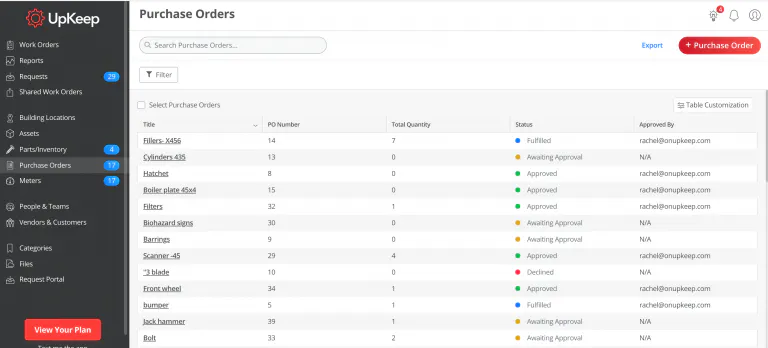
Wondering who approved a specific purchase order? Wonder no more! We have added "Approved By" as a column on the Purchase Orders table view. When administrators review their approved purchase orders, they now have visibility into who has approved each purchase order and who to address with any questions.


Wow, what a week. Make sure to log into your UpKeep app today and see all of these new features for yourself!
4,000+ COMPANIES RELY ON ASSET OPERATIONS MANAGEMENT
Leading the Way to a Better Future for Maintenance and Reliability
Your asset and equipment data doesn't belong in a silo. UpKeep makes it simple to see where everything stands, all in one place. That means less guesswork and more time to focus on what matters.






![[Review Badge] Gartner Peer Insights (Dark)](https://www.datocms-assets.com/38028/1673900494-gartner-logo-dark.png?auto=compress&fm=webp&w=336)



