Blog Post
iOS 3.46 May 31, 2019: Required Fields for Closing Work Orders



[video width="1280" height="720" mp4="http://wordpress-484842-1527293.cloudwaysapps.com/wp-content/uploads/2019/05/zoom_0-1.mp4"][/video]
Searching for a way to ensure you receive the data you need from your team? Look no further! After this week's product update, UpKeep's iOS users can not only set required fields when creating work orders but now set required fields for completing work orders as well! This enables UpKeep administrators to enforce data integrity and ensure they receive all of the necessary data they need to effectively run reporting and manage their facilities. iOS users will see an additional tab titled "Completing Work Order" when they navigate to Settings and select Work Order Customizable Fields. Once navigating to this new tab, administrators can select Required, Optional, or Hidden for the desired fields:
Required Fields


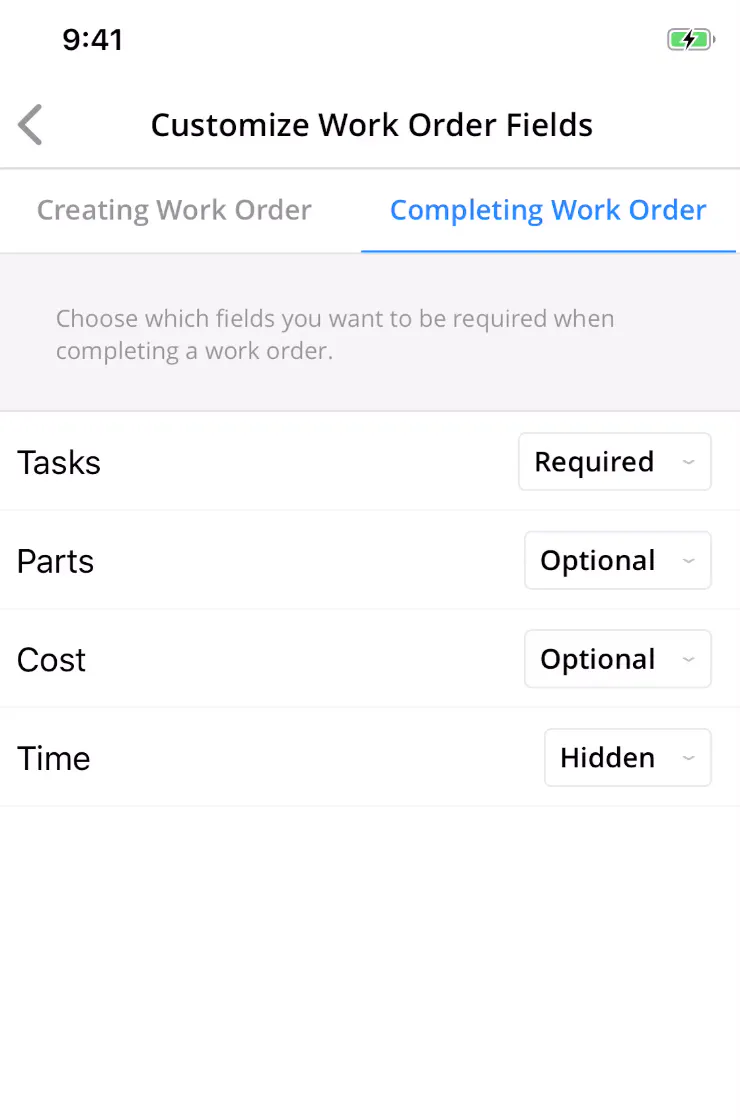
Log in to your UpKeep app today and check it out!
4,000+ COMPANIES RELY ON ASSET OPERATIONS MANAGEMENT
Leading the Way to a Better Future for Maintenance and Reliability
Your asset and equipment data doesn't belong in a silo. UpKeep makes it simple to see where everything stands, all in one place. That means less guesswork and more time to focus on what matters.






![[Review Badge] Gartner Peer Insights (Dark)](https://www.datocms-assets.com/38028/1673900494-gartner-logo-dark.png?auto=compress&fm=webp&w=336)



