Blog Post
Android 3.25.0 October 25, 2019: Set of Parts
[video width="1280" height="720" mp4="http://wordpress-484842-1527293.cloudwaysapps.com/wp-content/uploads/2019/10/release-notes_10.25.19.mp4"][/video]
It's a big day for UpKeep's Android users! Set of parts has made it's way to all Android devices and we could not be more excited to share it with all of you! Creating a set of parts allows users to group parts in their inventory so they can easily be added to an asset and/or work order with just one touch!


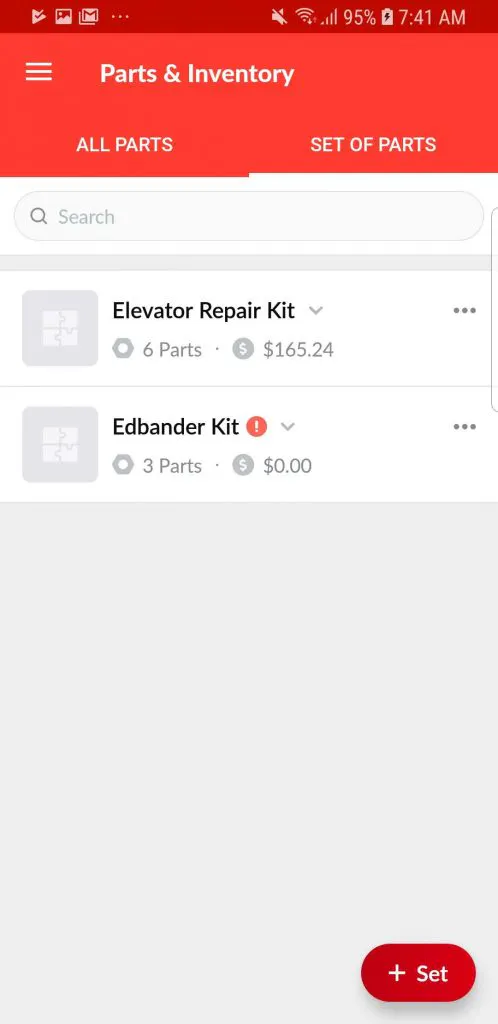
To take advantage of this new feature, UpKeepers can navigate to the “Part/Inventory” page and select the new “Set of Parts” tab at the top of the page. After creating a set or multiple sets, you will then see your sets appear as an option to assign to each asset and work order!
Log into your UpKeep app today to start creating those sets!
[mc4wp_form id="2605"]
4,000+ COMPANIES RELY ON ASSET OPERATIONS MANAGEMENT
Leading the Way to a Better Future for Maintenance and Reliability
Your asset and equipment data doesn't belong in a silo. UpKeep makes it simple to see where everything stands, all in one place. That means less guesswork and more time to focus on what matters.






![[Review Badge] Gartner Peer Insights (Dark)](https://www.datocms-assets.com/38028/1673900494-gartner-logo-dark.png?auto=compress&fm=webp&w=336)



