Entrada en el Blog
¡Presentamos proveedores y clientes en UpKeep!


We're excited to announce UpKeep's newest feature: "Vendors and Customers". It's a very subtle, but impactful one!
With UpKeep's Vendors and Customers, you can now manage all of the contractors all within the UpKeep application.
Why we built this feature
We noticed that so many of our customers wind up contracting work out to different vendors, BUT they wanted to continue using UpKeep to have a centralized place for all of their maintenance work and projects. UpKeep was previously built for the internal maintenance team, but we noticed that there were businesses of all different shapes, sizes, and workflows. For example on business might contract out HVAC work, but continue to do wok on their specialized manufacturing equipment internally. Ultimately they wanted a centralized asset management solution that kept record for work that was done on both. We found this case to be so common, we decided to build out Vendors & Customers exactly for this reason.
Here's how it works
Step 1: Navigate on over to our Vendors and Customers Page
https://app.onupkeep.com/#/app/vendors


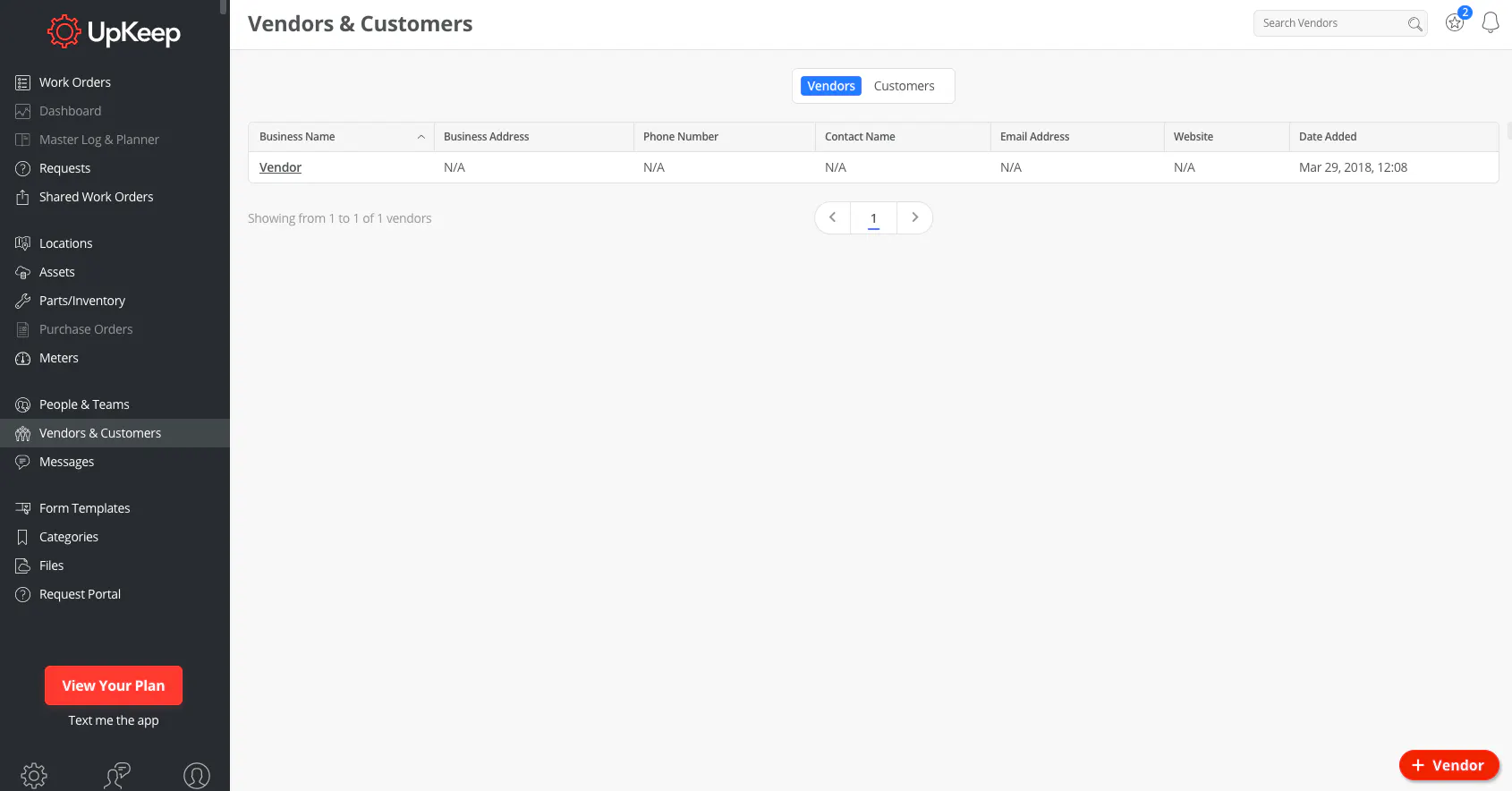
Step 2: Click the Add Vendor Button in the bottom right hand corner
In this step, you'll be able to fill out additional vendor details like their address, phone number, and website!
Step 3: Start managing!
The next time you assign a work order to a vendor, keep track of all of that from UpKeep! You'll be able to track reports, measure completion time, and so much more! One additional great feature is that you'll now be able to create purchase orders and work order invoices using the pre-populated data you've set up in your Vendors and Customers page.
MÁS DE 4000 EMPRESAS CONFÍAN EN LA GESTIÓN DE OPERACIONES DE ACTIVOS
Liderando el camino hacia un futuro mejor para el mantenimiento y la confiabilidad
Los datos de sus activos y equipos no pertenecen a un silo. UpKeep simplifica ver dónde se encuentra todo, todo en un solo lugar. Eso significa menos conjeturas y más tiempo para concentrarse en lo que importa.






![[Review Badge] Gartner Peer Insights (Dark)](https://www.datocms-assets.com/38028/1673900494-gartner-logo-dark.png?auto=compress&fm=webp&w=336)



