






CMMS COMPARISON

UpKeep vs MaintainX

MaintainX is a strong pick for small teams that want a free plan and fast, chat-style mobile work orders. UpKeep fits teams that need preventive maintenance, asset reporting, and safety, fleet and training in one platform.

  • you need safety (OSHA incident recordkeeping), fleet and training in the same platform as maintenance
  • you want an AI assistant on every plan, not only on Enterprise
  • you manage complex equipment and need a deeper asset hierarchy (4 levels) with lifecycle and downtime reporting
4.5★ G2 rating
4,000+ Teams worldwide
652% ROI (Forrester TEI)

Across 10 categories

UpKeep 5
Tie 3
MaintainX 2
See how we scored it →
McDonald'sCaterpillarPepsiChevronUnileverYamahaShellStratasys

Trusted by 4,000+ businesses

Side by side

MaintainX vs UpKeep at a glance

Measure MaintainX
Best for Teams that need PM, asset reporting, and safety, fleet and training in one platform Small teams that want a free plan and simple, chat-style mobile work orders
Starting price $24/user/month (Essential) $0 (Basic); paid plans from $20/user/month billed annually, $25 monthly
Free plan / trial No free plan. Free trial with no credit card, and every tier can be bought self-serve Free-forever Basic plan; free trial of paid plans
G2 rating G2 4.5 G2 4.8
Standout strengths AI native platform: Nova works across every location, asset, work order, incident, certification and sensor, on every plan. Maintenance, safety, fleet, training and sensors on one data model. Customers have built 5,700 apps by describing them in plain language Free plan; real-time messaging on work orders; fast technician adoption
Main limitations No free plan; PM scheduling starts on Premium; offline mode starts on Professional Parts inventory, purchase orders and meter-based PM need Premium ($65 billed annually, $75 monthly); SSO and multi-site need Enterprise
Mobile apps iOS and Android; offline work orders on Professional and up iOS and Android with offline mode
Gated to higher plans
  • PM and inventory: Premium
  • Offline, asset lifecycle, external request portal: Professional
  • POs, API, SSO, custom roles, custom dashboards, multi-site, workflow automation: Enterprise
  • Meter-based PM, inventory, POs, API, time and cost tracking: Premium
  • SSO, multi-site, IoT sensor integrations, custom permissions, MaintainX Assist: Enterprise

The honest version

Which one is for you?

Both tools are in this market for a reason. The right answer depends on what you run.

Choose UpKeep if…

  • you need safety (OSHA incident recordkeeping), fleet and training in the same platform as maintenance
  • you want an AI assistant on every plan, not only on Enterprise
  • you manage complex equipment and need a deeper asset hierarchy (4 levels) with lifecycle and downtime reporting
  • you want condition monitoring, with Edge sensors that open a work order when a reading goes out of range
  • leadership and finance need to see reports without paying for seats (unlimited free view-only users)

Choose MaintainX if…

  • you're a small team that wants to start on a forever-free plan
  • getting technicians to log work at all is your biggest problem, and chat-style work orders will help
  • you already use Autodesk tools and want maintenance in the same ecosystem

Find your fit

  • 1 site + adoption is the main problem + no fleet/training/sensors → MaintainX may suit you. Its free plan and chat-style work orders get a small crew logging work fast.
  • 1 site + PM and asset depth → UpKeep is likely the better fit. Meter- and condition-based PMs and asset reporting come without moving to an enterprise plan.
  • 2–5 sites, any challenge → UpKeep is likely the better fit. Free view-only seats and one platform for maintenance, safety and fleet scale across sites.
  • 6+ sites → Talk to both. Compare enterprise quotes; ask UpKeep about multi-site modules and MaintainX about its Autodesk roadmap.
  • Any answer + yes to fleet, training or sensors → UpKeep is likely the better fit. Those modules are built in, not third-party integrations.

The detail

Feature by feature

Ten categories, scored against published plans and documentation. Where MaintainX is ahead, it says so.

5 UpKeep leads
3 Tie
2 MaintainX leads

AI features

UpKeep leads

Every plan includes Nova with monthly credits (250 on Essential up to 1,000 on Enterprise). Nova answers questions about your data, drafts closeout notes, cleans up data and builds checklists. The Nova App Builder creates custom apps from a description, starting on Premium.

MaintainX

MaintainX Assist is listed on the Enterprise plan. MaintainX also describes AI-generated procedures, voice transcription and anomaly detection on inspection data. Check which of these each paid plan includes.

UpKeep puts AI on every plan. MaintainX's AI assistant is an Enterprise feature.
Work order management

Tie

Every plan includes unlimited work orders and locations, custom categories, data importing and unlimited requesters. Technicians create work orders by voice with Voice Fill, and Nova drafts closeout notes and activity summaries. Checklists, time and cost tracking start on Premium, and custom statuses and workflow automation on Enterprise.

MaintainX

Every plan, including the free one, gets unlimited work orders, unlimited requesters and real-time messaging on each work order. Technicians can chat, attach photos and follow digital procedures from their phones. Free and Essential plans limit how many work orders can carry procedures (2–3 per month).

MaintainX gives more on its free tier and builds chat into each job. UpKeep adds AI help when work orders are created and closed.

Preventive maintenance

Tie

PM scheduling starts on Premium at $55/user/month. It covers time-based schedules, meter readings and custom checklists, with the Smart Checklist Builder writing checklists from a short description. Edge sensors can open a work order automatically when a reading leaves its range.

MaintainX

Repeating work orders are capped at two on Basic and unlimited from Essential at $20/user/month. Meter-based maintenance needs Premium at $65 billed annually ($75 monthly), and IoT sensor integrations need Enterprise. Condition-based maintenance and procedures with conditional logic help standardize recurring jobs.

MaintainX is the cheaper entry point for simple calendar PMs. UpKeep gets you meter-based PMs at a lower price ($55 vs $65), and sensor-triggered PMs on its own hardware.

Asset management

UpKeep leads

UpKeep supports a four-level asset hierarchy, barcode scanning and meter readings from Premium, and asset lifecycle tracking on Professional. Enterprise adds depreciation, warranty and downtime tracking, custom asset statuses and check-in/check-out for shared equipment.

MaintainX

MaintainX tracks assets with QR codes, downtime tracking and real-time asset status. Asset Health Insights is on Enterprise. UpKeep's comparison lists MaintainX's hierarchy at two levels, and depreciation tracking isn't listed on its pricing page.

Teams with complex equipment trees, or that report asset costs to finance, get more depth from UpKeep.

Parts and inventory

UpKeep leads

Parts and inventory management with costing starts on Premium at $55/user/month, with multiple inventory lines per part. Photo-to-Parts creates part records from a photo. Purchase orders sit on Enterprise.

MaintainX

Parts inventory management, purchase orders and time and cost tracking unlock on Premium at $65/user/month billed annually ($75 monthly). Enterprise adds Global Parts for sharing a parts catalog across sites.

UpKeep gets you inventory for $10 less per user. MaintainX includes purchase orders on a lower tier.

Reporting and analytics

Tie

Drill-down reporting starts on Premium (30 days of history), with full history from Professional. Enterprise adds custom dashboards, asset downtime and equipment reliability reports, and multi-site modules. UpKeep's compare page says reports are powered by Looker.

MaintainX

Advanced Analytics is a 1-month trial on Basic, 3 months on Essential and unlimited on Premium. Enterprise adds a Report Builder and multi-site reporting. Reports and dashboards can be emailed to stakeholders on a schedule.

Both put their deepest reporting on top tiers. Choose based on the specific reports you need.

Mobile app and offline use

MaintainX leads

UpKeep's iOS and Android apps cover work orders, scanning, photos and signatures. Offline work orders start on Professional, with bookmarked and auto-cached work orders and offline drafts. Push notifications, email digests and SMS support are included.

MaintainX

MaintainX's mobile app is the center of the product: chat, procedures, photos and QR scanning. Offline mode lets technicians open and complete saved work orders with poor signal. Workstation Mode lets several people log in on one shared device.

If crews work in basements, remote sites or dead zones, check which plan each vendor needs for offline mode.

Integrations

MaintainX leads

API access, business integrations and custom integrations are on Enterprise. UpKeep's own Edge sensors connect natively on any plan that includes them, without an integration project.

MaintainX

A REST API is included on Premium. Enterprise adds IoT sensor integrations and SSO. MaintainX is now part of Autodesk, so tighter links with Autodesk's design and operations tools are likely.

Teams that need an API on a mid-tier budget get it sooner with MaintainX.

Safety, fleet and training

UpKeep leads

UpKeep sells Safety (incident capture with OSHA 300, 300A and 301 recordkeeping), Fleet (DVIRs, VIN lookup, telematics) and Learn (courses and certifications) as modules on the same platform and login as maintenance.

MaintainX

MaintainX handles safety inspections and procedures inside its work order and procedure tools. Fleet work runs through third-party telematics integrations, and there is no separate training or certification module.

One vendor for maintenance, EHS, fleet and training means fewer tools and invoices.

Sensors and condition monitoring

UpKeep leads

UpKeep Edge is UpKeep's own wireless sensor line for vibration, temperature and other readings. A reading outside the range you set opens a work order on that asset automatically. Dashboards show sensor trends next to maintenance history.

MaintainX

MaintainX connects to third-party IoT sensors on its Enterprise plan, and offers Asset Health Insights there too. The sensors themselves come from another vendor.

UpKeep supplies the sensors and the software together, so you don't need a separate sensor project.

3. Platform breadth

One login, where MaintainX needs several

Maintenance is just the start. Run safety, learning, fleet and IoT monitoring in the same platform. Same login, same data model, same mobile app.

Maintenance

AI-powered CMMS with mobile work orders, asset tracking and preventive maintenance.

Safety

EHS management, incident reporting, OSHA logs and Voice-to-CAPA analysis.

Nova

AI assistant for work orders, insights and answers across the platform.

UpKeep only · every plan

Supernova

Autonomous AI agents that handle routine decisions and multi-step workflows.

UpKeep only

Edge

First-party wireless sensors for temperature, vibration, pressure and humidity.

UpKeep only

Fleet

DVIRs, VIN lookup, mileage-based PMs and telematics integration.

UpKeep only (MaintainX via integrations)

Learn

Training programs, certifications and compliance tracking built for technicians.

UpKeep only

Providers

Marketplace for vetted service partners and third-party work tracking.

UpKeep only

4. Customer success

24/7 support on every plan

When your line is down at 3 a.m., sales-tier gating isn't helpful. UpKeep includes 24/7 live chat and a dedicated customer success team on every paid plan, not as an upsell.

24/7 live chat

Real humans, actually around the clock. Average response under 3 minutes.

Dedicated CS team

Your team gets a named customer success manager. Onboarding, QBRs, expansion support. Not a ticketing queue.

White-glove migration

Switching from MaintainX? We help import your assets, PMs and work order history, and validate everything with you before go-live.

Migration

Switching is easier than starting over

Our customer success team handles the import with you and validates everything before go-live.

01

Export your data

Assets, PMs, work order history, parts, vendors. Our CS team walks you through the export or handles it for you.

02

We set up your workspace

Data mapped, users configured, integrations connected. You review before anything goes live.

03

Train and roll out

On-site or virtual training for your team. Phased rollout so you're never betting the whole operation on day one.

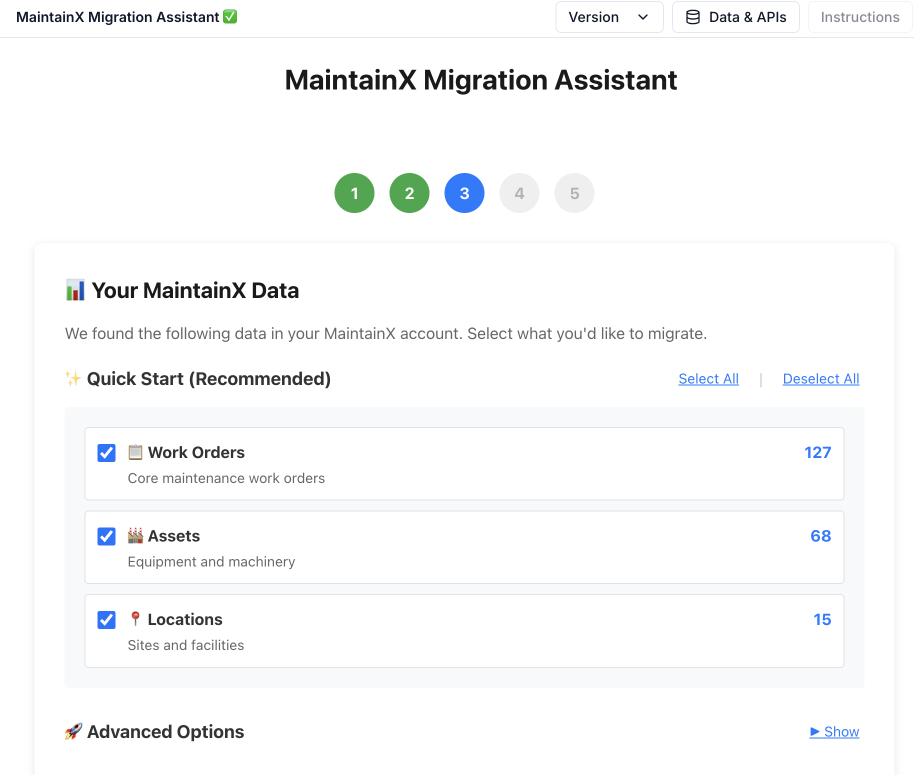
MaintainX migration assistant built as a Nova App in UpKeep
Built as a Nova App: a migration assistant that helps import and map your MaintainX data.

Talk through what migrating your data would actually involve.

Book a demo

“UpKeep is made by maintenance people, for maintenance people. It's just so user-friendly.”

Maintenance Team · Mattr, 8 sites

FAQ

Questions teams ask before switching

Can I import my MaintainX data into UpKeep?

Yes. Assets, preventive maintenance schedules, work order history, parts inventory and vendor records can all be imported. Our customer success team handles the data mapping and validates everything with you before it goes live in production.

How does UpKeep pricing compare to MaintainX?

UpKeep plans are priced comparably to MaintainX at the list level. The real difference is what's included: AI, custom reporting, Nova Apps, Learn, Fleet and 24/7 chat support are part of the package, not paid add-ons. View-only seats are free, so leadership and finance get visibility without paying for full licenses. When you total up what you'd actually need, UpKeep is typically less expensive for equivalent capability.

What about integrations with our existing tools?

UpKeep connects to 1,000+ systems through native integrations, Zapier and a public API. Common integrations (ERP, procurement, IdP, SCADA) have first-party connectors. For anything custom, Nova can build the connection without an engineering ticket.

Will my technicians actually adopt it?

UpKeep is mobile-first and was built for the floor, not the desk. Across our customer base, mobile work order completion averages 100% because technicians use the mobile app as their primary interface, not an afterthought.

Can I try UpKeep before committing?

Yes. Book a walkthrough and we'll set up a sandbox with your actual data. You can run both systems in parallel during evaluation and compare the experience on work you're doing anyway.

What happens to my MaintainX contract?

Most teams time the switch to the end of their MaintainX term to avoid overlapping costs. If you're mid-contract and want to move sooner, we can structure onboarding to keep your total spend flat during the overlap. Our CS team has done this migration plenty of times.

See the difference yourselfBring your renewal quote and your hardest questions.

See why teams are leaving MaintainX for UpKeep

Real data. Honest comparison.

Get your demo
UpKeep vs MaintainX Get a demo