Blog Post
Introducing UpKeep Studio: An App Platform Built on Your CMMS Data
Extend your UpKeep CMMS with Studio. Install ready-made apps, build custom tools with AI, or get apps built for you. No code, no integrations.


Your CMMS handles work orders, assets, and parts. But every operation has gaps. The shift handoff that lives in a spreadsheet, the inspection form that doesn't quite fit, the dashboard your team has been asking for since last year. Those gaps don't get filled by feature requests. They get worked around.
UpKeep Studio changes that. It's an app platform that connects directly to your UpKeep data and gives your team three ways to fill those gaps without writing code, managing integrations, or waiting on IT.
What Is Studio?
Studio is a new layer of the UpKeep platform that lets maintenance and operations teams install ready-made apps, build their own through a chat-based AI builder, or partner with UpKeep engineers to have custom apps built for them.


Every app runs inside UpKeep. Same login, same permissions, same security. There's nothing new to manage, no third-party accounts to create, and no data leaving the platform.
Three Ways to Get the App You Need
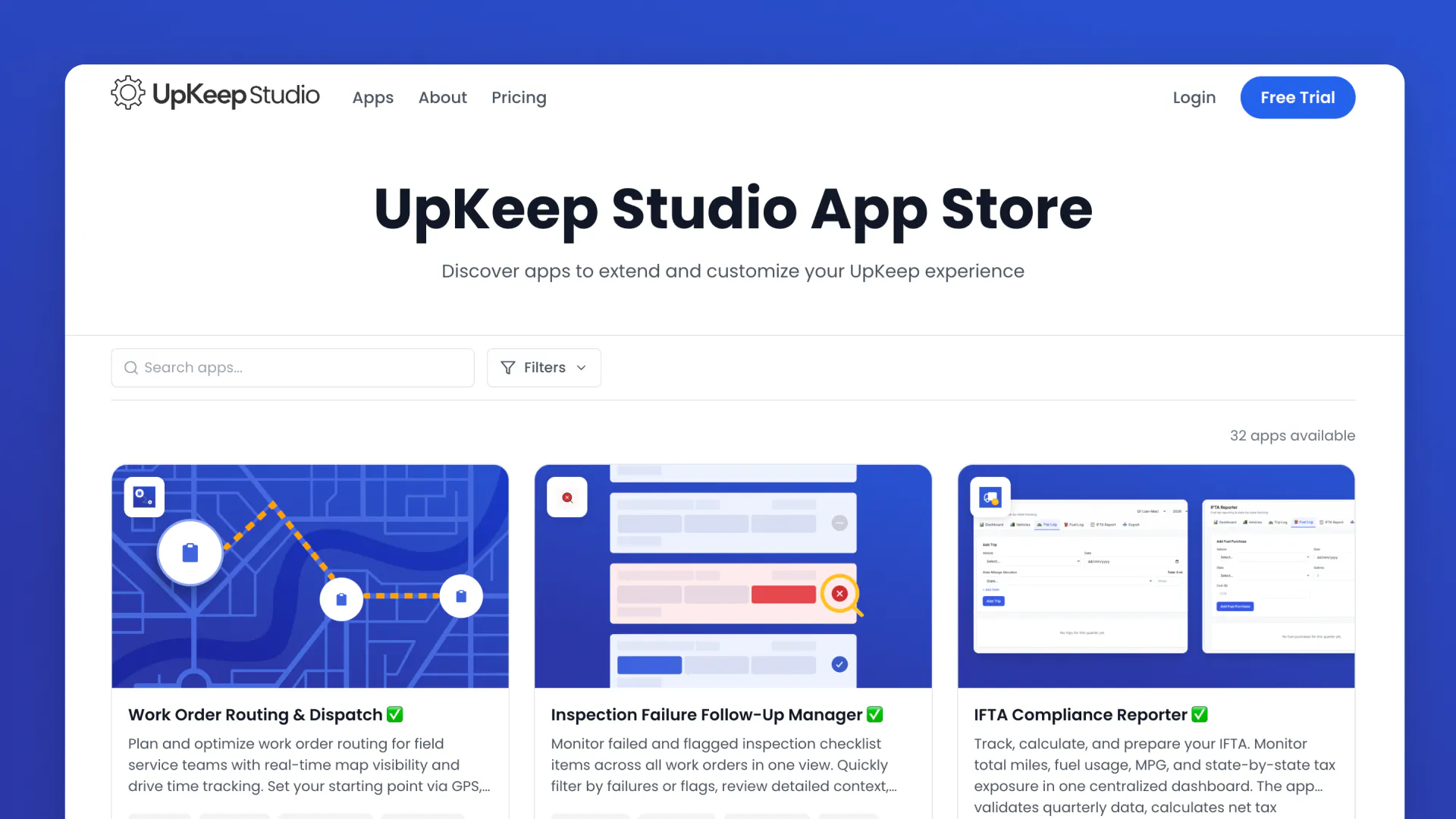
The App Marketplace
Studio includes a curated catalog of pre-built apps covering the workflows that maintenance teams deal with every day — asset treemaps, shift handover tools, work order routing and dispatch, fleet maintenance hubs, vendor performance scorecards, workforce capacity dashboards, quick inspections, and more.
Each app installs in one click and works immediately with your real UpKeep data. No configuration, no syncing, no middleware sitting between systems. If an app doesn't fit anymore, deactivate it and swap in something else. Your active app limit only counts what's currently deployed.
The App Builder
This is where Studio gets most exciting. Open a chat interface, describe the tool you need in plain language, and Studio builds it. The builder has full read/write access to the UpKeep API, which means your app works with real work orders, assets, locations, and parts data from the moment it's created.
The process is simple:
1. Describe — Tell Studio what you need in everyday language
2. Build — Studio's AI assembles the app logic
3. Deploy — Review, customize, and deploy in minutes
What can you build? Custom inspection forms designed for your specific equipment. Shift handoffs that match how your team actually operates. Dashboards that surface the metrics your supervisors care about. Compliance workflows aligned with your industry's regulations. The only constraint is what's available through the API — and that's extensive.
You can also connect apps to external tools like email and Slack, use webhooks to push data to other systems, and attach custom data objects so your workflows aren't limited to the standard CMMS model.
No developers. No engineering resources. No dev cycle.
Custom-Built Apps
Some projects may seem too complex for a self-serve builder. For those situations, UpKeep pairs a forward-deployed engineer with your team to design and ship apps tailored to your exact workflows. You bring the operational knowledge. UpKeep brings the platform, security, and infrastructure.
Why Apps Instead of Integrations?
Traditional integrations are generic. They move data between systems but don't adapt to how your team actually works. They require middleware, break when APIs change, and create new systems your team has to manage.
Studio apps are different. They're self-contained and additive. They extend your CMMS without touching or breaking the core system. Instead of maintaining fragile pipes between platforms, you get durable tools that live right where your team already works.
Every operation is different. Studio lets you build for yours instead of settling for something that was built for everyone.
Built for Both Sides of the House
Operations teams get tools without learning new software. Studio apps live inside UpKeep alongside everything else. Handle inspections, manage vendor approvals, or track training — all without leaving the platform. Browse ready-made apps or describe what you need and have it built in minutes.
Technical teams stop writing integrations. If your engineers have been spending weeks building internal tools just to get data out of UpKeep and into a usable format, Studio is a faster path. Full API access. No middleware. No integration maintenance.
Apps You Can Install Today
The Studio marketplace already has dozens of apps ready to go. Here are a few:
Parts Forecast Planning
See which parts will be needed for upcoming scheduled work before the jobs start. Forecast demand based on future work orders so your team can procure what's needed ahead of time instead of scrambling when something's out of stock.
Work Order Routing & Dispatch
Plan and optimize work order routing for field service teams with real-time map visibility and drive time tracking. Stop dispatching technicians blind and start routing them efficiently.
Inspection Failure Follow-Up Manager
Track inspection checklist failures and flags, then create follow-up work orders with one click. No more failed inspections falling through the cracks.
Repair or Replace Cost Evaluator
A decision-support tool for maintenance managers to compare repair estimates against replacement costs. Stop guessing and start making data-driven equipment decisions.
Technician Performance Coach
View your full technician roster with key performance metrics at a glance. Click any technician to see detailed breakdowns and identify coaching opportunities.
Work Order Parts Procurement
Surface active work orders with associated parts needs and quickly identify procurement gaps. Turn parts requirements into purchase orders without the back-and-forth.
Browse the full catalog →UpKeep.com/apps
Enterprise-Grade from Day One
Studio isn't a bolt-on tool or a low-code side project. It's platform architecture built for scale.
SOC 2 compliant — Apps run on UpKeep infrastructure with the same security controls your organization already approved
No new threat vectors — Same login, same permissions, no third-party credentials
Cross-domain — Apps can span CMMS, EHS, LMS, Fleet, and other Studio apps
No artificial limits — No restrictions on app complexity or functionality
UpKeep handles the APIs, data models, permissions, security, and compliance underneath. Your team focuses on workflows.
See It in Action
Studio is available now for UpKeep customers on Premium plans and above. Browse the app marketplace at [appstore.upkeep.com] to see what's ready to install, or [request a demo] and we'll walk you through how Studio can work for your team.
Your CMMS just got a whole lot more useful.
Want to keep reading?


Article
Custom CMMS Dashboards: 7 Must-Have Views for Maintenance Management

Article
CMMS Administrator Job Guide: Duties, Daily Tasks & Career Path


Article
Best EHS Software Solutions for Safety and Compliance: Top 10 Ranked & Reviewed
4,000+ COMPANIES RELY ON ASSET OPERATIONS MANAGEMENT
Leading the Way to a Better Future for Maintenance and Reliability
Your asset and equipment data doesn't belong in a silo. UpKeep makes it simple to see where everything stands, all in one place. That means less guesswork and more time to focus on what matters.






![[Review Badge] Gartner Peer Insights (Dark)](https://www.datocms-assets.com/38028/1673900494-gartner-logo-dark.png?auto=compress&fm=webp&w=336)



