Blog Post
Work Order Assignment: How to Track & Manage Maintenance Tasks
Discover the best methods for work order assignment, from pen and paper to CMMS, plus a step-by-step process and best practices to follow.



Key Takeaways
Work order assignment is a critical function in any maintenance department, yet it can be frequently underestimated.
Work order assignment is the process of directing a work order to the right technician or crew at the right time.
Work order assignment is the execution of your maintenance strategy, and its quality determines whether your PM program and predictive technology translate into completed work on the floor.
Manual assignment methods carry a hidden cost that compounds over time, with paper and whiteboard-based processes directly tied to higher error rates, rework, and unplanned downtime.
A computerized maintenance management system (CMMS) converts work order assignment from a coordination bottleneck into an automated, trackable workflow by replacing manual handoffs with mobile notifications, real-time status visibility, and auto-assignment rules.
Disciplined habits around expectations, parts staging, checklists, and completion tracking determine whether your assignment process performs, regardless of how sophisticated your software is.
When done poorly, it creates chaos:
Technicians show up to jobs without the right parts.
High-priority equipment sits idle.
Supervisors have no real-time visibility into what’s happening on the floor.
When done well though, work order assignment drives uptime, reduces costs, and keeps every member of a maintenance team working at peak efficiency.
This guide covers everything you need to know about work order assignment, including where it fits in the maintenance cycle, the methods teams use today, the benefits of getting it right, and a step-by-step process you can implement immediately.
What Is Work Order Assignment?
A work order authorizes and records a specific maintenance task. It captures what needs to be done, where, by whom, with what parts, and by when. Work order assignment is the process of directing a work order to the right technician or crew at the right time.
Assignment sounds simple on the surface, but it requires a supervisor or planner to balance several competing variables simultaneously. These include technician skill sets, current workloads, proximity to the asset, parts availability, and the relative priority of other tasks within limited labor hours. A misjudgment at this step affects the subsequent stages of the job.
The Role of Work Order Assignment in the Maintenance Cycle
The maintenance cycle typically moves through five phases: identification, planning, scheduling, execution, and closeout. Work order assignment sits at the intersection of scheduling and execution. It’s the handoff point where administrative planning meets physical action.
When identification and planning are done correctly, the work order that arrives at the assignment stage will already contain a task description, estimated labor hours, required parts, and a priority level. The planner or maintenance supervisor then reviews the backlog, assesses team availability, and assigns the work order to an individual or crew. That technician receives the assignment, withdraws any needed parts from the storeroom, and proceeds to the job site.
Because an assignment involves a handoff, it’s vulnerable to communication errors. Any ambiguity introduced here, whether in the task description or some other information, will surface during execution as delays, rework, or safety incidents.
Efficient work order assignment is therefore the execution engine of your maintenance strategy.
Methods of Work Order Assignment
How you assign work orders is just as important as what you assign. The method your team uses shapes how fast information travels, how many errors creep in, and how much visibility supervisors have over day-to-day operations.
Broadly, work order assignment methods fall into two categories: physical and digital. Understanding the strengths and weaknesses of each helps you make the right choice for your operation's size, complexity, and growth trajectory.
Physical Methods: Pen, Paper, and Whiteboards
Despite the availability of digital tools, a surprising number of maintenance operations still rely on physical methods to assign work orders. These include handwritten job cards, paper-based log books, printed schedules pinned to a bulletin board, and magnetic whiteboards where job tiles are moved between columns representing workflow stages.
Physical methods have existed for a long time because they’re tangible, require no training, and are immediately visible to anyone standing in the maintenance office; a technician who isn’t comfortable with technology can walk in, find their name on the board, pick up a job card, and get to work.
However, the limitations of physical work order assignment are severe, and the data make them impossible to ignore: Research estimates the world's 500 largest companies lose about $1.4 trillion per year to unplanned downtime. Another study found that documentation errors caused $1.8 trillion in losses worldwide and may be responsible for 14% of avoidable rework, which amounts to almost $88.7 billion in costs.
Further, physical methods are invisible to anyone not standing in front of them. A remote supervisor, a second-shift planner, or a reliability engineer in a different building has no access to real-time assignment status. When something changes, such as a priority escalation or a parts delay, someone has to physically update the board and notify the affected technician.


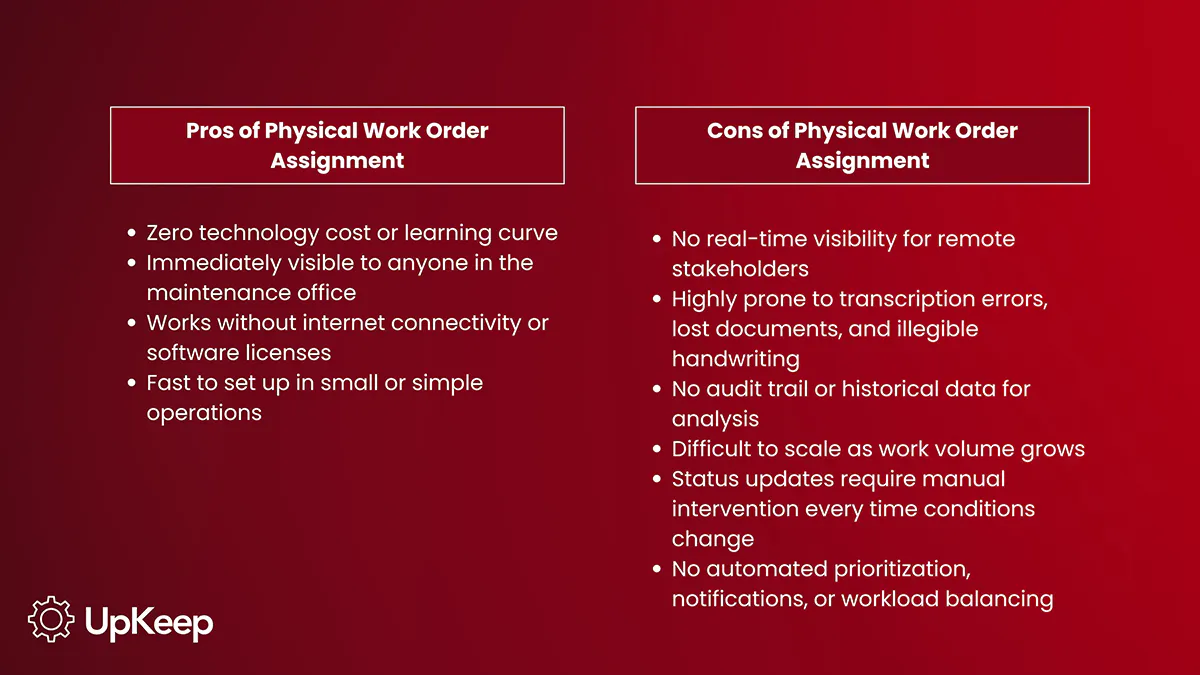
Pros of Physical Work Order Assignment:
Zero technology cost or learning curve
Immediately visible to anyone in the maintenance office
Works without internet connectivity or software licenses
Fast to set up in small or simple operations
Cons of Physical Work Order Assignment:
No real-time visibility for remote stakeholders
Highly prone to transcription errors, lost documents, and illegible handwriting
No audit trail or historical data for analysis
Difficult to scale as work volume grows
Status updates require manual intervention every time conditions change
No automated prioritization, notifications, or workload balancing
Digital Methods: Spreadsheets and CMMS
Digital work order assignment tools range from basic spreadsheets to purpose-built computerized maintenance management systems (CMMS). Both represent a meaningful improvement over paper, though they differ in capability and sophistication.
Spreadsheets
Spreadsheets are the most common first step away from paper. A maintenance planner can build a shared Google Sheet or Excel workbook that lists open work orders, assigns them to technicians by name, and tracks status with color coding.
It’s a significant improvement in visibility and data integrity compared to a whiteboard, but spreadsheets weren’t designed for maintenance operations. They have no built-in notification system, no connection to asset data or parts inventory, and no way to track actual versus estimated labor time unless someone manually enters every data point.
Pros of Spreadsheets for Work Order Assignment
Low cost and broad ease of use
Centralized visibility for shared access
Easier to search, filter, and sort than paper records
Cons of Spreadsheets for Work Order Assignment
No automated notifications or escalations
Manual data entry creates the same error risk as paper
Version control issues occur when multiple people edit simultaneously
No connection to inventory, asset history, or reporting dashboards
Computerized Maintenance Management System
CMMS platforms are built specifically to address this problem. A CMMS allows planners to create a work order, attach it to an asset record, specify required parts, set a priority level, and assign it to a technician with a single workflow. When the technician receives an immediate notification on their mobile device, they can see all the details they need, update the status in real time, and close out the work order with time stamps and notes that feed directly into asset history and reporting.
Pros of CMMS for Work Order Assignment
Full work order life cycle managed in one system
Mobile, offline access for technicians in the field
Automated notifications and escalation triggers
Built-in reporting and KPI tracking
Integration with inventory, asset records, and scheduling
Complete audit trail for compliance and analysis
Cons of CMMS for Work Order Assignment
Higher up-front cost and implementation time
Requires training and change management
Value depends heavily on data quality and user adoption
Benefits of Efficient Work Order Assignment
Establishing structured work order assignments pays dividends across the entire operation. Outside of the maintenance department, it also affects production output, budget performance, and stakeholder satisfaction.
Enhanced Operational Efficiency Through Increased Uptime
The most direct financial benefit of efficient work order assignment is the reduction of unplanned downtime. When work orders are assigned quickly, accurately, and to the right technician, preventive tasks are completed on time, meaning failure modes are caught before they become breakdowns. The downstream effect is a measurable increase in overall equipment effectiveness (OEE) and a reduction in emergency repair costs.
Greater Team Productivity
Work order assignment directly shapes how a technician spends their day. When assignments are clear, complete, and accompanied by the right parts and documentation, a technician can move efficiently from one job to the next with minimal interruption. When assignments are vague, incomplete, or piled up without prioritization, the same technician spends their shift chasing information, waiting for parts, or working on lower-priority jobs.
Reduced Response Times and Improved Service Delivery
In areas like facilities management, hospitality, and property maintenance, work order assignment speed directly determines service quality. When assignments are slow or disorganized, response times suffer, and service quality perceptions drop.
Efficient digital assignment systems can reduce average response time from hours to minutes by automating the routing of new work orders to available, appropriately skilled technicians.
Manager Pro Tip
Managers can use UpKeeps Automated Workflows to build custom rules that automatically assign incoming requests to specific users or teams based on initial criteria like the task's category or location.
Step-by-Step Work Order Assignment Process
A repeatable, structured process is what separates maintenance teams that consistently hit their targets from those that only react. The following four steps form the backbone of an effective work order assignment workflow, regardless of whether your team uses a clipboard or a fully integrated CMMS.
Step 1: Identify Service Needs
Work orders originate from three primary sources, and mature maintenance operations often use all three.
Scheduled preventive maintenance (PM) generates work orders automatically based on calendar intervals or meter readings. A CMMS will trigger a PM work order for a monthly lubrication task or an annual inspection without anyone having to remember to create it.
Sensors and predictive technology generate condition-based work orders when asset parameters drift outside acceptable ranges. A vibration alert on a pump bearing, a temperature anomaly on an electrical panel, or an oil analysis indicating elevated metal content can automatically create a work order that flows into the assignment queue.
Work requests come from operators, tenants, or other stakeholders who observe a problem and submit a request through a portal, phone call, or direct conversation with the maintenance team. These requests must be reviewed and approved before becoming a formal work order ready for assignment.
Step 2: Prioritize Tasks
Not all work orders are equally urgent, and treating them as though they are will overwhelm your team with low-value tasks while critical assets wait. A consistent prioritization framework is therefore essential. Many organizations use a four-tier system of emergency, urgent, routine, and scheduled. Others use a numerical scoring matrix that weighs factors like safety risk, production impact, and asset criticality.
Manager’s Pro Tip
Whatever framework you choose, it must be applied consistently so technicians trust the priority signals they receive. If every work order is marked “urgent,” none of them effectively are.
Step 3: Use Work Order Management Tools
Before assigning work orders, planners should ensure every request that enters the assignment queue is complete. The work order should include a clear task description, the asset ID and location, estimated labor time, required parts and their storeroom location, any applicable safety procedures, and the target completion date.
Assigning incomplete work orders results in the technician having to stop the job and return to the planner for information, which defeats the purpose of planning.
Step 4: Assign Tasks to Team Members
With a prioritized, complete work order in hand, the planner can make the assignment. This entails matching the task requirements against the available workforce by considering technical skills, current workload and available hours, location, and whether the technician has the appropriate tools and personal protective equipment.
In a CMMS, this step is supported by dashboards that display technician availability, current assignments, and workload balance in real time, making it easy to identify the right person for each job.
Best Practices for Work Order Assignment
Processes and tools only go so far. The habits and standards your team builds around work order assignment determine whether those tools are used to their full potential. These best practices apply regardless of your current maturity level and can be implemented incrementally as your program develops.
Clearly Communicate Your Expectations
When assigning a work order, the technician should know not only what to do but also what a successful completion looks like. Specify the acceptance criteria, any required photos or measurements, and who to contact if they encounter unexpected conditions.
Create Follow-up Mechanisms
Assigning a work order is only half the job. Build check-in points into your workflow, particularly for complex or long-duration tasks so problems surface early enough to be addressed without missing the completion deadline.
Use Technology to Automate Routine Assignments
For recurring PM tasks that go to the same crew or skill group, auto-assignment rules in a CMMS eliminate planning overhead and ensure nothing slips through the cracks during busy periods or staff absences.
Provide Parts for Work Orders Before Assignment
One of the leading causes of in-progress work order delays is discovering a required part isn’t in stock. A planner who kits parts before assigning a work order removes this bottleneck entirely and enables the technician to complete the job in a single visit.
Make Checklists for Recurring Tasks
Recurring work orders benefit from standardized digital checklists that guide the technician through each step, ensure nothing is skipped, and create a consistent documentation record. Checklists also reduce the cognitive load on technicians performing the same task across multiple assets.
Track Completed Assignments Over Time
Monitor the number of work orders each technician completes per week, along with on-time completion rates and rework rates. These metrics reveal individual performance and systemic problems in the assignment process itself, such as underestimation of labor hours or recurring parts stockouts.
Adopt a CMMS for Effective Work Order Assignment
A CMMS transforms work order assignment from a manual coordination task into a streamlined, data-driven workflow. But the platform only delivers value when it’s chosen thoughtfully, integrated properly, and used consistently. Here’s what to focus on to gain the most from your CMMS investment.
Learn More: The 10 Best CMMS Software Ranked and Reviewed
Choose the Right Work Order Management Software
When evaluating a CMMS for work order assignment, prioritize mobile accessibility for field technicians, ease of work order creation and routing, configurable priority and escalation rules, and integration capabilities with other platforms. Your technicians won’t use a system that’s too cumbersome to navigate on a tablet in a noisy plant floor, meaning it won’t deliver its promised value, regardless of its feature list.
Integrate With Existing Workflow Systems
A CMMS that operates as an island of data disconnects easily from procurement, finance, and operations. Look for platforms that offer API integrations or native connectors to your ERP, purchasing system, and asset monitoring tools. When a work order automatically updates an inventory record upon parts consumption, or when a completed job automatically triggers a purchase order for a replacement part, the entire operation becomes self-sustaining in a way that manual processes can’t match.
Real-Time Tracking and Updates
One of the most impactful capabilities of a modern CMMS is real-time status visibility. Supervisors can see at a glance which work orders are in progress, which are overdue, and which are awaiting parts. Technicians can update the status from the field without returning to the office. Stakeholders who submitted requests can check progress without calling the maintenance desk. This transparency reduces interruptions, builds trust, and allows faster identification of bottlenecks before they escalate.
Learn More: Evaluate your CMMS in 8 Steps
The Bottom Line: Assignment Is Execution
Work order assignment is the critical execution point of your entire maintenance strategy. Whether your organization is reactive, preventive, or predictive, its strategy relies on service being completed correctly and on time.
By investing in a structured process, consistent prioritization, and the right CMMS, you move work order assignment from a chaotic bottleneck to a streamlined driver of uptime, cost reduction, and efficiency.
Improvement doesn’t require a complete overhaul overnight though. Organizations that start by standardizing their prioritization framework, completing work orders before they’re assigned, and building basic follow-up habits will see measurable gains before they even invest in new software. From there, moving to a CMMS compounds those gains by removing manual steps, closing communication gaps, and giving supervisors the real-time visibility they need to make faster, better decisions.
Ready to improve your work order assignment process? Get started with UpKeep today!
Frequently Asked Questions About Work Order Assignment
Why is documentation important in assigning work orders?
Documentation creates an auditable record of what was assigned, to whom, when, and what was done. This is essential for regulatory compliance in industries like food manufacturing, pharmaceuticals, and aerospace. Beyond compliance, documented work order history is the foundation of reliability analysis: It reveals failure patterns, refines PM frequencies, and supports budgeting for future maintenance needs.
What is the difference between a work order and a maintenance order?
The terms are often used interchangeably, but in some organizations, a maintenance order is a broader financial document within an enterprise resource planning (ERP) system that authorizes costs for a maintenance event, while a work order is the operational task document that describes the work to be performed. Most CMMS platforms use work orders to cover both functions.
Who is responsible for work order assignments?
In most organizations, a maintenance planner or maintenance supervisor holds primary responsibility for work order assignment. In smaller operations, the maintenance manager may perform this function directly. In large facilities with dedicated reliability teams, a planner-scheduler role often exists specifically to manage the assignment queue full-time.
Which industries use work orders?
Work orders are used in virtually every industry that maintains physical assets. This includes manufacturing, oil and gas, utilities, healthcare, hospitality, property management, municipalities, transportation, food and beverage processing, mining, and data center operations. Any organization that needs to track, assign, and document maintenance tasks for physical assets will benefit from a structured work order assignment process.
4,000+ COMPANIES RELY ON ASSET OPERATIONS MANAGEMENT
Leading the Way to a Better Future for Maintenance and Reliability
Your asset and equipment data doesn't belong in a silo. UpKeep makes it simple to see where everything stands, all in one place. That means less guesswork and more time to focus on what matters.






![[Review Badge] Gartner Peer Insights (Dark)](https://www.datocms-assets.com/38028/1673900494-gartner-logo-dark.png?auto=compress&fm=webp&w=336)



