Blog Post
What is Equipment Maintenance Tracking Software? 7 Essential Features
See how equipment maintenance tracking software turns maintenance data into business value with better uptime, compliance, and ROI.


Key Takeaways
Transitioning from spreadsheets to Equipment Maintenance Tracking Software (CMMS) moves organizations to a centralized, proactive maintenance strategy that reduces unplanned downtime.
While often confused, equipment maintenance tracking software (often called CMMS) is specialized for immediate maintenance execution (work orders, repairs), whereas EAM focuses on the total financial lifecycle of an asset from design to disposal.
Successful implementation requires a mobile-first, intuitive interface (like UpKeep) that functions offline and mimics consumer apps.
Equipment maintenance tracking software drives business value by automating compliance for regulated industries, optimizing inventory levels to prevent stockouts, and extending the lifespan of expensive assets.
Equipment maintenance tracking software, often called Computerized Maintenance Management Software (CMMS), is a centralized command center for managing the operational lifecycle of physical assets. This digital platform empowers maintenance, reliability, and operations teams to organize work, track asset health, and optimize inventory from a single interface.
Equipment Maintenance Tracking Software (CMMS) vs. Enterprise Asset Management Software (EAM)
While the terms are often used interchangeably, there is a clear difference between a Computerized Maintenance Management System (CMMS) and an Enterprise Asset Management (EAM). A CMMS is explicitly designed to track and optimize maintenance operations, focusing on work orders, preventive tasks, and equipment uptime. In contrast, EAM software takes a holistic view of the asset lifecycle, tracking an asset from procurement through financial depreciation to eventual disposal.
Feature | CMMS (Equipment Maintenance Tracking Software) | EAM (Enterprise Asset Management) |
Core Functionality | Work orders, preventive maintenance, and inventory control. | Financial planning, procurement integration, and complex compliance. |
Implementation Speed | 1-2 weeks | Lengthy implementation cycles |
Usability | Mobile-first | Built for desktops |
Who Uses Equipment Maintenance Software?
Different roles within an organization use maintenance tracking software to achieve specific outcomes, ranging from faster field repairs to strategic alignment in the boardroom.
Frontline Technicians
Maintenance technicians are the direct executors of maintenance work who operate primarily in the field or on the plant floor. They use the software to view assigned tasks, access manuals offline, and log work completion immediately.
Operational Managers
Maintenance managers are responsible for coordinating personnel and work orders daily. Unlike technicians who execute tasks, they focus on job and resource allocation, workflow optimization, and removing administrative bottlenecks.
Facility Managers
Facility managers use automated preventive maintenance scheduling to ensure critical building systems remain operational and compliant.
Reliability Engineers
Reliability engineers use equipment maintenance tracking software to analyze deep operational data to prevent equipment failures before they occur. They also use predictive analytics to identify trends and perform root cause analysis of recurring issues.
Executives
They use the platform to connect field operations data directly to high-level business metrics. These platforms allow executives to make informed investment decisions and view equipment maintenance as a value driver rather than a cost center.
Benefits of Switching from Spreadsheets to Maintenance Tracking Software
Transitioning to dedicated maintenance-tracking software enables your team to automate workflows and gain visibility that manual methods cannot provide. Making this switch has the following benefits:
Reduce Unplanned Downtime
Spreadsheets cannot trigger alerts or automate schedules when a machine needs servicing. Maintenance software actively reduces unplanned downtime by automating preventive maintenance (PM) schedules and ensuring tasks are assigned and completed before breakdowns occur.
Retain Centralized Data
Managing maintenance across multiple spreadsheets results in fragmented data, making it difficult to find repair histories or warranty information when needed. Maintenance tracking software provides a single source of truth for every asset, technician, and work order, ensuring that all stakeholders have access to the most current data in real time.
Ensure Compliance Readiness
Relying on spreadsheets is risky, especially if you’re in a highly regulated industry. A dedicated software for equipment maintenance creates audit-proof maintenance logs, ensuring your organization is always prepared for regulatory visits from organizations like OSHA.
Excellent Inventory Control
Spreadsheets cannot track real-time usage as your technicians pull parts from the shelf. Maintenance tracking software integrates inventory management with work orders, automatically tracking consumption and triggering reorder alerts when stock levels hit defined thresholds.
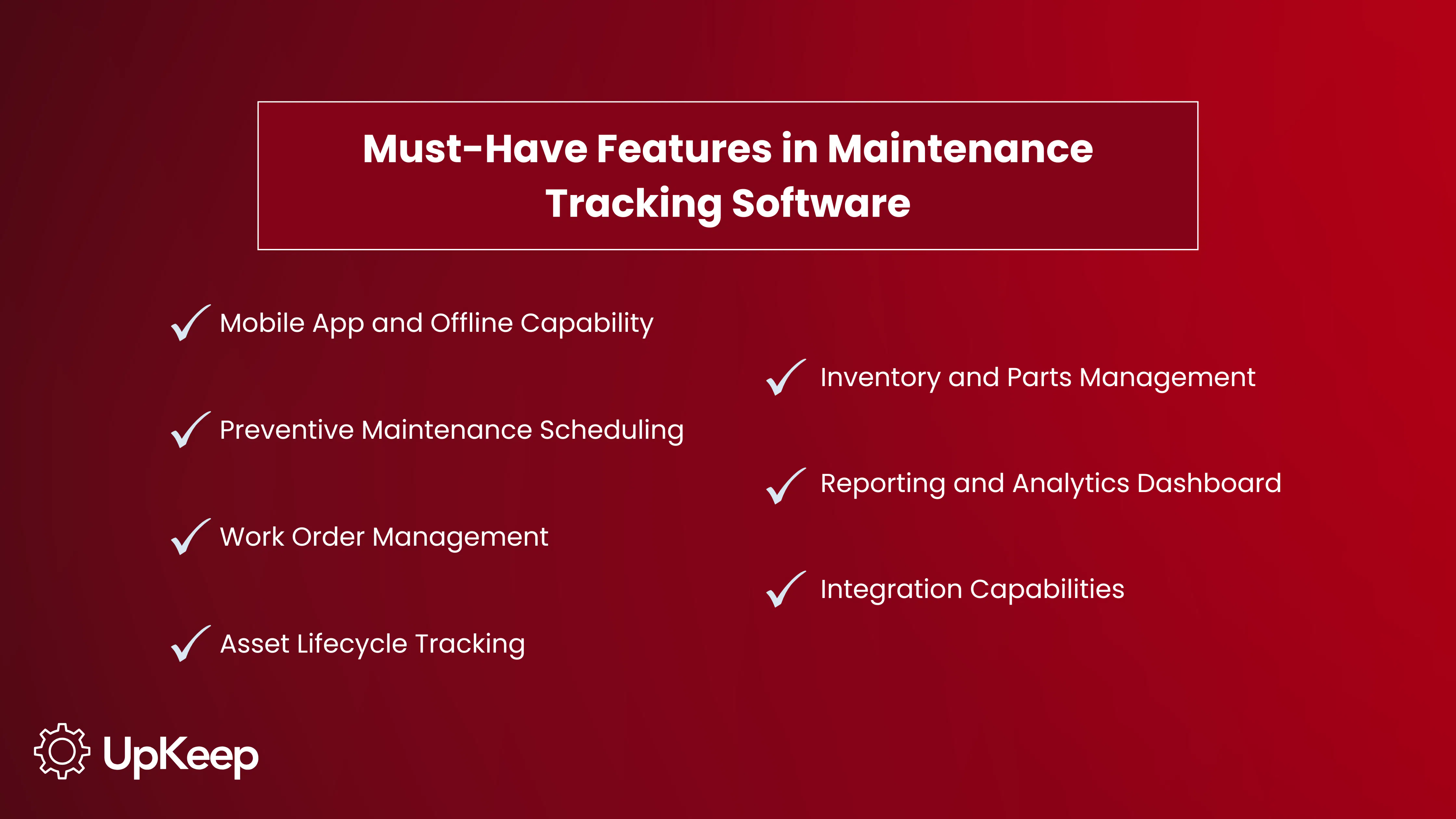
7 Must-Have Features in Maintenance Tracking Software
Selecting the right maintenance platform requires looking beyond basic digital logbooks to features that actively drive operational efficiency. A robust system should empower field teams, automate repetitive tasks, and provide data-driven visibility into asset health.


Mobile App and Offline Capability
Technicians need mobile access to scan QR codes, upload photos, and update statuses directly from the plant floor. Offline capability ensures that technicians can create and update work orders even in dead zones, with data syncing automatically once connectivity is restored.
Preventive Maintenance Scheduling
Automated PM scheduling lets teams schedule recurring tasks based on time or usage intervals, ensuring critical inspections never slip through the cracks. This feature extends asset life by catching small issues before they escalate into expensive breakdowns.
Work Order Management
Efficient work order management serves as the central source of truth for all repairs and inspections. This feature enables managers to create, assign, and track work orders in real time, providing total visibility into what is overdue and who is responsible.
Asset Lifecycle Tracking
To make strategic decisions, managers need a complete history of every piece of equipment from installation to disposal. Asset lifecycle tracking records warranty information, downtime history, and total cost of ownership in a centralized view.
Inventory and Parts Management
Disorganized inventory results in extended downtime when critical spares are unavailable during a repair. Effective software integrates parts management with work orders, preventing both costly overstocking and the operational risk of stockouts.
Reporting and Analytics Dashboard
Customizable dashboards visualize key performance indicators KPIs to prove ROI to leadership. These insights allow reliability engineers to identify trends, optimize schedules, and spot recurring failures.
Integration Capabilities
Integration capabilities enable the software to connect to Enterprise Resource Planning systems, Supervisory Control and Data Acquisition (SCADA) sensors, and business intelligence tools.
Top Equipment Maintenance Tracking Software Solutions in 2026
The Business Research Company values the global equipment management tracking software market at $9.52 billion and is projected to reach $15.06 billion by 2029, growing at a CAGR (Compound Annual Growth Rate) of 9.5%.
To help you navigate this growing space, we ranked the top five solutions based on their ability to deliver immediate ROI, streamline workflows, and scale with your operations.
Read the full 2026 CMMS comparison guide here.
1. UpKeep - Best For Maintenance, Reliability, and Operations Teams Requiring an Agile, Mobile-First Solution
UpKeep differentiates itself by focusing on the technician's experience. It serves as a comprehensive equipment maintenance tracking platform that unifies maintenance, operations, and reliability data into a single ecosystem.
UpKeep's key strengths lie in the features below;
Mobile-First Design: Technicians can complete work orders, scan QR codes, and access manuals directly on their devices, offline.
UpKeep Intelligence: A suite of AI tools that includes Smart Scheduler for optimizing technician assignments and Voice Fill for hands-free, voice-activated data entry.
Ecosystem Integration: Native connectivity with ERPs, SCADA systems, and IoT sensors (Edge) to drive condition-based maintenance.
Outcome Focused: Specifically designed to move teams from reactive "break/fix" cycles to proactive reliability.
2. eMaint
eMaint is used by reliability engineers who need deep integration with their assets. However, it is frequently criticized for its legacy interface, which can be more difficult for non-technical users to navigate than other platforms.
Pros: Strong condition-monitoring capabilities and deep hardware integration.
Cons: Often viewed as clunky, with a steeper learning curve and a longer implementation timeline than other CMMS tools.
3. MaintainX
MaintainX is known for its chat-like interface for internal communication. It offers strong configurability for compliance-heavy industries that require rigid data structures.
Pros: Strong instant messaging features for teams.
Cons: While excellent for communication, it can lack depth in reliability engineering and reporting capabilities found in more comprehensive CMMS platforms.
4. LimbleCMMS
LimbleCMMS has a user-friendly drag-and-drop interface and a high level of customization. It offers a strong self-serve model that allows maintenance managers to build their own workflows.
Pros: Flexible dashboarding and easy setup for small teams.
Cons: Sometimes struggle with complex multi-site visibility and robust enterprise reporting compared to platforms built for global scale.
5. Fiix
Acquired by Rockwell Automation, Fiix provides integration potential for specific industrial setups. The user experience is frequently described as less intuitive than competitors' and often requires technicians to spend more time mastering the workflow.
Pros: Good analytics for identifying trends.
Cons: Users often find the user experience (UX) less intuitive than UpKeep, and it can feel “click-heavy" for technicians in the field.
Ready to make a choice? Review our 2026 CMMS guide now.
Why Maintenance Tracking Software Implementations Fail
Most CMMS implementations fail not because the features are lacking, but because the rollout is too complex. Here are some mistakes businesses make when implementing maintenance tracking software.
Low Adoption Rates
The Problem: Low adoption is the biggest cause of implementation failure. If technicians do not use the software, the system provides zero value.
The Fix: Effective training focuses on the specific workflows technicians use daily. Top equipment maintenance tracking platforms support this by offering intuitive, mobile-first interfaces. When the tool is as easy to use as a personal app, the barrier to adoption disappears.
Poor Data Migration
The Problem: Bad data stops an implementation in its tracks. Many teams try to import years of messy spreadsheet data directly into their new system. This approach creates a garbage-in, garbage-out scenario where technicians cannot use the information they see.
The Fix: Successful teams clean up their data before migration. They standardize naming conventions for assets and spare parts to ensure consistency. This clean slate allows the team to build a reliable foundation from day one.
Large Scale Launches
The Problem: The biggest mistake organizations make is attempting to map every asset, part, and workflow across multiple sites simultaneously. This only leads to burnout and confusion on your team.
The Fix: Smart software implementations start small. Teams should launch with a single pilot group or a critical set of assets to prove value quickly. Once one team sees the impact of the tool, they become internal champions who help drive adoption across the rest of the organization.
UpKeep is the First Choice for Maintenance Tracking
With UpKeep, businesses avoid implementation failures caused by low adoption rates. Unlike many equipment maintenance software, UpKeep offers a mobile-first platform that frontline workers intuitively understand and actually use. It also creates an intelligent source of truth for the organization, with tools relevant to everyday maintenance tracking.
Over 4,000 businesses trust UpKeep to reduce downtime, extend their equipment life, and ensure regulatory compliance. Ready to streamline your operations? Start your free trial today.
Frequently Asked Questions About Equipment Maintenance Tracking
How long does it take to implement maintenance tracking software?
Modern mobile-first platforms like UpKeep are designed for rapid deployment. Most teams can be up and running in days or weeks, not months. The intuitive interface means technicians can often start creating work orders immediately with little to no formal training.
Can I use UpKeep if I don’t have internet access in the field?
Yes. UpKeep’s mobile app features a robust offline mode. Technicians can access manuals, complete checklists, and update work orders while in dead zones. The app automatically syncs all data to the cloud the moment connectivity is restored, ensuring no critical information is lost.
Can the platform scale across multiple facilities?
Yes, users can configure role-based access to ensure site managers see local data while executives view centralized reporting across multiple facilities.
4,000+ COMPANIES RELY ON ASSET OPERATIONS MANAGEMENT
Leading the Way to a Better Future for Maintenance and Reliability
Your asset and equipment data doesn't belong in a silo. UpKeep makes it simple to see where everything stands, all in one place. That means less guesswork and more time to focus on what matters.






![[Review Badge] Gartner Peer Insights (Dark)](https://www.datocms-assets.com/38028/1673900494-gartner-logo-dark.png?auto=compress&fm=webp&w=336)



