Blog Post
CMMS Process Flow Guide: Optimizing Your Maintenance Operations
Explore how information flows within a modern CMMS. Discover how it eliminates bottlenecks, improves workflow efficiency, and standardizes asset management.



Key Takeaways
A structured CMMS workflow keeps maintenance activities organized, measurable, and aligned with broader operational goals.
Data in the CMMS follows a rigorous five-step flow (entry, validation, centralized storage, automated processing, and visualization) so maintenance decisions are based on a single, verified source of truth.
Implementing a CMMS streamlines the entire maintenance process flow and allows organizations to eliminate manual bottlenecks and ensure high-priority safety and production risks are addressed first.
CMMS drives measurable ROI by transitioning teams from reactive firefighting to proactive care, enabling rapid scalability (as seen in the Energy Company example), and preserving institutional knowledge amid labor turnover.
A computerized maintenance management system (CMMS) is the digital nervous system of maintenance operations. Its value lies in how it structures, automates, and optimizes the process flow of maintenance activities. A structured workflow ensures maintenance activities remain organized, measurable, and aligned with broader operational goals.
Without a clear understanding of how data and tasks move through the system, even the best CMMS software can easily become shelfware. This guide explores how the software works, a step-by-step CMMS workflow, and how it improves maintenance efficiency.
How CMMS Software Works: System Architecture and Workflow
Understanding the technical architecture behind CMMS software helps organizations maximize its potential and integrate it effectively into existing systems and workflows.
It consists of several interlocking modules, each of which serves a specific stage of the maintenance process flow.
Asset Management System
This component tracks the asset life cycle from procurement to disposal. It stores critical data such as:
Technical Specifications: Manuals, warranties, and serial numbers
Hierarchical Location: Organizing assets by site, building, and floor
Asset Criticality: Ranking equipment by how vital it is to the operation
Work Order Management
The work order is the currency of the maintenance world. It captures the who, what, where, when, and why of a task. The CMMS flow ensures every task is documented, assigned, and tracked to completion.
Preventive Maintenance Scheduling
This facet moves the organization from firefighting to proactive care. With preventive maintenance (PM) scheduling, managers can trigger work orders based on time (e.g., every 30 days), usage (e.g., every 500 miles), or condition (e.g., when a sensor detects high vibration).
Inventory Management
The CMMS tracks stock levels, storage locations, and lead times for maintenance parts. Then, when a work order is generated, the system can automatically reserve the necessary parts so the technician doesn't arrive at the job site empty-handed.
Reporting and Analytics
A CMMS aggregates data from all assets and locations to generate important maintenance KPIs, such as mean time to repair (MTTR), planned maintenance percentage (PMP), and total maintenance cost.
Mobile Maintenance Interface
Mobile CMMS interfaces allow technicians to scan QR codes on machines, upload photos of broken components, and log their hours right at the point of work for easy, unified cataloging.
Information Flow in CMMS Software
Next, we look at how information flows through the various components of the CMMS. This commonly follows a five-step process, described below.
Step 1: Entry Through Web or Mobile Apps
Information enters the CMMS through multiple channels, each designed for a different user role. This enables the right stakeholders to interact with the system in ways that fit their workflows.
How this works in real time
Operators submit work requests through simplified web forms or mobile apps.
Technicians update work orders from the field using mobile devices.
Planners create PM schedules through the desktop interface.
Managers configure approval workflows and business rules through administrative consoles.
Step 2: Validation and Verification
As data enters the system, validation rules ensure accuracy and completeness, and required fields prevent incomplete submissions.
How this works in real time
Format checks verify that dates, numbers, and codes conform to expected patterns.
Business rules can enforce policies like mandatory safety documentation or approval requirements for purchases exceeding set thresholds.
Step 3: Centralized Storage
All validated information is stored in a centralized database that serves as the single authoritative source for maintenance operations. Centralized storage allows powerful cross-referencing capabilities.
How this works in real time
Using analytics and reporting, you can instantly see work orders associated with a specific asset, parts used by a particular technician, or costs attributed to a department or project.
Step 4: Automated Processing
The CMMS continuously monitors stored data and triggers automated actions based on predefined rules.
How this works in real time
When an asset's meter reading reaches a set threshold, the system generates a PM work order.
When inventory falls below minimum levels, purchase requisitions are created.
When work orders remain open past their due dates, escalation notifications are sent to supervisors.
Step 5: Reporting and Visualization
The final stage of information flow transforms data into insights through dashboards, reports, and visualizations.
How this works in real time
Real-time dashboards provide at-a-glance status updates.
Trend charts reveal patterns over time.
Comparative analytics highlight differences between facilities, departments, or asset classes.
Step-by-Step CMMS Workflow
Understanding the workflow helps organizations configure their CMMS to align with operational realities and train users effectively.


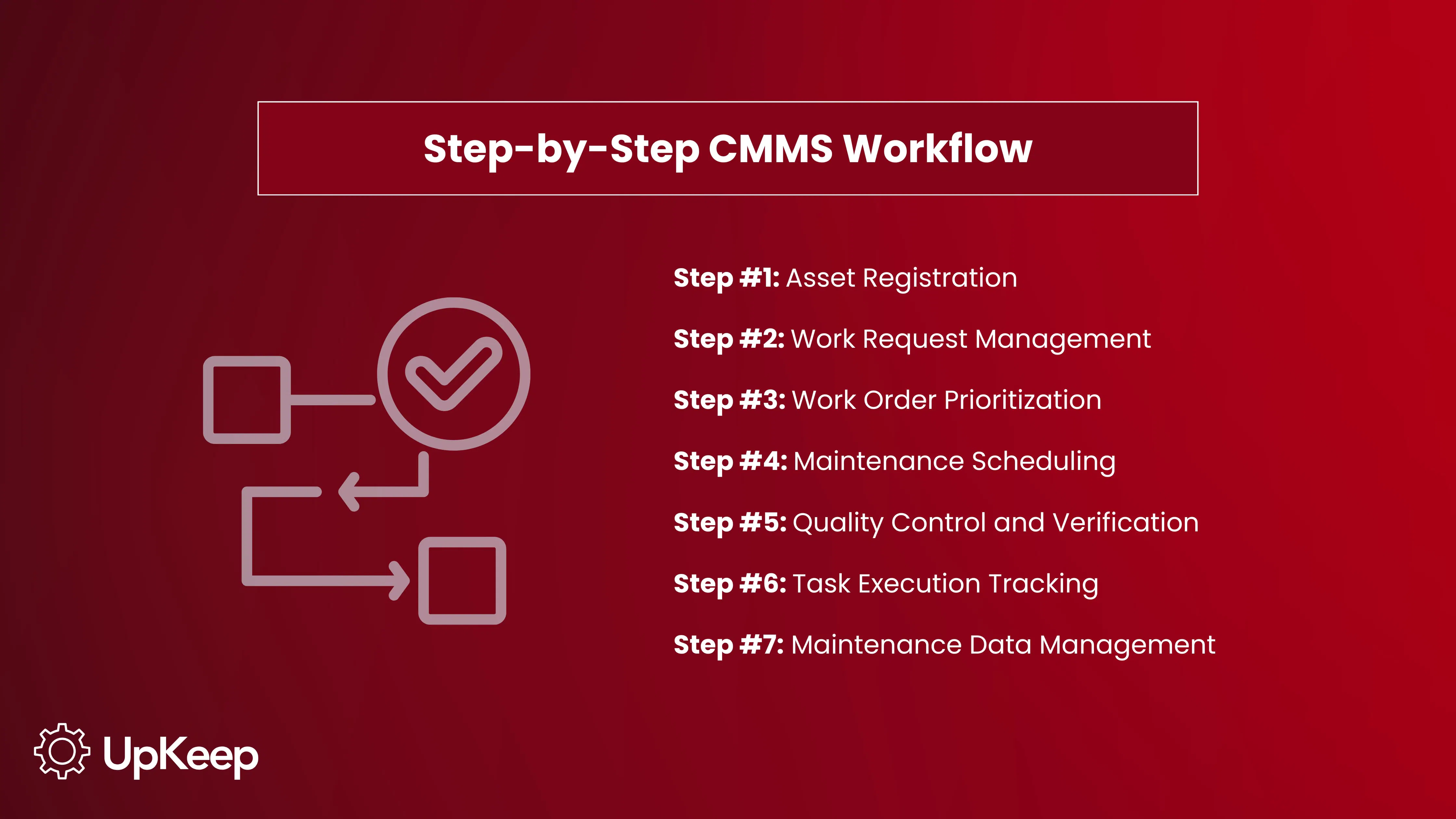
Asset Registration
The CMMS journey begins with comprehensive asset registration. Each piece of equipment is entered into the system with critical identifying information, such as asset ID, description, location, manufacturer, model number, serial number, and installation date.
Effective asset registration also integrates criticality ratings, system hierarchies, and custom fields that store industry-specific data, such as regulatory compliance requirements or environmental conditions. Many organizations attach photos and diagrams as well to help technicians quickly identify equipment, especially in complex facilities.
Work Request Management
When someone identifies a maintenance need, they submit a work request through the CMMS. The request captures essential information like which asset needs attention, the problem observed, the urgency of the situation, and any safety concerns. Requesters can attach photos or videos that help maintenance teams grasp the issue before arriving on site.
Once submitted, the request enters a review queue where maintenance managers or supervisors evaluate it. They determine whether immediate action is required or if the work can be scheduled during planned downtime. They also assess resource needs and verify that the request is properly classified before approval.
Approved requests are converted into work orders, while declined requests are documented and closed with explanations.
Learn more: The Difference Between Work Requests and Work Orders
Work Order Prioritization
Effective prioritization ensures critical issues receive immediate attention while less urgent tasks are scheduled efficiently.
CMMS prioritization typically uses the following criteria:
Safety Impact: Does the issue pose risks to personnel?
Operational Impact: Will it stop production or reduce capacity?
Asset Criticality: How important is this equipment to core operations?
Regulatory Requirements: Are there compliance deadlines for this work order?
The CMMS can automate initial prioritization based on asset criticality and requester inputs, then allow managers to adjust based on broader operational context.
Maintenance Scheduling
With prioritized work orders in hand, managers can create optimized schedules that balance multiple constraints within the organization, the most common of which are:
Technician availability
Technician skill sets
Availability of parts and materials
Production schedules that dictate when equipment can be taken offline,
Coordination requirements for multiple crafts working together
The maintenance scheduling module provides calendar views that show workload distribution across time periods and teams. Planners can identify overloaded weeks and redistribute work to avoid both overwhelming teams and idle time.
Task Execution Tracking
When technicians get started, they open the assigned work order on their mobile device or workstation. The CMMS displays complete task instructions, safety procedures, required tools, and parts to be used. Technicians can also log their activities in real time to prevent errors and delays in paper systems where they have to record work on clipboards and transcribe it later.
If additional issues are discovered during execution, technicians can create follow-up requests directly from the current work order, ensuring nothing is lost during handoff. If unexpected parts are needed, they can request them from inventory and automatically track material costs against the work order.
Quality Control and Verification
Before closing work orders, organizations can implement verification actions within the CMMS to ensure quality and completeness. This might include photographic evidence of repairs, functional testing to confirm the equipment is operating properly, or customer sign-off on service requests. The CMMS enforces configured verification requirements so work orders remain open until the required steps are completed.

Manager’s Pro Tip
Having quality control and verification in your CMMS workflow maintains standards and provides documentation for compliance audits.
Maintenance Data Management
The final step in the CMMS workflow is the systematic capture and management of maintenance data. Every completed work order adds to the knowledge base. You learn what failed and why, how it was repaired, how long it took, what it cost, and how effective the repair was.
This historical data enables powerful analytics that drive continuous improvement.
Failure pattern and downtime analyses reveal chronic problems worth solving.
Asset-level cost tracking identifies equipment that should be replaced rather than repaired repeatedly.
Time studies show which tasks take longer than estimated, enabling better planning.
The CMMS also manages knowledge through maintenance logs. When similar issues arise in the future, technicians can review past solutions instead of starting from scratch. This knowledge preservation is especially valuable as more experienced workers retire and new technicians join the team.
How CMMS Improves Maintenance Workflow Efficiency
The structured approach of a CMMS delivers multiple efficiency improvements that directly impact your bottom line.
Elimination of Bottlenecks
Traditional maintenance operations suffer from numerous bottlenecks like:
Work requests pile up in someone's email inbox.
Approval delays stall urgent repairs.
Parts availability is uncertain until technicians arrive at the job site.
Paperwork orders are lost or misfiled.
A CMMS eliminates these obstacles through digital workflows with built-in accountability. Digital work orders are easily accessible, and automated notifications keep stakeholders informed of progress.
The numbers confirm these benefits, as research by ATS and Plant Engineering magazine found that implementing a CMMS led to an increase in productivity for 74% of the maintenance professionals surveyed.
Process Standardization
CMMS enforces standardized workflows that ensure everyone follows the same processes. This creates predictable, repeatable results and establishes baselines for continuous improvement.
Standardization also facilitates smoother training, as new employees learn to work consistently rather than adapting to individual preferences. Knowledge transfer becomes easier when everyone uses the same terminology and procedures.
Reduced Human Error
Manual maintenance supervision introduces countless opportunities for error. Research has shown that human factors are responsible for 75-80% of factory errors. A CMMS eliminates many of these through automation and validation. Calculations are executed consistently using defined formulas, automated scheduling ensures tasks aren't forgotten, and digital communication creates clear audit trails.
The result is higher-quality data that supports better decision-making and fewer operational mistakes.
Faster Decision-Making
When maintenance data is scattered across spreadsheets, filing cabinets, and individuals, answering simple questions can take hours or days of research. A CMMS puts this information at decision-makers' fingertips through dashboards and reports that update in real time. As a result, managers can spot developing problems immediately and respond proactively, budget holders can continuously track spending against plans, and executives can access KPIs without waiting for staff to compile reports.
This accelerated decision-making enables agile responses to changing conditions and data-driven resource allocation that optimizes maintenance investments.
Stronger Training Programs
CMMS data provides visibility into skill gaps and training needs, which supports targeted investments in development.
Managers can see which technicians successfully complete various work types and compare their performance metrics (e.g., time to completion, quality scores, callback rates). More broadly, organizations can identify high performers to mentor others and spot skill deficiencies that need more formal training.
Role-Based CMMS Process Optimization
Different stakeholders interact with a CMMS in distinct ways, and effective implementation optimizes the experience for each role.
What do technicians, managers, and executives need in a CMMS to optimize their maintenance operations?
Technicians
Technicians need a CMMS that’s fast, intuitive, and mobile accessible. They don't have time to navigate complex menus or enter excessive detail. Their optimized workflow includes:
Simplified mobile interfaces with large touch targets, barcode scanning for quick asset identification, voice-to-text for notes, and offline capability for areas with poor connectivity.
Work order displays should prioritize actionable information: What needs to be done, where it's located, and what parts to bring.
Historical data and troubleshooting guides should be easily accessible without cluttering the primary view.
Photo capture should be a simple one-tap to encourage visual documentation.
Organizations that optimize their CMMS for technician efficiency will see improvements in adoption and data quality, as workers find the system helps rather than hinders their productivity.
Managers and Supervisors
Maintenance managers and supervisors use a CMMS to plan work, allocate resources, and monitor team performance. Their optimization needs include:
Calendar and dispatch views that show workload distribution
Drag-and-drop scheduling for quick adjustments
Real-time status dashboards showing progress toward daily targets
Exception reports that highlight overdue work or safety issues
Automated notifications that alert them to situations requiring intervention without overwhelming them with routine updates
Effective supervisor interfaces balance details with broad overviews, allowing them to drill down into specific work orders when needed while maintaining situational awareness of overall operations.
Executives
Executive stakeholders need strategic insights from maintenance data.
Executive reports should present information with clear indicators, benchmarks, and specific capabilities that support investigation without operational expertise. The ability to view data by business unit, facility, or asset class enables targeted interventions and resource allocation.
Best Practices for Implementing CMMS Process Flow
Successful CMMS implementation requires careful planning and execution across several critical dimensions.
Process Mapping
Before configuring your CMMS software, document current maintenance processes to understand what works, what doesn't, and where improvements are needed.
Process mapping involves interviewing stakeholders at all levels, observing current workflows, identifying pain points and bottlenecks, and designing future-state procedures that leverage CMMS capabilities.
This discovery phase is when you set up the CMMS to support how work gets done, rather than imposing theoretical workflows that don't align with operational realities. It also informs stakeholders of how processes will change.
Smart Configuration
Modern CMMS platforms offer extensive customization capabilities, and the temptation to customize every feature can cause unnecessary complexity. Smart configuration involves implementing core functionalities like asset management, work orders, and basic PM before adding advanced capabilities.
Starting simply allows users to become familiar with fundamental features before tackling sophisticated workflows. It also provides quick wins that build confidence and momentum for later enhancements.
Training
Comprehensive training ensures users can effectively leverage CMMS capabilities. Training should be role-specific and include hands-on practice with realistic scenarios, which builds competency better than theoretical presentations.
Timing is important too. Training too far before going live leads to knowledge decay, while scheduling it the day before creates stress and inadequate preparation. Ideally, conduct training one to two weeks before launch and provide readily accessible job aids and reference materials.
CMMS Process Flow: Real-World Examples
Examining how organizations have successfully implemented a CMMS provides valuable insights and practical lessons that you can apply in your own company.
Energy Company: Automating Processes to Enable Rapid Growth
A global renewable energy company operating in Europe struggled with manual spreadsheets and email systems to track labor hours and spare parts across a growing client base. As the company expanded, these inefficient processes created bottlenecks that threatened their ability to scale operations and meet contractual KPI requirements.
The management team selected UpKeep's mobile-first CMMS three years ago as a solution. With UpKeep embedded in 90% of operations, the company achieved significant improvements:
Time Savings: Automated reporting replaced hours of manual spreadsheet work with one-click report generation. As a result, engineers who saved just 10 minutes over the course of a year would generate £150,000 in savings.
Spare Parts Management: Automated inventory tracking with minimum stock level alerts eliminated all contractual damage payments for missing parts.
KPI Tracking: Previously cumbersome manual KPI reporting became automated, with roughly half of all client reports now generated directly from UpKeep data.
Explosive Growth: The company grew five times in just four months after securing a large contract and expects to double again within the year. Management credits UpKeep as essential to handling this rapid expansion.
Today, the team uses UpKeep to service nine offices throughout Europe, demonstrating the platform's scalability across distributed international operations.
Read more here.
Foertmeyer and Sons: Improved Efficiency
Foertmeyer and Sons, a greenhouse operation, experienced rapid growth when they added a chrysanthemum program and expanded from 15,000-20,000 plants to 300,000 plants annually. This expansion increased equipment and facility usage significantly, but the company had no maintenance system in place, as all information was stuck in the heads of one or two people.
A consultant helping organize their maintenance data with Excel spreadsheets quickly realized the company needed more. After exploring CMMS options, Foertmeyer & Sons ultimately selected UpKeep for assistance.
Since implementation, the company has realized greater organization, better asset tracking, and improved transparency in labor and material costs.
Most significantly, Foertmeyer & Sons has boosted their PM program from only 10% of their workload to roughly half, which has led to greater reliability and better overall production.
The UpKeep CMMS system now helps the company track repair costs, monitor technician performance and workload, and facilitate communication across the facility.
Read more here.
Frequently Asked Questions About CMMS Process Flow
What level of technical expertise is required to use CMMS software effectively?
Most modern platforms prioritize intuitive design to drive high adoption rates among field technicians. UpKeep is built specifically for non-technical users, featuring a mobile app that operates much like the standard applications people use in their daily lives. While administrators may need to understand basic data structures to set up asset hierarchies, technicians primarily interact with simple interfaces to scan QR codes, attach photos, and log hours.
What are the most common reasons CMMS implementations fail?
Implementation failure typically stems from software complexity or a lack of team buy-in rather than technical limitations. Many organizations struggle when they adopt bloated legacy systems that technicians find too difficult or time-consuming to use in the field. Failure also occurs when there’s no clear strategy for data migration, which leads to incomplete records that the team eventually stops trusting.
How can I evaluate ROI from CMMS process flow improvements?
You can measure ROI by tracking specific maintenance KPIs before and after implementation. Teams also see ROI through:
Reduced labor costs by increasing wrench time and decreasing administrative paperwork
Lower inventory spend by setting reorder thresholds and tracking parts usage accurately
Extended asset life through consistent, automated PM scheduling
Do I need to redesign our maintenance processes before adopting a CMMS?
You don’t necessarily need to redesign every process, but the transition is an ideal time to standardize disorganized workflows. UpKeep allows you to digitize existing paper-based or manual processes while providing tools to move from reactive cycles to planned maintenance
4,000+ COMPANIES RELY ON ASSET OPERATIONS MANAGEMENT
Leading the Way to a Better Future for Maintenance and Reliability
Your asset and equipment data doesn't belong in a silo. UpKeep makes it simple to see where everything stands, all in one place. That means less guesswork and more time to focus on what matters.






![[Review Badge] Gartner Peer Insights (Dark)](https://www.datocms-assets.com/38028/1673900494-gartner-logo-dark.png?auto=compress&fm=webp&w=336)



