Entrada en el Blog
UpKeep Update: Configurable Preventive Maintenance Triggers
Today, we are thrilled to announce the ability to edit Preventive Maintenance trigger cadences! Users can have more control over the timing of PM schedules.
UpKeep Update: Configurable Preventive Maintenance Trigger Cadences


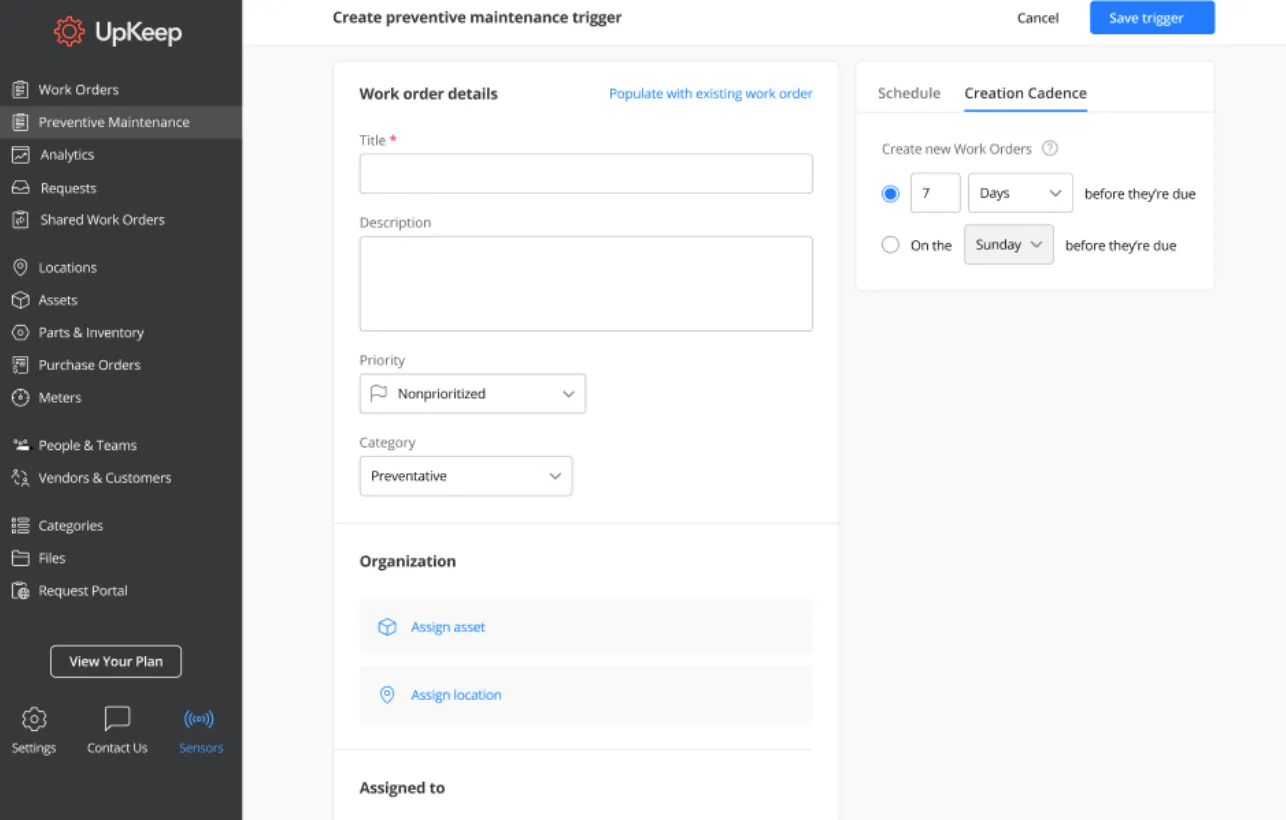
Today, we are thrilled to announce the ability to edit Preventive Maintenance trigger cadences! Users will now have more control over the timing of when a work order appears in a technicians’ feed.
PM trigger cadences will help Maintenance Planners and Schedulers, as well as Maintenance Managers, more easily assign tasks to team members at the right time. With the right timing of planned maintenance activities, you can achieve longer equipment lifespans and save on unnecessary breakdowns. We wanted to make it easier for maintenance teams to maintain accuracy around the timing of performing preventive maintenance.
What is Preventive Maintenance?
We released Preventive Maintenance Beta last year to set the foundation for all that is to come in the future of maintenance planning and scheduling in UpKeep. If you want to schedule routine adjustments, repairs, or inspections in UpKeep, you can simply do so in the Preventive Maintenance section. Establishing a routine PM program has huge benefits in cost savings through reduced equipment downtime. Preventive maintenance not only pays for itself, but results in an average 545% return on investment.
What is changing in Preventive Maintenance?
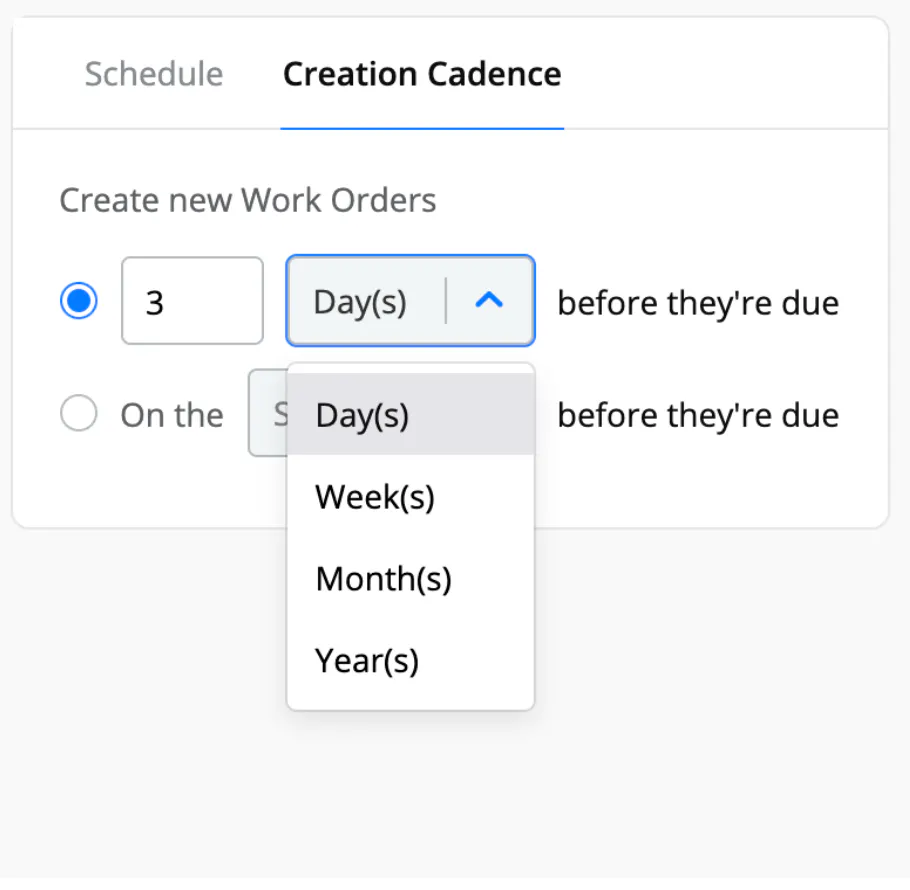
We are improving the Preventive Maintenance Beta feature to allow users to edit or change the frequency of when a work order is generated within its PM trigger. All PM triggers currently have a set cadence when work orders are generated. This feature allows admins to customize the timing of when work orders are generated. For example, if you had a yearly PM trigger, the work order currently is created 3 months before the due date. Now, you can change the 3 months to 6 months for more customized planning.




Who can access Preventive Maintenance?
Admins within UpKeep’s Starter, Professional, and Business Plus plans can access Preventive Maintenance as part of their paid packages.
What are some of the major changes?
Editing Preventive Maintenance Cadences
Previously, all PM triggers had a set cadence in which work orders were generated; however, not all of the work orders were immediately created. This feature allows admins to edit and change from that default schedule.
It is important to note you cannot edit the cadence of work orders that are scheduled “after completion.” All work orders need to be on a time-based schedule, rather than completion based, in order to have configurable cadences.
Options for Creating Cadences
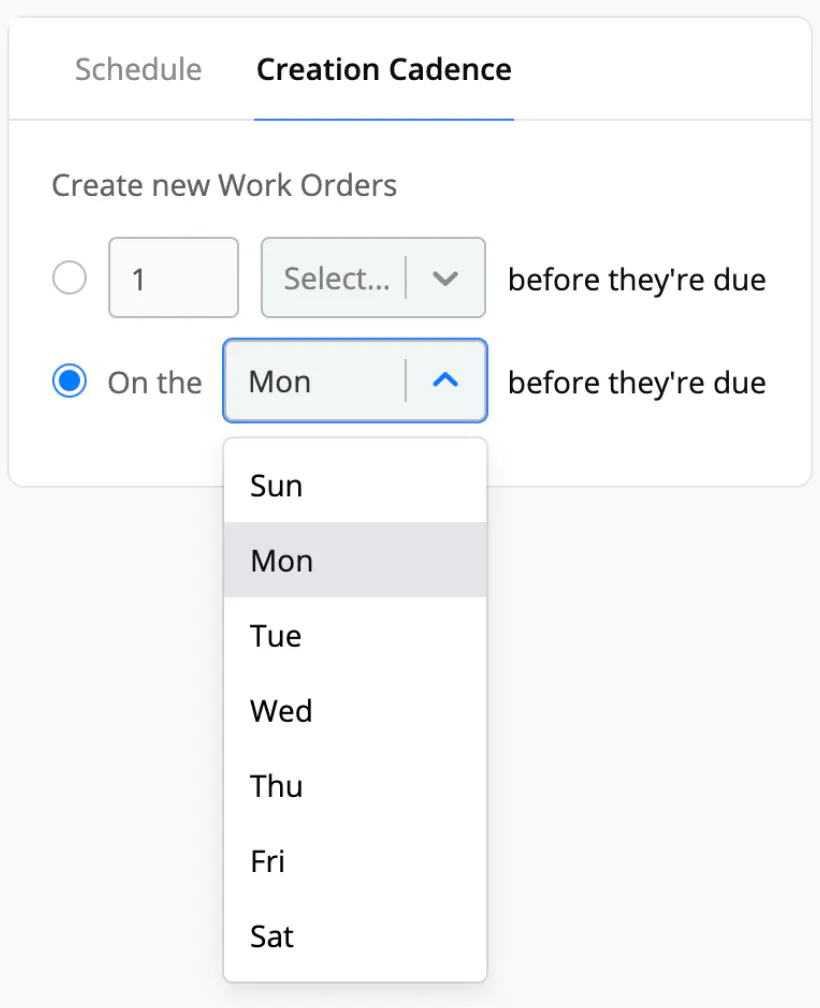
You can either create cadences during a certain period of time before the work order due date, or you can create a cadence on a specific date of the week before the work order is due. For example, you can schedule a monthly filter inspection to create work orders to appear on technicians’ calendars 3 days before the work order is due. Alternatively, if your team has more time to spend on PMs on a certain day of the week, you can schedule the monthly filter inspection to appear on the Monday before the work order is due.
You can view the cadence schedule for every trigger in the PM trigger details view.
What’s to come in the future with Preventive Maintenance
We are constantly updating Preventive Maintenance to give you more options in how you assign preventive maintenance work orders to your team. Here’s what you can expect to see in the coming months ahead within Preventive Maintenance:
A refreshed calendar view of upcoming PMs
Importing and exporting PMs
Event-based triggers and automated workflows
Usage-based maintenance and meter triggers
Predictive maintenance
Advanced scheduling
And much more!
¿Quieres seguir leyendo?



Artículo
Cómo crear una lista de verificación de mantenimiento preventivo


Artículo
7 consejos para un mejor programa de mantenimiento preventivo



Artículo
Ejemplos de mantenimiento preventivo que ahorran y desperdician dinero
MÁS DE 4000 EMPRESAS CONFÍAN EN LA GESTIÓN DE OPERACIONES DE ACTIVOS
Liderando el camino hacia un futuro mejor para el mantenimiento y la confiabilidad
Los datos de sus activos y equipos no pertenecen a un silo. UpKeep simplifica ver dónde se encuentra todo, todo en un solo lugar. Eso significa menos conjeturas y más tiempo para concentrarse en lo que importa.






![[Review Badge] Gartner Peer Insights (Dark)](https://www.datocms-assets.com/38028/1673900494-gartner-logo-dark.png?auto=compress&fm=webp&w=336)



