Entrada en el Blog
Free Fleet Maintenance Log Template: Track Every Service, Every Vehicle
Download a free fleet maintenance log template for Excel or PDF. Track service history, costs, and compliance for every vehicle in your fleet.



Key Takeaways
A fleet maintenance log creates the asset history that makes repair-versus-replace decisions defensible. Without records, replacement timing is guesswork driven by gut feel rather than cost data.
Structured logs reveal which vehicles are draining your budget. High-cost assets hide inside fleet averages until you track cost at the vehicle level.
Timestamped service records and DVIR logs satisfy DOT audit requirements. When an inspector requests 90 days of pre-trip inspections, a complete log yields a report, not a search through filing cabinets.
A spreadsheet works for small fleets, but manual logging breaks down as the operation grows. With 10–15 vehicles or multiple technicians entering data, version conflicts and missed entries start to corrupt the record.
Preventive maintenance compliance depends on knowing when service was last performed. A log that tracks mileage, engine hours, and service history per vehicle is what turns a PM schedule from a calendar guess into a usage-based trigger.
Every vehicle that’s down is lost uptime, whether the failure was preventable or not. The difference is avoidable breakdowns leave a paper trail of missed opportunities: skipped inspections, unlogged fluid issues, a coolant leak that was noted once and never followed up on, etc.
A fleet maintenance log fixes the first problem (no record) but doesn’t solve the second (having no system to act on the data). When records exist in isolation, disconnected from the decisions they should be driving, the resulting gap is where most fleet operations lose money.
This guide covers what a maintenance log should include, how to create one, and when a spreadsheet stops being enough. The free template at the end gives you a working starting point.
The goal is to produce a log that doesn’t just record what happened but tells you what to do next.
What Is a Fleet Maintenance Log?
A fleet maintenance log is a structured record of every service event performed on a vehicle: what was done, when, at what mileage, by whom, and at what cost. It covers preventive maintenance, corrective repairs, inspections, and recalls across every asset in the fleet. It comes in four formats — paper, Excel or Google Sheets, PDF, and CMMS — each with different tradeoffs.
It's important to distinguish it from two related documents:
A work order is task-level. It authorizes and tracks a specific repair from request to completion.
An inspection report is a snapshot of a vehicle’s condition. It records the vehicle’s state at a specific point in time.
The maintenance log is the historical record that sits behind both: It captures what was completed across all work orders and inspections for a given asset over its entire service life.
Why Vehicle Maintenance Logs Matter for Fleet Operations
A log provides visibility into failure patterns, a data-backed basis for replacement decisions, and audit trails when a DOT inspector requests records on demand. This record is also imperative for:
Compliance: FMCSR Part 396 requires the retention of maintenance records for commercial vehicles. Missing or incomplete records can trigger DOT violations even when the maintenance was performed correctly. A log that exists only in someone's memory might as well not exist at all.
Cost visibility: Per-vehicle records make the cost per mile calculable. Total maintenance spend divided across a fleet produces an average that masks the real picture. For example, one vehicle running at $0.28 per mile looks identical to five running at $0.08 until you break the number down by asset. High-cost vehicles hide inside fleet averages until you track cost at the vehicle level.
Repeat failure detection: One coolant leak repair isn’t a major concern, but if the same vehicle has three coolant leaks in six months, that’s an alarming pattern, and logs capture these clearly. Without them, by the time a repeat failure is obvious, the damage will have already compounded.
Repair-versus-replace decisions: Replacing a vehicle without a full service history is just guessing. A vehicle that’s had $14,000 in repairs over 18 months should likely be higher on the chopping block than one that hasn’t, but you need the records to prove it. Logs turn that decision into something you can clearly justify to leadership.
PM program integrity: Usage-based preventive maintenance (PM) depends on knowing each vehicle’s last service mileage and current odometer reading. Without that data, PM intervals default to estimates that inevitably drift.


What to Track in Your Fleet Maintenance Log
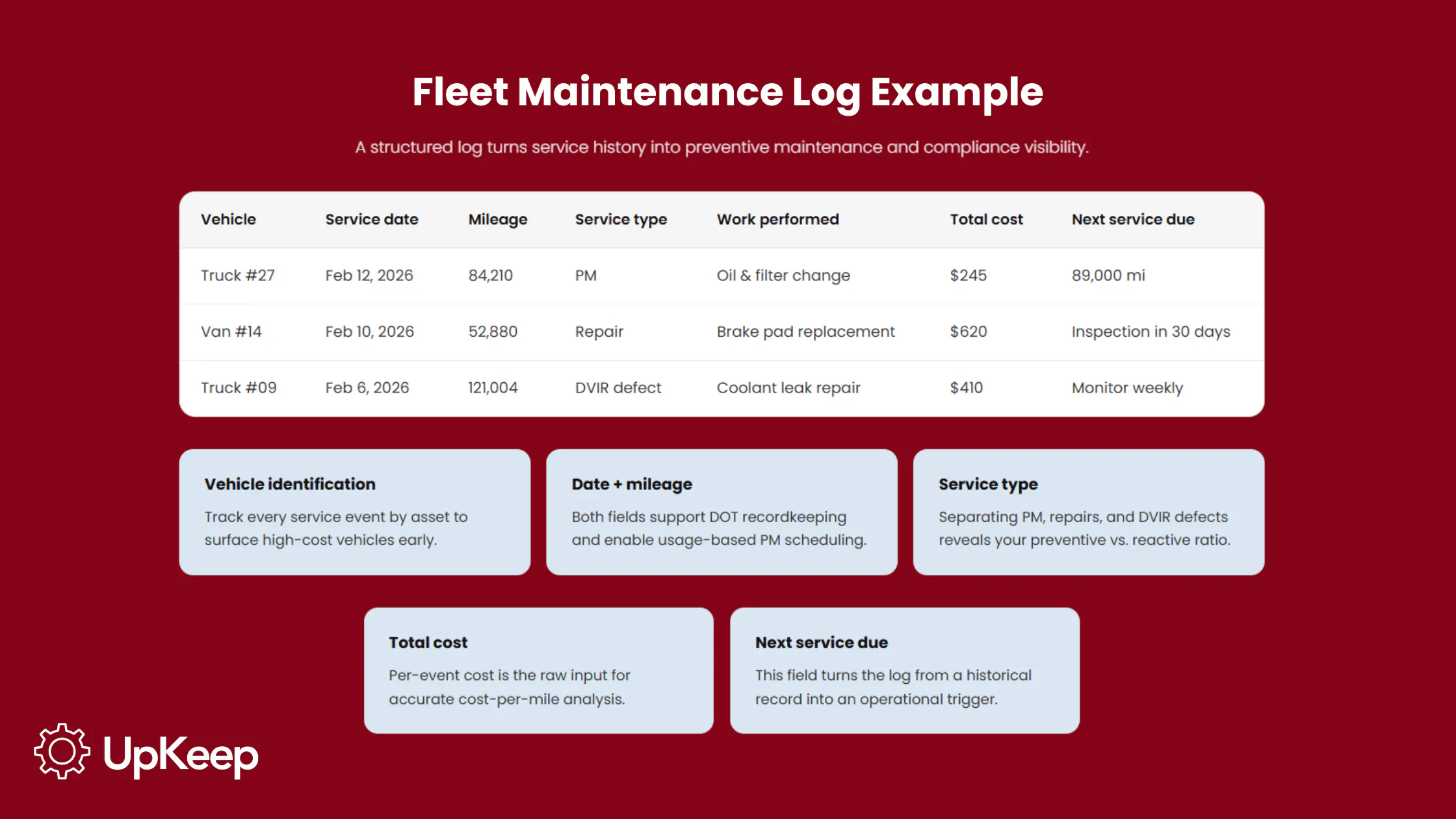
Organize records by data category, not by spreadsheet column. Each category serves a specific operational purpose.
Category | Fields to Include |
Vehicle Identification | VIN, license plate, year/make/model, asset number, assigned driver or department |
Service Event | Date of service, mileage at service, engine hours (if applicable), service type (PM, corrective, inspection, recall) |
Work Performed | Description of repair or maintenance, technician name, labor hours |
Parts & Materials | Part name, part number, quantity, unit cost, vendor, date ordered |
Total Cost | Labor cost, parts cost, total cost per event, total time out of service: the inputs for CPM calculation |
Next Service Due | Next scheduled mileage or date: the field that makes the log operational rather than purely historical |
Compliance Flags | DVIR result (pass/fail), DOT inspection date, recall status, certification expiry |
Notes | Observed conditions, driver-reported issues, deferred work, follow-up required |
Two fields are especially critical here: Next Service Due is the forward-looking trigger. Without it, the log records what happened but doesn't drive what happens next.
Total time out of service, meanwhile, sits alongside labor cost because a two-hour repair that keeps a vehicle down for three days has a different operational cost than the labor line alone captures.

How to Create a Fleet Maintenance Log
A log that starts with incomplete vehicle data or inconsistent field definitions produces gaps that compound over time. To avoid unnecessary mistakes, follow these recommendations.
1. Choose a format that matches your fleet size. A single-vehicle sheet works for owner-operators and small fleets, while a master log with one row per service event, filterable by VIN or asset number, scales better for more than five vehicles. (The template at the bottom of this page covers both.)
2. Populate vehicle identification fields using the VIN. Manual data entry of year, make, model, and specs can introduce errors that cause mismatches later. VIN lookup tools auto-populate these fields, eliminating that risk from the start.
3. Create a standard service event row and log by both date and mileage. FMCSA (49 CFR Part 396.3) requires maintenance records to include the date of service and the odometer reading, so logging both is the compliance baseline for commercial fleets. Mileage should drive PM decisions, while the date satisfies the audit requirement.
4. Add cost columns and build a running total per vehicle. Log labor costs, parts costs, and total cost per event separately. That breakdown is the raw data for CPM calculation.
5. Include a “Next Service Due” field on every event. Without this, the log is historical only. The next service mileage or date on every row is what turns a record into a PM trigger.
6. Establish a logging protocol. Decide who creates logs, when, and where records are stored before the first entry is made. Prioritize consistency over format; a simple log completed after every service event outperforms a sophisticated one that’s updated quarterly.
Types of Maintenance Logs
Paper logs have the lowest setup cost but the highest compliance risk. Records become lost, handwriting can be illegible, and there's no audit trail for who logged what or when. This format is acceptable for one to three vehicles where a single person manages all maintenance, but isn’t scalable beyond that.
Excel and Google Sheets are the standard entry point for most fleet operations since they’re free, shareable, and customizable. The limitation isn’t the format but the workflow.
As fleets grow, manual entry across multiple technicians starts to create conflicting versions, missed entries, and data gaps. A shared spreadsheet also has no audit trail, no automatic work order generation, and no way to flag when a record is incomplete.
PDF forms serve a specific purpose: pre-trip inspection records and DOT-facing documents that require a signature. Since a PDF only captures a moment in time and not a searchable service history, these forms can’t substitute for a master log.
CMMS and fleet software auto-generate records from completed work orders, link directly to DVIRs and telematics alerts, and calculate CPM. The log exists as a byproduct of the workflow rather than a separate task someone has to remember to complete.
For fleets of any size, once manual tracking starts to produce blind spots, the log becomes an operational risk. The decision to upgrade isn’t driven by fleet size but whether your current system is limiting visibility and obscuring the data you rely on.
How Maintenance Logs Support Preventive Maintenance Programs
PM schedules are only as accurate as the data they draw on. A PM program without a complete service history works from estimates, and estimates can skew.
The baseline problem
Every PM decision starts with the same question: What was the last service mileage, and what’s the current odometer?
If mileage and hour history aren’t captured consistently, PM becomes calendar-driven by default. That’s how, despite completely different wear patterns, a high-mileage delivery van and a low-mileage field truck end up on the same schedule.
Usage-based PM fixes that, but it only works when the log is current.
Completion rate visibility
Logs reveal when PM intervals are missed before the consequences show up as breakdowns. PM completion rate drops first, then breakdown frequency rises. Catching the drop in logging involves addressing a procedural gap; missing it means inheriting an emergency repair.
Interval tuning
A full service history lets you make maintenance decisions based on how the car performs in the field, not just the factory’s standard schedule. If the oil still looks clean at 5,000 miles, that’s evidence you can safely extend the interval. If it’s already dirty at 3,000 miles though, you should shorten it.
Without that record, any change is just a guess, rather than a decision backed by data. Important metrics to track include PM completion rate, MTBF, and preventive-to-reactive ratio.
For a comprehensive overview of fleet maintenance strategy, see UpKeep’s fleet maintenance best practices guide.
Download the Free Fleet Maintenance Log Template
The template is available in three formats depending on how your operation is set up.
Master fleet log (Excel/Google Sheets). All vehicles in one sheet, filterable by VIN or asset number. Includes a CPM auto-calculation row, dropdown options for service type, and conditional formatting that flags overdue service and DVIR failures. Built for fleet managers tracking 5–50 vehicles.
Single-vehicle log (Excel/Google Sheets). One sheet per vehicle, designed for owner-operators or small fleets where per-vehicle details matter more than cross-fleet filtering.
PDF inspection and service record. DOT-format pre-trip inspection and service record with signature fields. Designed for audit readiness and driver completion at the vehicle.
All three templates include the eight data categories covered above. Use them as a starting point and adjust columns for your specific fleet type, duty cycle, and compliance requirements:
When to Upgrade from a Spreadsheet to Fleet Maintenance Software
When the record is no longer enough, you need fleet maintenance software to manage a system. The signs you’ve passed that threshold include:
Fleet size crosses 10–15 vehicles: Each vehicle requires manual updates after every service event. One missed entry creates a gap in the record that’ll slowly compound. Above 15 vehicles, the maintenance burden of keeping the spreadsheet accurate starts to rival that of keeping the fleet running.
Multiple technicians are logging simultaneously: A shared spreadsheet has no version control, so two technicians who update the same file at the same time will produce conflicts. There's no audit trail for who entered what, no way to flag incomplete records, and no notification when an entry is skipped.
DOT audits or compliance pressure increases: Manual records can’t produce filtered reports on demand. When audits hit, manual records turn into a report-building sprint. A CMMS exports inspection history on demand.
Telematics data doesn't connect to work orders: Fault alerts that land in an email inbox and don’t automatically generate a work order only document, rather than prevent failures. The gap between alert and action is where preventable breakdowns happen.
Reactive repairs are outpacing planned maintenance: When more than half of maintenance work consists of emergency repairs rather than scheduled PM, the log isn’t driving decisions; it's recording consequences. That ratio is a leading indicator and shows up in the data before it appears in the budget.
Repeat failures on the same vehicle are frequently missed: Manual logs rarely uncover patterns across months of data without deliberate analysis. A CMMS automatically flags repeat failures, which is the difference between catching a chronic problem early and replacing a vehicle that could have been saved.
Metrics to watch: PM completion rate, emergency repair ratio, and maintenance turnaround time (work order opened until vehicle returned to service).
From Manual Logs to Operational Control
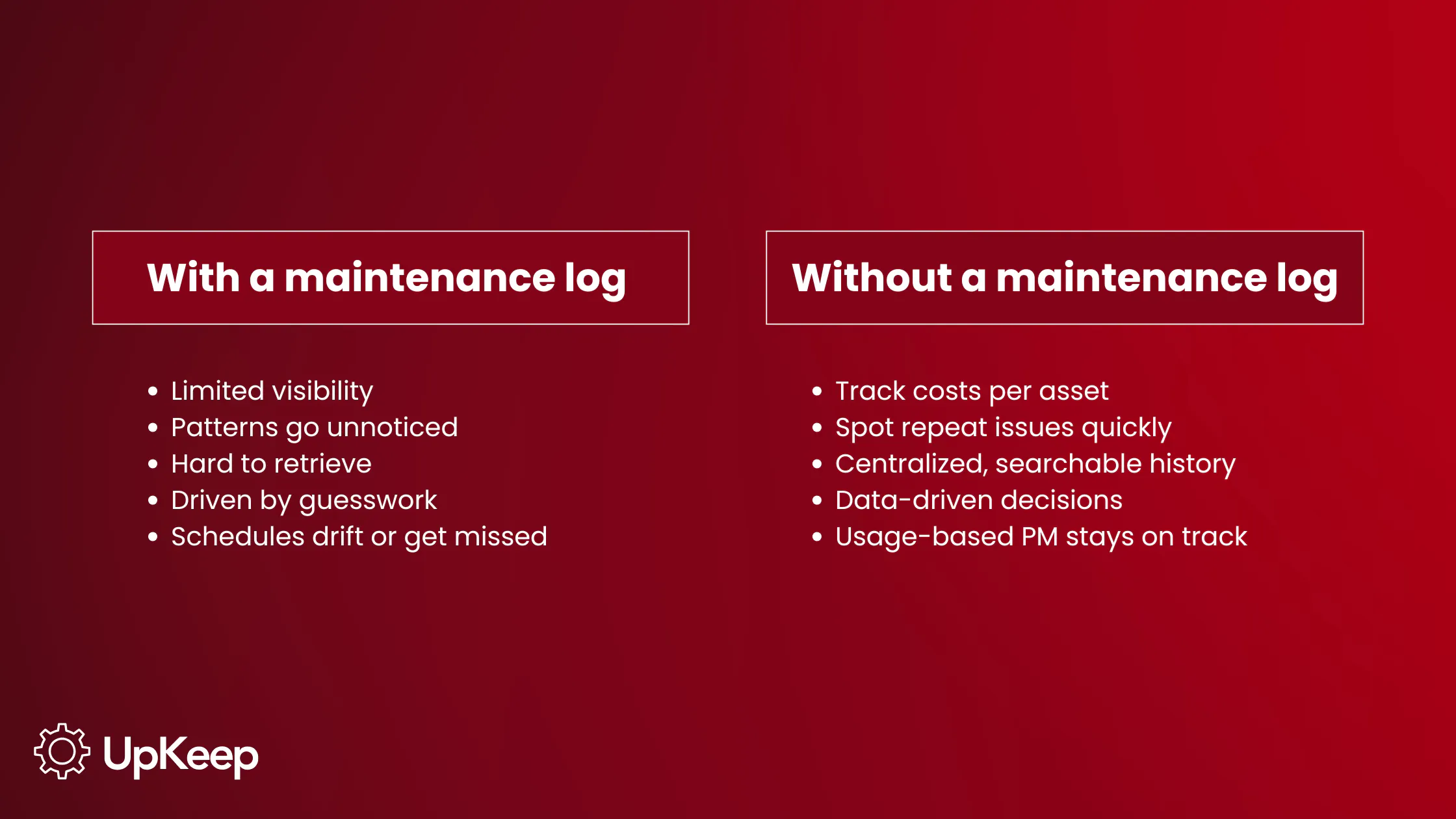
Without a complete maintenance log, replacement decisions are made on gut feel, PM intervals are based on calendar guesses, compliance records are assembled by hand under audit pressure, and there’s no visibility into which vehicles consume budget disproportionately. The problems aren't hidden, just undocumented.
With a complete log though, every service event is captured at the vehicle level. Cost per mile is calculable per asset, and PM triggers fire based on actual mileage and engine hours. Further, when a DOT auditor requests records, the response is a filtered export.
The result is fewer breakdowns, lower repair costs, defensible replacement timing, and audit-ready compliance records.
You can start with a spreadsheet, but when the fleet grows, multiple technicians are recording information, and telematics alerts need to connect to work orders automatically, you need a complete system. UpKeep centralizes maintenance records, work orders, DVIRs, and inventory on one platform, connecting the log to the decisions it should drive.
Frequently Asked Questions
How do I create an equipment maintenance log?
Start with vehicle identification fields — VIN, asset number, year, make, and model — then, add one row per service event with date, mileage, service type, technician, parts, and costs. Include a “Next Service Due” field on every row as well. Use the template above as a baseline and adjust columns for your fleet type and duty cycle.
What is a vehicle maintenance log?
A vehicle maintenance log is a structured record of every service event performed on a vehicle, such as PM, corrective repairs, inspections, and recalls. It tracks what was done, when, by whom, at what mileage, and at what cost. It's the foundational data source for cost-per-mile calculations, repair-versus-replace decisions, and DOT compliance documentation.
Why do vehicle maintenance logs matter?
Logs create the visibility that memory can’t. Missing or incomplete records can trigger DOT violations even when maintenance was performed correctly. Beyond compliance, logs reveal repeat failure patterns and provide the cost history that makes replacement decisions defensible.
How do maintenance logs support PM programs?
PM programs rely on accurate last-service data. Without a log, intervals are estimated, and those estimates drift over time. Logs provide odometer and engine-hour readings that trigger usage-based PM, track completion rates, and enable interval adjustments based on vehicle behavior rather than OEM defaults alone.
When should I upgrade from a spreadsheet to fleet maintenance software?
When manual logging creates more gaps than records. Practical triggers include: more than 10–15 vehicles, multiple technicians entering data simultaneously, DOT audit demands for instant report exports, telematics alerts that aren’t connecting to work orders, or reactive repairs consistently outpacing planned maintenance. A CMMS automates the log and integrates it with work orders, DVIRs, and telematics into a single workflow.
What’s the difference between a maintenance log and a work order?
A work order is a task that authorizes and tracks a specific repair or PM event from request to completion. A maintenance log is the historical record that captures what was completed across all work orders for a given asset over time. The work order drives the repair; the log is what you reference for cost analysis, compliance, and replacement decisions.
MÁS DE 4000 EMPRESAS CONFÍAN EN LA GESTIÓN DE OPERACIONES DE ACTIVOS
Liderando el camino hacia un futuro mejor para el mantenimiento y la confiabilidad
Los datos de sus activos y equipos no pertenecen a un silo. UpKeep simplifica ver dónde se encuentra todo, todo en un solo lugar. Eso significa menos conjeturas y más tiempo para concentrarse en lo que importa.






![[Review Badge] Gartner Peer Insights (Dark)](https://www.datocms-assets.com/38028/1673900494-gartner-logo-dark.png?auto=compress&fm=webp&w=336)



