Blog Post
Fleet Maintenance Management Software: What It Does and What to Look For
Fleet maintenance management software connects work orders, PMs, inspections, and parts in one system. Learn what it does, what to look for, and when to upgrade.



Key Takeaways
Fleet maintenance management software connects work orders, PM schedules, inspections, parts inventory, and asset history into one workflow.
Work order integration locks in parts availability before scheduling a repair, eliminating mid-repair stockouts.
Usage-based PM scheduling triggers service on mileage or engine hours, not calendar dates.
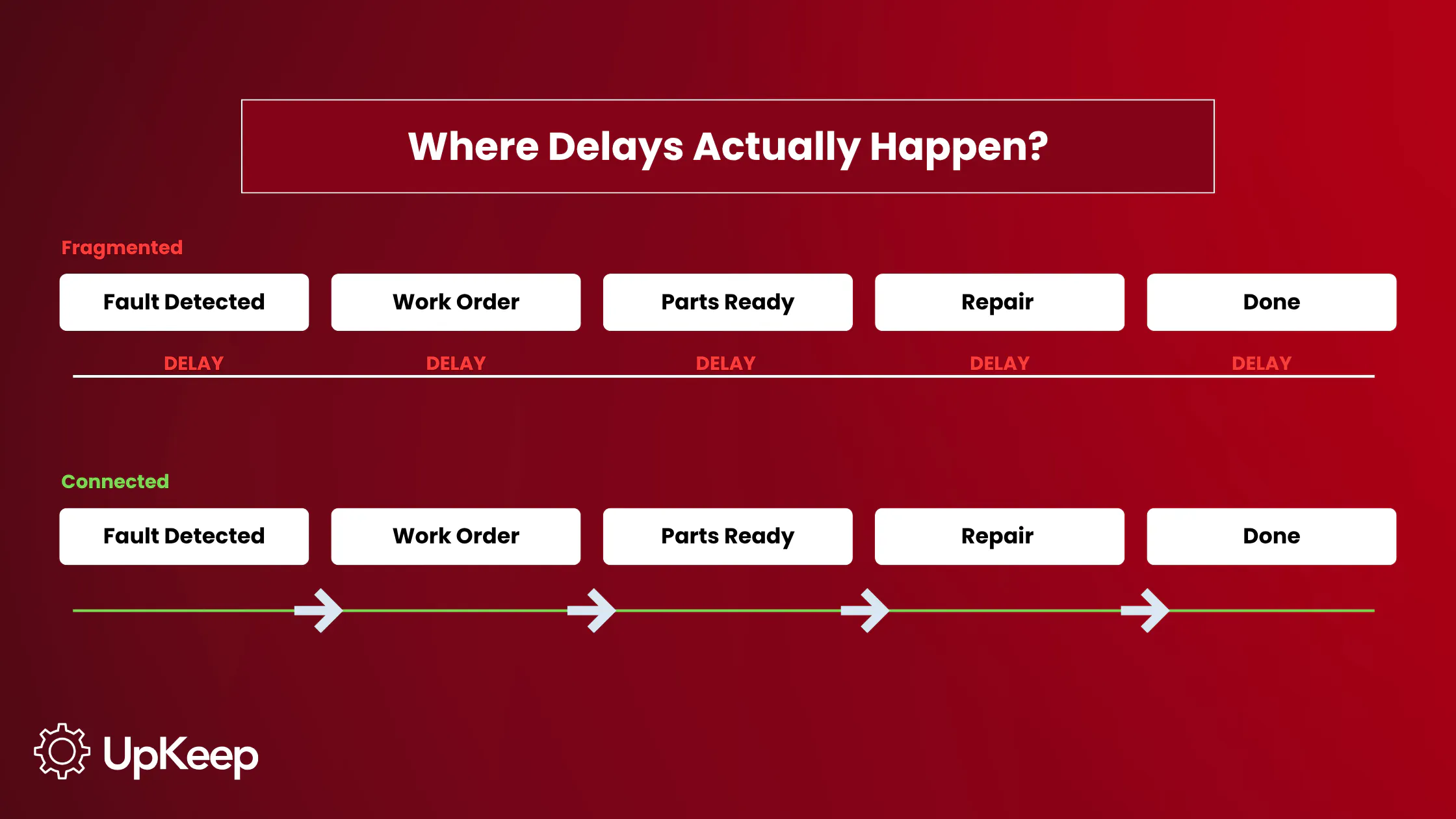
Every unscheduled breakdown starts with a gap. A fault is detected but not dispatched. A repair is scheduled before parts are confirmed. An alert sits in an inbox with no automatic handoff.
The data exists, but it sits in the wrong system, with inspections, work orders, telematics alerts, and parts inventory stored in separate spaces that don’t connect. That keeps the gap between spotting a problem and fixing it open longer than it should.
Maintenance and repair are a major operating cost, which makes these delays expensive. When a defect isn’t addressed right away or a repair stalls mid-job, the cost isn’t just the fix but also extended downtime, idle labor, and missed service.
What Is Fleet Maintenance Management Software?
Fleet maintenance management software centralizes work orders, PM schedules, driver inspections, parts inventory, and asset history, so a logged defect can open a work order, confirm parts availability, and move straight to repair scheduling. Without it, you only have a record of what happened. With it, you have a system that does something about it.


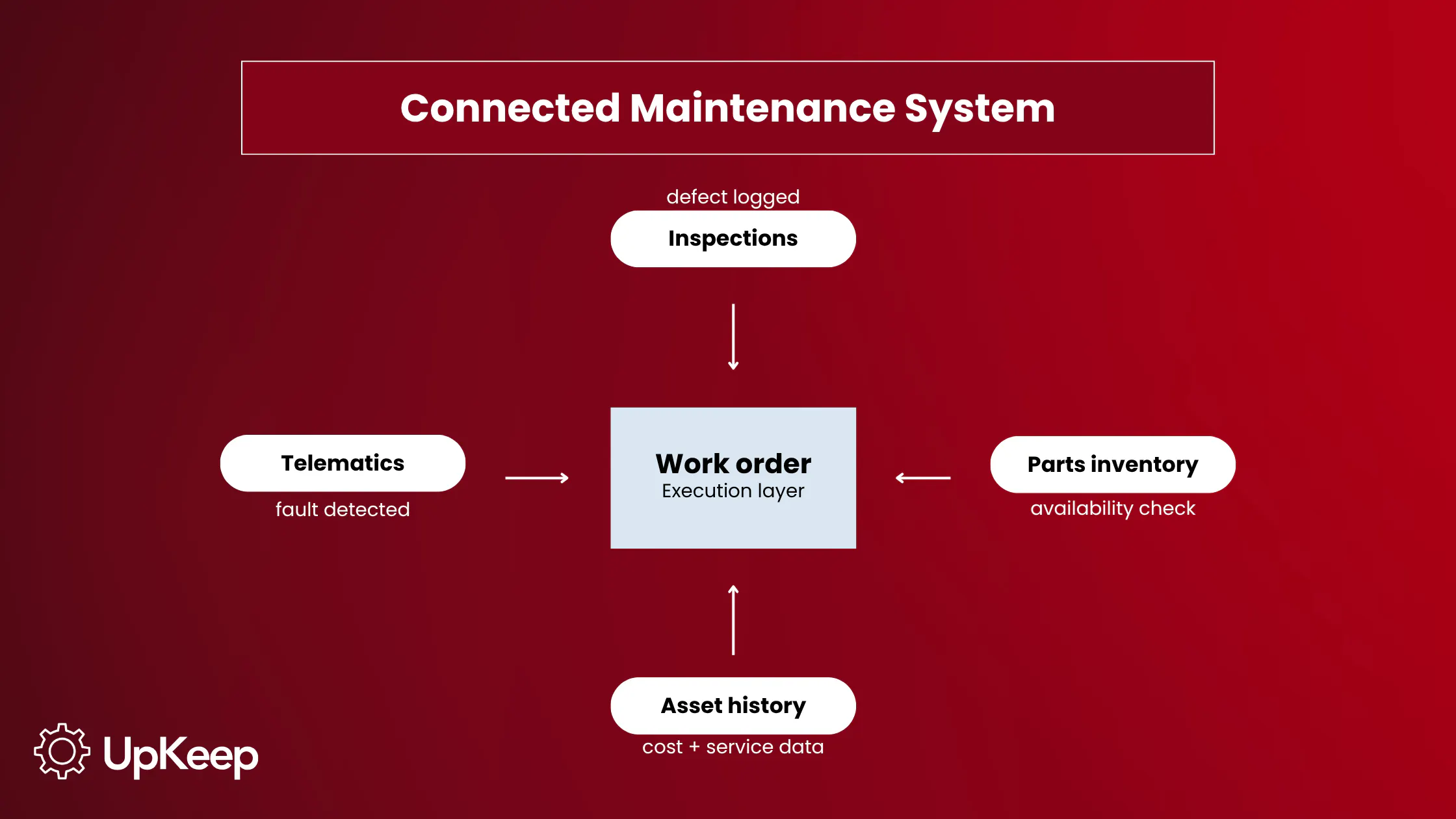
Most operations already run some version of these tools: A spreadsheet holds service history, a telematics platform generates fault alerts, and a general CMMS tracks work orders. The problem is none of them hand off to each other natively.
Fleet maintenance management software is built to close those handoffs natively. Opening a PM work order at an engine-hour threshold, matching an NHTSA recall to a VIN, and producing audit-ready inspection records aren’t features a general CMMS can reliably replicate through configuration. They require a system built for vehicles from the ground up.
For a broader breakdown of categories, use cases, and terminology, see our article on fleet maintenance software.
Why It Matters Operationally
These failures usually follow the same operational patterns:
Defects stay in service longer than they should: When inspection data doesn’t trigger immediate action, vehicles continue operating with known, potentially dangerous issues. A defect logged on paper sits until someone processes the form, opens a work order, and schedules the repair, and the vehicle keeps running the whole time.
Repairs stall after they’ve already started: When parts availability isn’t confirmed before a repair is scheduled, work begins without all the parts necessary to finish it. A technician pulls the vehicle in, starts the job, and then discovers the part isn’t in stock. That delay is due to the missing confirmation step.
Faults are detected early but handled late: Telematics systems catch problems early, but without direct routing into a repair workflow, that early detection doesn’t translate into swift action. A fault code lands in an inbox, where a manager sees it, opens a work order, and schedules the repair hours or days after the fault first appeared. By then, the problem has progressed.
High-cost vehicles go unnoticed: Without per-asset cost tracking, the vehicles driving maintenance spend aren’t identified until the budget runs short. When spend is tracked fleet-wide, a vehicle accumulating $18,000 in annual repair costs looks identical to one running at $4,000.
The operational consequences are the same in all four cases: longer downtime, higher repair costs, and reduced vehicle availability. Detecting the problem isn’t difficult; acting quickly on it is.
Core Capabilities of Fleet Maintenance Management Software

Work Order Management
Work orders are the operational spine. Every repair, PM, and inspection runs through them. A capable system opens work orders from multiple sources: a driver-logged defect, a PM threshold reached, a telematics fault code, or a manager’s direct entry. Each carries asset details, fault description, parts requirements, labor time, and completion records, feeding asset history, cost reporting, and PM interval adjustment. That reduces unplanned downtime and improves asset availability without adding more manual work.
PM Scheduling
Usage-based PM triggers service on mileage or engine hours, not on a fixed date that ignores actual wear. A refrigerated truck running regional routes six days a week accumulates wear at a different rate than a utility vehicle making occasional site visits, meaning the same calendar interval under-services one and over-services the other. Mileage and engine-hour triggers eliminate that problem, and work orders are generated automatically when thresholds are reached. These triggers are a core part of fleet maintenance best practices for reducing avoidable downtime.
Digital Inspections and DVIRs
A defect logged on a mobile device generates a work order immediately, with the vehicle ID, defect description, and photo documentation already attached. The inspection record retains inspector credentials and timestamps, satisfying the 14-month retention requirement under 49 CFR 396.21. No form to process, no overnight queue, no gap between the defect and the work order. For teams standardizing inspections before digitizing them, a fleet maintenance checklist helps define what should be checked and when.
Parts Inventory Integration
Confirming parts availability before a repair is scheduled rather than after the vehicle is pulled in eliminates mid-repair stockouts. A system with inventory integration checks on-hand stock when a work order is opened and flags shortages before the repair starts. Consumption-based reorder triggers replenish stock automatically when quantities drop below configured thresholds.
Telematics Integration
A fault code detected by a connected telematics platform opens a work order without manual intervention, with vehicle ID, GPS location, and fault description already populated and routed to the technician’s queue. Whether that connection actually works as described depends on the type of integration.
Asset History and Cost Reporting
Every work order, inspection, parts transaction, and PM record contributes to a vehicle's service history. If a vehicle has logged $16,000 in transmission repairs over 24 months, the data makes that visible, along with the case for replacement. For those still tracking this manually, a fleet maintenance log template is a good starting point before moving to a connected system.
Compliance and Audit Records
Fleet compliance risk often comes from documentation gaps, not just missed maintenance. A certification that lapses without an alert keeps a vehicle in service, which carries liability the manager doesn't know exists. A capable system tracks expiry by asset and matches open NHTSA recalls to fleet VINs, catching both before a roadside stop does.
Fleet and Equipment Coverage: Why Mixed Operations Are Harder Than They Look
A fleet comprises more than just vehicles. Forklifts, generators, trailers, compressors, and construction assets share the same maintenance budget and technician pool, but they don’t possess the same service logic.
Vehicles run on mileage, whereas equipment runs on engine hours. A forklift due for a 500-hour hydraulic fluid change and a delivery van due for an oil change at 7,500 miles need different triggers, inspection checklists, and often technician qualifications. A system that can’t handle both asset types within the same work order queue forces parallel tracking: a spreadsheet for equipment alongside the CMMS for vehicles, reintroducing the fragmentation the software was meant to eliminate.
Trailers add a third trigger type: calendar intervals and visual inspection cycles, not mileage or engine hours. A system that can’t schedule a trailer’s annual brake adjustment and lighting check on the same platform as a truck’s oil change requires a separate workflow, which means a separate record, a separate queue, and another gap where things fall through.
The practical question for any mixed-fleet buyer is whether the system handles all asset types within a unified work order workflow, or whether equipment requires a separate module that doesn’t connect to the same parts inventory and cost reporting. If the software handles trucks and equipment in separate modules, you’re back to managing two systems.
The Telematics Integration Reality
Most fleet operations already run a telematics platform. The gap isn’t the data but what the integration does with it. A fault code that populates an alert feed still requires a manager to read it, interpret it, and open a work order manually. The vehicle stays in service during that handoff, while the telematics system documents the failure window but doesn’t close it.
With work order integration, the fault code opens a work order the moment it appears. Vehicle ID, GPS location, fault description, and priority level are already populated. The work order routes to the assigned technician’s mobile queue without a manager serving as the relay. Instead of waiting for someone to act on the alert, the response starts the moment the fault fires.
The question to ask any vendor is, does the integration route fault codes directly into the work order queue, or does it populate an alert feed that still requires manual action? Native integrations, built and maintained by the CMMS vendor, are more reliable than third-party connectors that can break when either platform updates.
Do I Actually Need This? Spreadsheet vs. Software
A spreadsheet is a record that captures what happened. Fleet maintenance management software is a system that acts on what’s happening.
The former can handle service history for a small fleet, basic cost tracking, and simple PM reminders for one or two technicians. The following signs indicate you need to invest in a complete system:
Multiple technicians logging simultaneously means the record depends on coordination that doesn’t scale. When technicians update the same file, it produces overwritten entries, no way to trace who recorded what, and no alert when a required entry hasn’t been made.
Telematics alerts that need to connect to work orders can’t flow through a spreadsheet because there’s no API. The connection depends on someone seeing the alert and manually transferring the data between systems.
PM intervals that should fire at mileage thresholds require someone to check the spreadsheet and compare odometer readings against scheduled intervals. The trigger depends on human review; it doesn’t fire automatically.
Chronic problems on the same vehicle stay invisible in a spreadsheet unless someone goes back and reviews months of entries. A system spots them automatically, and that makes the difference between catching a failing component before it takes the vehicle out of service and replacing one that could have been repaired for less.
The practical threshold is usually 10 to 15 vehicles, or the point where a missed entry starts causing delayed repairs or compliance exposure. Free fleet maintenance software exists and may cover basic needs at a small scale: parts lists, manual work orders, and simple reminders. The limitations become operational when telematics integration is needed or compliance records need to be produced on demand.
Deployment Options: Cloud, Mobile, and On-Premise
The deployment model you choose affects the system’s adoption rate and efficacy:
Cloud-based deployment matters most for multi-location operations. When a technician at one yard can see parts stock at another before ordering, duplicate purchasing drops, and stockout risk shrinks. When a manager can pull work order status across three locations without calling each site, response time shortens. A local install keeps the data on the machine it lives on — none of that visibility is possible.
Mobile-first design determines technician adoption. Fleet technicians work on vehicles, not desks. A system that requires a desktop login to open a work order will see low adoption, leading to incomplete data and the system no longer reflecting operational reality. Technicians are more likely to use a platform where the phone or tablet is the primary interface, not an afterthought.
On-premises deployment still serves operations where data residency requirements or security policies restrict cloud storage — with higher IT overhead, no automatic updates, and no native multi-location visibility without custom development. For most fleets, cloud delivers more capability at a lower cost. On-premise is the right choice for a specific set of constraints, not the default.
KPIs to Track
|
KPI |
Definition |
Why It Matters |
|---|---|---|
|
Cost Per Mile (CPM) |
Total maintenance spend ÷ miles driven, per vehicle |
Fleet averages mask individual budget-drainers — track per asset, not fleet-wide |
|
PM Compliance Rate |
Scheduled PMs completed on time ÷ total scheduled PMs |
Leading indicator — compliance rate drops before breakdown increases |
|
Mean Time Between Failures (MTBF) |
Total operating time ÷ number of failures |
Rising MTBF over time confirms the PM program is working |
|
Maintenance Turnaround Time |
Work order opened → vehicle returned to service |
Spikes expose parts shortages, technician bottlenecks, or approval delays |
|
Uptime Percentage |
(Operational time ÷ total available time) × 100 |
Primary vehicle availability metric — target varies by fleet type and duty cycle |
|
Work Orders Delayed by Missing Parts |
# or % of WOs held waiting on stock |
Direct measure of the gap between inventory management and repair scheduling |
How to Implement Fleet Maintenance Management Software
The evaluation criteria that matter most aren’t feature counts. Focus on workflow questions: Does the system automatically open work orders from fault codes, confirm parts before scheduling a repair, and natively support mileage- and engine-hour-based PM triggers? Once you’ve chosen a fleet maintenance management software, follow a systemic rollout to ensure a smooth introduction and widespread adoption:
Add vehicles using VIN lookup to auto-populate make, model, year, and OEM specifications. Starting with accurate asset data means PM triggers, parts linkages, and inspection checklists are configured to the right vehicle from day one, not corrected after the first missed service.
Configure usage-based PM triggers based on OEM recommendations and actual duty cycles. A vehicle running severe-duty cycles (stop-start urban delivery, extreme temperatures, extended idling) needs compressed intervals relative to OEM baseline specs.
Set up digital DVIR workflows, including defect logging, photo documentation, and work order auto-generation on defect submission. Configure completion tracking from day one; gaps in driver adoption show up immediately in the data, not six months later in an audit.
Integrate the telematics platform and confirm that fault codes are being converted into work orders without manual entry, not just populating an alert feed. Test with a known fault before treating the integration as operational.
Configure parts inventory thresholds and reorder triggers for the components most frequently consumed by the fleet. Set minimum quantities based on average consumption rate and supplier lead time, not on what was ordered last time.
Establish baseline metrics over the first 30 days: CPM per vehicle, PM compliance rate, breakdown frequency, and average turnaround time. Without a baseline, early improvements are invisible.
Review metrics monthly and adjust PM intervals, inventory minimums, and technician assignments based on what the data shows. A PM trigger set too late for a vehicle’s actual duty cycle shows up as components replaced before the scheduled interval; move it forward.
UpKeep brings these workflows together on one platform, providing easy access to work orders, PM scheduling, digital DVIRs, parts inventory, and telematics integrations such as Samsara or Azuga. It also tracks asset history and cost reporting run per vehicle, so the analysis that drives PM adjustment, parts ordering, and repair-versus-replace decisions is available without building it manually.
From Disconnected Tools to Operational Control
In a disconnected operation, a work order depends on someone acting on an alert, and a repair depends on someone remembering to check parts stock. Certifications lapse with no alert and no action, and an open recall is likely to sit unmatched against fleet VINs.
In a connected operation, a fault code opens a work order before a manager reads the alert. Parts are confirmed to be on-hand before the vehicle is pulled into the bay. PM fires when the mileage threshold is crossed, not when the calendar date arrives. Certification expiry appears weeks before the lapse. Open recalls are matched to fleet VINs automatically and flagged for action before the vehicle leaves the yard.
UpKeep connects the workflows behind that shift: fault codes that open work orders, parts confirmation before repair, and asset history that supports replacement decisions when costs get too high. The work order is the input; the outputs are shorter downtime, lower CPM, higher PM compliance, and a compliance record that doesn’t need to be assembled under pressure.
Frequently Asked Questions
What is fleet maintenance management software?
Fleet maintenance management software is a connected system for managing vehicle maintenance: work orders, PM schedules, driver inspections, parts inventory, and asset history on one platform. It's built for vehicles specifically: A logged defect opens a work order automatically, PM triggers fire on mileage or engine hours, and compliance records carry the credentials DOT audits require.
How is fleet maintenance management software different from a general CMMS?
A general CMMS manages work orders and assets across facility types. Fleet maintenance management software is configured for vehicles from the ground up, with native DVIR workflows, odometer and engine-hour PM triggers, VIN-based asset setup, and NHTSA recall tracking. In a general CMMS adapted for fleet use, those workflows usually become workarounds rather than native functions.
What features should I look for in fleet maintenance management software?
The features that matter most are workflow connections: work order integration with inspections and parts locks in availability before a repair is scheduled; usage-based PM fires on mileage or engine hours; native telematics integration converts fault codes into work orders without manual entry; and per-asset cost reporting supports repair-versus-replace decisions.
Can fleet maintenance software manage equipment as well as vehicles?
Yes, but the configuration differs. Vehicles run on mileage, equipment on engine hours, and trailers on calendar intervals. A capable system handles all three trigger types within the same work order queue. The key is to determine if the equipment is a native asset type, or if it requires a separate module that doesn’t connect to the same parts inventory and cost reporting.
Do I need fleet maintenance software, or will a spreadsheet work?
A spreadsheet works for a small fleet with one or two technicians and straightforward PM schedules. The practical trigger for moving to software is when a missed entry creates a gap that compounds: a defect unrecorded, a PM that slips, a compliance record that can’t be produced on demand. For most operations, that threshold arrives around 10 to 15 vehicles, or earlier when multiple technicians are logging simultaneously.
Is cloud-based fleet maintenance software better than on-premise?
For most fleet operations, yes. Cloud delivers multi-location visibility, native telematics integration, and mobile access without local server infrastructure. On-premise is still used where data residency or security policies restrict cloud storage. The difference is most evident in multi-location fleets: A cloud system lets a technician at one yard see parts stock at another yard; an on-premises install can’t.
How does telematics integration actually work — does it create work orders automatically?
A native integration, built and maintained by the CMMS vendor for a specific telematics platform, routes fault codes directly into the work order queue, with vehicle ID, GPS location, and fault description already populated. A third-party connector may surface fault data in a separate view that still requires manual work order creation. Ask vendors if fault codes automatically open work orders or populate an alert feed.
When should a small fleet invest in fleet maintenance management software?
Fleet size matters less than workflow complexity. A 10-truck operation running telematics, multiple technicians, and DOT inspections has more to gain from connected software than a 25-truck fleet with simple routes and a single mechanic. The practical triggers are PM intervals that need to fire on mileage, telematics alerts that need to reach a work order without a manual handoff, and compliance records that need to be exportable on demand.
4,000+ COMPANIES RELY ON ASSET OPERATIONS MANAGEMENT
Leading the Way to a Better Future for Maintenance and Reliability
Your asset and equipment data doesn't belong in a silo. UpKeep makes it simple to see where everything stands, all in one place. That means less guesswork and more time to focus on what matters.






![[Review Badge] Gartner Peer Insights (Dark)](https://www.datocms-assets.com/38028/1673900494-gartner-logo-dark.png?auto=compress&fm=webp&w=336)



