vs EZO
Built for maintenance. Not IT asset tracking.
EZO started as office inventory and added maintenance later. UpKeep was built mobile-first for maintenance teams — with Nova AI on every plan, Studio, Learn, Fleet and Edge IoT included.
- Designed for maintenance teams, not IT. EZO's DNA is IT/office asset tracking. Maintenance workflows feel bolted on. UpKeep is built for the floor.
- Work orders and PM are not Enterprise-gated. EZO puts full CMMS functionality behind upper tiers. UpKeep includes work orders and PM on every plan.
- Nova AI on every plan. EZO's Zoe assistant is gated to upper tiers. Nova works on maintenance data from day one.
- Mobile-first, not Planner-on-desktop. EZO's Planner is desktop-focused and the mobile app is 'temperamental' per reviewers. Our technicians live in the mobile app.






Head to head
What each platform actually includes
Any platform demos well. The differences show up in daily use: PM depth, permissions, reporting, and what's gated behind which tier. Based on publicly available product and pricing information.
| Capability | UpKeep | EZO |
|---|---|---|
| AI depth & breadth | ||
| AI assistant for work orders, assets and insights | Nova — included on every plan | Zoe — upper tiers only, narrower scope |
| Autonomous AI agents that execute multi-step workflows | Supernova | |
| AI-powered data audits and anomaly detection | Nova Intelligence | |
| Customization | ||
| No-code app builder for custom workflows | Studio | |
| Pre-built app marketplace | 49+ Studio apps | |
| Platform breadth | ||
| Integrated EHS / safety module | Safety | |
| Built-in learning and certification management | Learn | |
| Native fleet module (DVIRs, VIN lookup, telematics) | Fleet | |
| First-party wireless IoT sensors | Edge | API meter imports only |
| Service partner marketplace for third-party work | Providers | |
| Depth for maintenance teams | ||
| Work orders on every plan | Upper tiers only | |
| Preventive maintenance on every plan | Upper tiers only | |
| Mobile-first for technicians | Planner is desktop-first | |
| 24/7 live chat support on every paid plan | ||
| Information current as of June 2026, based on publicly available EZO product and pricing documentation. Product capabilities and plan inclusions change. Contact us for the latest side-by-side. | ||
Want this comparison for your operation, with your assets and your numbers?
Get your demo1. AI on every plan
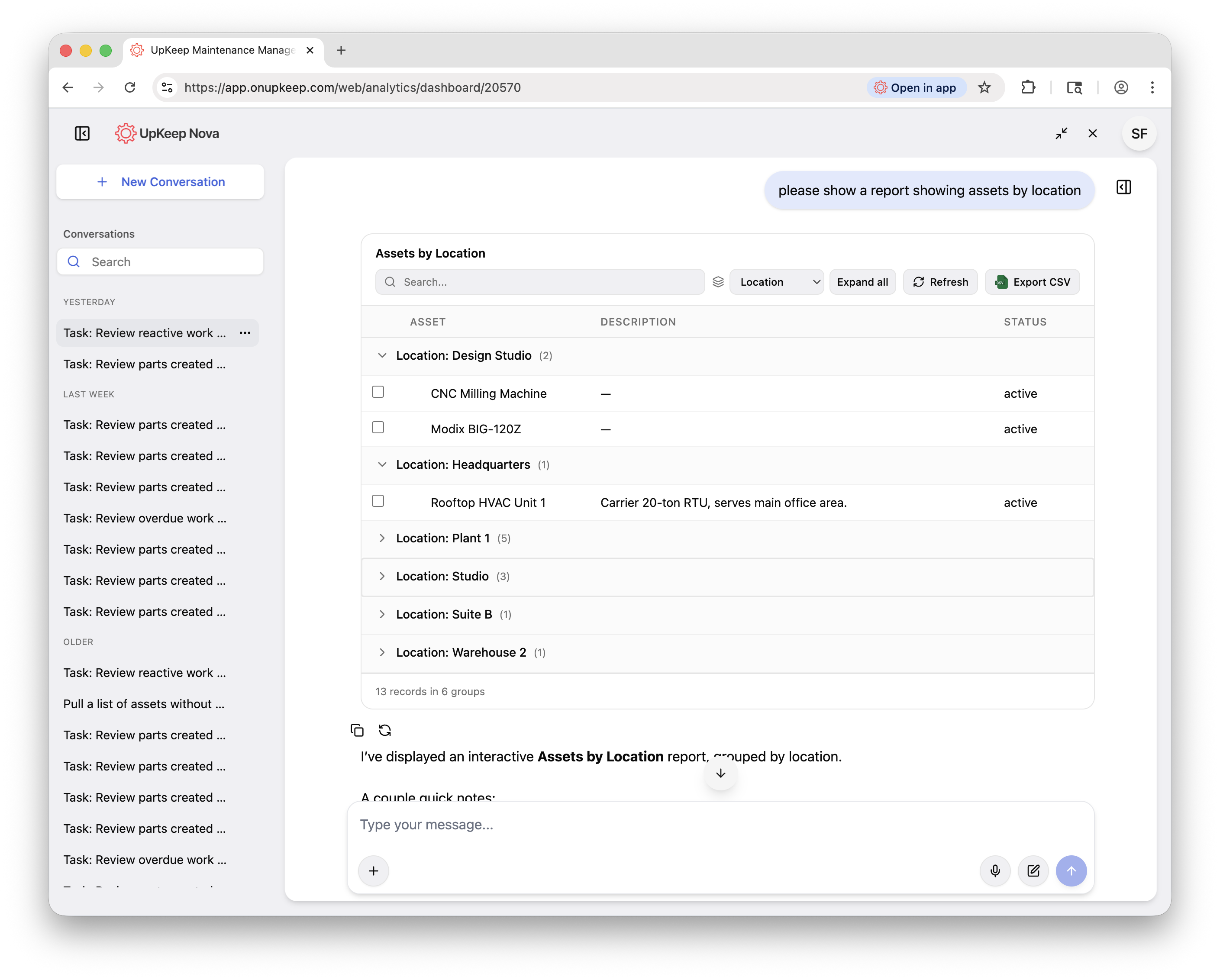
AI that actually shows up for work
EZO's Zoe is a chatbot for utilization questions and checklist generation. Useful if your primary use case is IT asset tracking — narrower for maintenance operations.
Nova is built for maintenance data. It drafts work orders from rough notes, surfaces recurring failure modes, audits asset data on a schedule and answers plain-English operations questions. Every UpKeep plan includes it.
Nova included. Not upper-tier only.
Built for maintenance operations, not IT asset tracking.
2. Studio
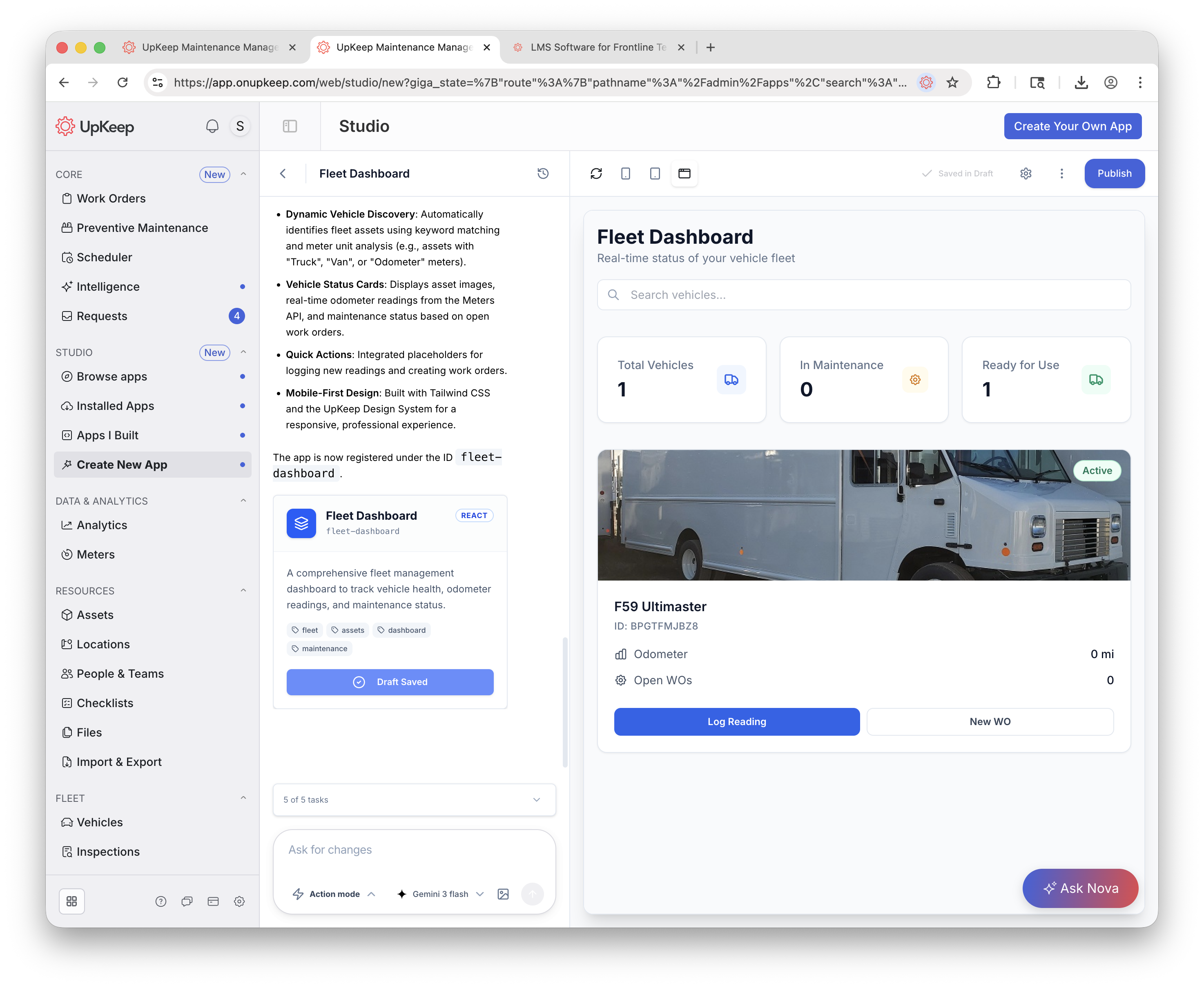
Build the apps you need. No engineers required.
EZO has no no-code app builder. Customization is limited to configurable fields.
Studio lets anyone describe what they need in plain language and ship an app in minutes. Every app reads and writes your real UpKeep data — shift handovers, vendor scorecards, safety hazard trackers and more.
3. Platform breadth
One login. Every module.
Maintenance is just the start. Run safety, learning, fleet and IoT monitoring in the same platform. Same login, same data model, same mobile app.
Maintenance
AI-powered CMMS with mobile work orders, asset tracking and preventive maintenance.
Safety
EHS management, incident reporting, OSHA logs and Voice-to-CAPA analysis.
UpKeep only (EZO has no EHS module)
Nova
AI assistant for work orders, insights and answers across the platform.
UpKeep only · every plan
Supernova
Autonomous AI agents that handle routine decisions and multi-step workflows.
UpKeep only
Studio
No-code app builder plus a marketplace of 49+ pre-built apps.
UpKeep only
Edge
First-party wireless sensors for temperature, vibration, pressure and humidity.
UpKeep only (EZO via API meter imports)
Fleet
DVIRs, VIN lookup, mileage-based PMs and telematics integration.
UpKeep only (EZO has no fleet module)
Learn
Training programs, certifications and compliance tracking built for technicians.
UpKeep only
Providers
Marketplace for vetted service partners and third-party work tracking.
UpKeep only
4. Customer success
24/7 support. On every plan.
When your line is down at 3 a.m., sales-tier gating isn't helpful. UpKeep includes 24/7 live chat and a dedicated customer success team on every paid plan, not as an upsell.
24/7 live chat
Real humans, actually around the clock. Average response under 3 minutes.
Dedicated CS team
Your team gets a named customer success manager. Onboarding, QBRs, expansion support. Not a ticketing queue.
White-glove migration
Switching from EZO? We help import your assets, PMs and work order history, and validate everything with you before go-live.
“UpKeep is made by maintenance people, for maintenance people. It's just so user-friendly.”
Migration
Moving from EZO to UpKeep
Teams that have outgrown asset-tracking-with-maintenance-layered-on usually migrate in under 30 days.
Export your data
Assets, PMs, work order history, parts, vendors. Our CS team walks you through the export or handles it for you.
We set up your workspace
Data mapped, users configured, integrations connected. You review before anything goes live.
Train and roll out
On-site or virtual training for your team. Phased rollout so you're never betting the whole operation on day one.
Talk through what migrating your data would actually involve.
Book a demoQuestions teams ask before switching
Can I import my EZO data into UpKeep?
Yes. Assets, work orders, PMs, parts and vendor records can all be imported. Our CS team handles the data mapping and validates everything with you before it goes live.
We use EZO for IT asset tracking too. Do we need to replace that?
Not necessarily. Some teams keep EZO for pure IT asset tracking and move maintenance ops to UpKeep. We can help you decide based on your actual use cases.
How does UpKeep pricing compare to EZO?
EZO gates real CMMS functionality (work orders, PM, automation) behind upper tiers. UpKeep includes those on every plan, plus Nova AI, Studio, Learn, Fleet and Edge. For maintenance-focused teams, UpKeep is typically materially cheaper for equivalent capability.
Will my technicians actually adopt it?
UpKeep was built mobile-first for maintenance teams. EZO reviewers describe the Planner as desktop-first and mobile as temperamental. Our mobile work order completion averages 100% across customers.
Can I try UpKeep before committing?
Yes. Book a walkthrough and we'll set up a sandbox with your actual data.
What happens to my EZO contract?
Most teams time the switch to the end of their EZO term. If you're mid-contract, we can structure onboarding to keep your total spend flat during the overlap.